Lesson 3: Set up the projects and use the EGL SQL retrieve feature
Before you write your logic, create two EGL projects, as well as a Record part that is based on the database table.
About this task
An EGL application is organized in one or more projects, each of which is a physical folder in the workspace. A project contains an EGL source folder that is provided for you, and that folder contains one or more packages, which in turn contain EGL source files. This hierarchy is basic to your work in EGL: a project, then an EGL source folder, then a package with EGL source files.
The EGL source files include EGL parts, which are type definitions that you create. For example, a Service part contains logic, and a Record part can be the basis of a variable that you declare in your Service part.
- A part name might be duplicated in two different packages, and any EGL source code can reference each part precisely. The main benefit of namespaces is that different teams can develop different EGL parts without causing name collisions.
- Each part name in a given package is unique within that package:
- A part in one package can easily reference another part in the
same package by specifying the part name. For example, here is a declaration
of a record that is based on the Record part
MyRecordPart:myRecord MyRecordPart{}; - A part in one package can also reference a part in a second package by giving the package name and part name, or by a shortcut that involves importing the part.
- A part in one package can easily reference another part in the
same package by specifying the part name. For example, here is a declaration
of a record that is based on the Record part
One project can reference the parts in a second project, but only if the EGL build path of the referencing project identifies the referenced project. Again, this tutorial gives examples. However, in all cases, avoid using the same package name in different projects, as that usage can cause problems in name resolution.
- PaymentService
- Holds an EGL Service part and related definitions
- PaymentClient
- Holds the Rich UI handlers and related definitions
You can include all your code in a single project, but the separation shown here lets you easily deploy the two kinds of code in different ways.
Parts in one project can use parts in a different project. EGL uses a build path to search for unresolved references. Later in this lesson, you will add the PaymentService project to the build path for the PaymentClient project.
Create the PaymentService project
Procedure
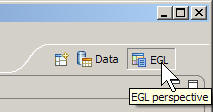
- Change back to the EGL perspective by clicking the EGL button
in the upper right of the workbench.
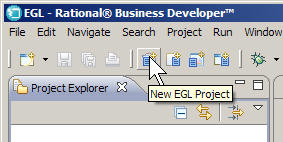
- Click , or click the New
EGL Project icon on the menu bar.
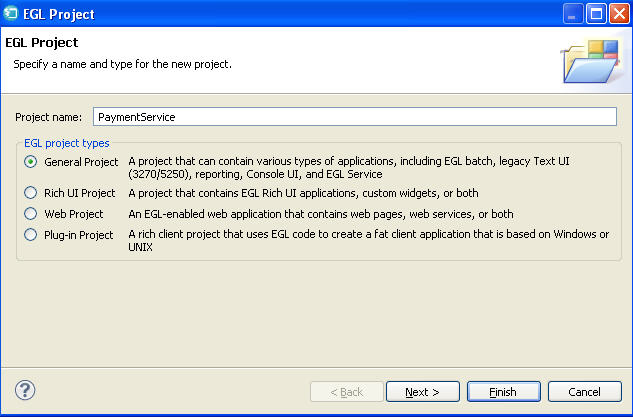
- In the New EGL Project window, enter
the following information:
- In the EGL project types section,
click General Project.
- In the EGL project types section,
click General Project.
Results
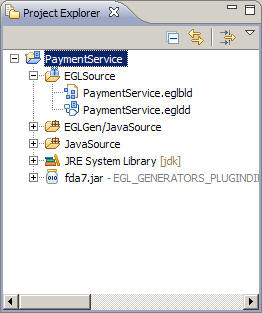
PaymentService.
Note the folders inside the directory: - EGLSource
- Put your packages and source files here.
- EGLGen/JavaSource
- EGL places the Java™ files it generates here.
- JavaSource
- Put any custom Java™ source files here. These files are not overwritten during the generation process.
- JRE System Library
- EGL uses this folder for JAR files that support the Java™ Runtime Environment.
Create the PaymentClient project
About this task
An EGL Rich UI project includes many shortcuts to speed the development of a user interface for the web.
Procedure
- On the build settings page, select PaymentService.
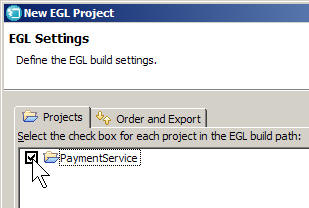
The
PaymentServiceproject is added to the build path for the project being created so that the Rich UI handler can use parts that are defined inPaymentService.
Results
PaymentClient and
adds support projects to the workspace for Rich UI, Dojo Widgets,
and the Dojo runtime library. In addition to the directories that
EGL created for the General project, a Rich UI project includes the
following directory:- WebContent
- Contains support files, such as cascading style sheets (CSS) and images.
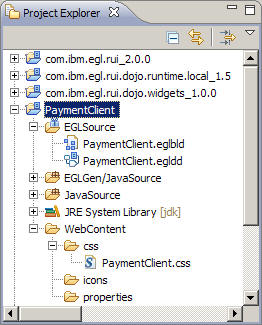
- com.ibm.egl.rui
- com.ibm.egl.rui.dojo.runtime.local
- com.ibm.egl.rui.dojo.widgets
These three projects contain widgets and other support files that you use in creating a Rich UI application.
Edit the build descriptor for the PaymentService project
About this task
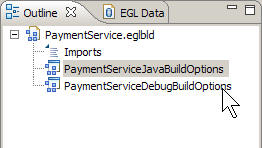
- PaymentServiceJavaBuildOptions
- PaymentServiceDebugBuildOptions
You must change the build descriptors for the project so that the logic you write there can access a database.
To edit the build descriptor:
Procedure
- Find the Outline view, located by default in the lower
left corner of the workbench. The PaymentServiceJavaBuildOptions build
descriptor should currently be highlighted. Double-click PaymentServiceDebugBuildOptions and
repeat step 2 for the other build descriptor, which is used by the
EGL debugger.
Results
Use the EGL SQL retrieve feature to create a Record part
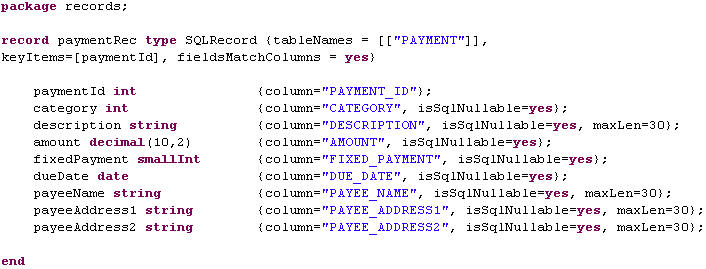
You can automatically retrieve the fields for a Record
part that corresponds to the PAYMENT table in the PaymentDB database.
The column names are the basis of the field names in the Record part.
About this task
Procedure
- Right-click anywhere in the Record statement and click .EGL automatically creates fields for the Record part in accordance with information that is provided by the database management system. You specified little more than the table name, and here is the result:
Lesson checkpoint
About this task
- Created an EGL project for developing a data-access service.
- Created an EGL project for developing a Rich UI application.
- Modified the build descriptors in a build file; specifically, by adding database information from a connection definition in the workbench.
- Set preferences for the EGL SQL retrieve feature.
- Created a Record part, retrieving most information from a database.
In the next lesson, you develop some of the Rich UI application and view your prototype code in action.