Introduction
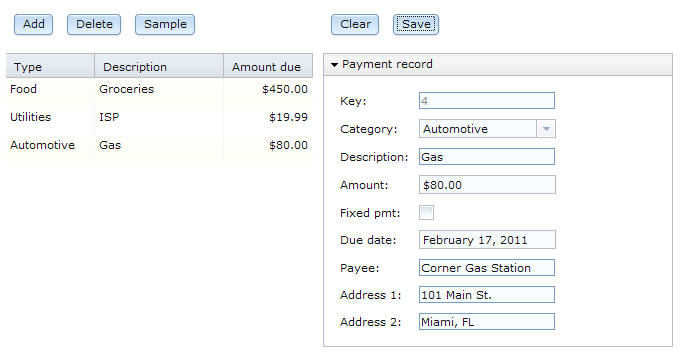
The web page displays all rows in a database table and lets the user update each one. In addition, the user can add and delete rows.
- You write the code.
- You generate the code and deploy it to another project in the workbench. At that point, the code that is destined for a browser is an HTML and JavaScript™ format; but other code is in Java™ format, as described later.
- You deploy all the code to a server such as Apache Tomcat.
- The server transmits the HTML and JavaScript™ code to the user's browser.
- The application both presents data to the user and accesses services that run remotely on a server.
A main benefit of EGL Rich UI is that users can interact with a responsive, local-running web application even as services do background work such as accessing a database.
In this tutorial, the Rich UI application accesses a service that you write and deploy along with the Rich UI application. This kind of service is called an EGL dedicated service. In general, you can use a dedicated service to do tasks that other EGL-generated Java™ services can do, such as accessing a database or file system. However, the dedicated service is not available to other code unless you redeploy it as an EGL-generated web service.
The benefit of a dedicated service results from its shared deployment with the Rich UI application. If a Rich UI application accesses a web service, your deployment of the application typically requires that you specify the service location. However, if a Rich UI application accesses a dedicated service, your deployment of the application does not require the location detail. Instead, the service will be available wherever you deploy the Rich UI application.
Learning objectives
The learning objectives are described in Access a database with EGL Rich UI.
Time required
This tutorial takes about 3 hours to finish. If you explore other concepts related to this tutorial, it might take longer to complete.
- Line by line (most helpful): Complete the individual lessons to explore the code in small, manageable chunks, learning important keywords and concepts. This method also requires the greatest time commitment.
- Finished code files: At the end of each lesson in which you develop logic, you can link to the completed code, which you can copy into the Rich UI editor.
Skill level
IntroductoryAudience
This tutorial is designed for people who know the basic concepts of programming and want experience with EGL Rich UI.System requirements
To complete this tutorial, you must have the following tools and components installed on your computer:- Rational® Business Developer Version 8.0.1.2 or higher.
- A working Internet connection.
Prerequisites
You do not need any experience with EGL to complete this tutorial.
Expected results
You will create a working Rich UI application and database-access service.