Lesson 9: Complete the code that supports the user interface
Next, you will complete the single-row layout, as well as the code that supports the Clear and Save buttons.
About this task
Complete the layout that displays a single row
Procedure
To complete the single-row layout:
Test the new code
About this task
Procedure
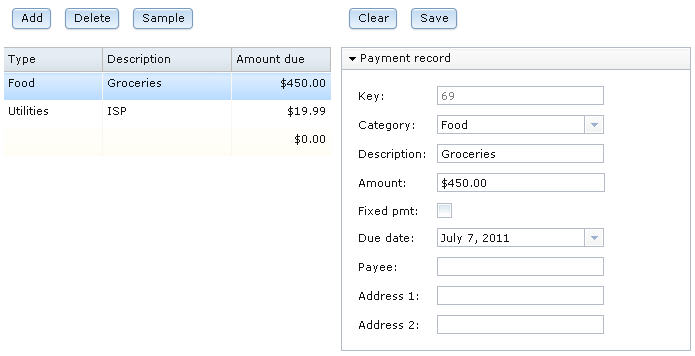
- Click the first line of sample data.The single-record layout now displays the category name rather than an integer.
Complete the code for the second set of buttons
About this task
clearAllFields function
runs. The function sets up the layout so that when the user types
data and clicks Save, the new typed data updates
an existing database row. Procedure
Test the new code
About this task
Procedure
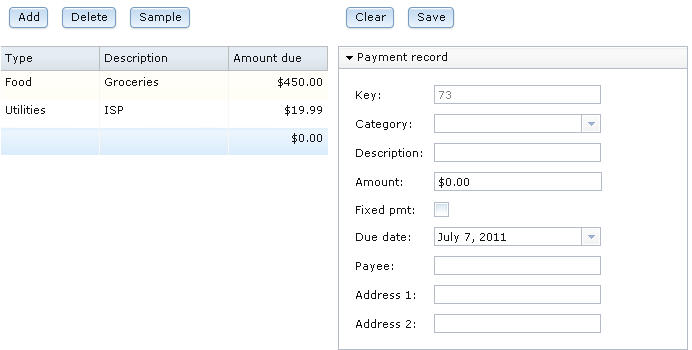
- Select the blank record at the bottom of the sample data.
You created this record in a previous lesson. The Payment record grid
shows blank fields, with the following exceptions:
- A key number is displayed.
- The Amount field shows a zero value.
- The current date is used as a default because the value of the DATE variable is null.
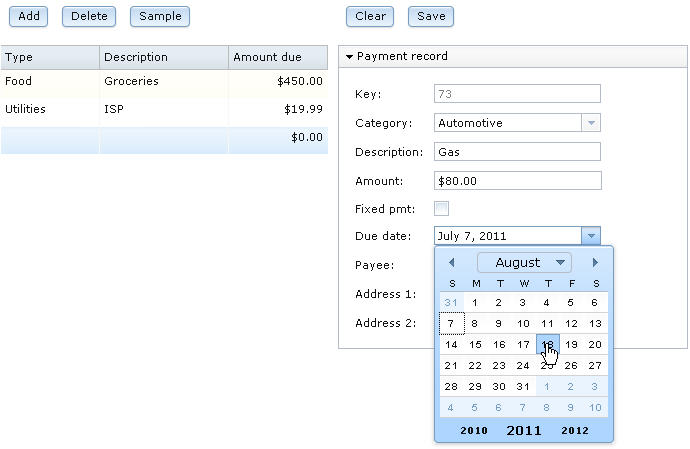
- Complete the record with data such as the following:
- For Category, enter Automotive.
- For Description, enter Gas.
- For Amount, enter $80.00.
- Leave the Fixed pmt check box clear.
- Click the current date in the Due Date field
and select a date from the displayed calendar.
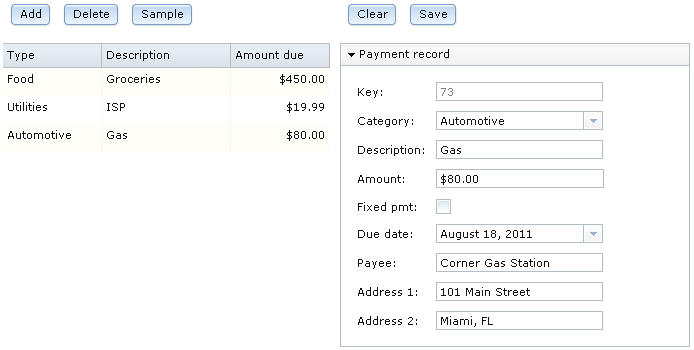
- For Payee, enter Corner Gas Station.
- For Address 1, enter 101 Main Street
- For Address 2, enter Miami, FL.
- Click Save.The new data is stored in the database and is displayed in the data grid.
Lesson checkpoint
About this task
- Assign a preset string array as the set of values that are provided by a Dojo combo box.
- Use conversion functions if you need to relate a field of type INT to a Dojo combo box that contains strings.
- Use the Form Manager isValid and commit functions.
In the next lesson, you install Apache Tomcat on your system so that you can run your application on a web server.