Default build descriptors
A hierarchy of default build descriptors makes the generation process more flexible.
- Workbench
- Project
- Source folder
- Package
- EGL source file
For information about how to specify build descriptors, see Setting the default build descriptors.
The hierarchy of default build descriptors
All EGL generation operations use the default build descriptor specified for the part being generated unless you override the default build descriptor by using the Generation wizard. To use the Generation wizard, right-click an EGL source file and click Generate With Wizard).
To determine the default build descriptor to use, EGL begins searching at the source file of the part being generated, and moves up the directory structure until it finds the first instance of a build descriptor.
- For a Rich UI Project, EGL specifies the projectNameJavaScriptBuildOptions Build Descriptor part.
- For a General Project, the Build Descriptor part that EGL specifies
depends on the Target Runtime Platform that
you select when you create the project:
- For Java™, projectNameJavaBuildOptions
- For COBOL, projectNameCOBOLBuildOptions
- For a Web or Plug-in Project, EGL specifies the projectNameJavaBuildOptions Build Descriptor part
For more information about how EGL resolves default build descriptors, see "Build descriptors, target platforms, and the debugger" in this topic, as well as the examples.
Build descriptors, target platforms, and the debugger
- Debug
- Target platform
- EGL uses the Interpretive debugger for parts that are generated to Java™ or COBOL. This debugger works by interpreting the EGL source code.
- EGL uses the JavaScript debugger for parts that are generated to JavaScript™. This debugger works by running the generated code in a browser.
- COBOL
- Java™
- JavaScript™
Within a category, all of the values are used at a given level if any value is specified at that level. This rule means that if EGL is looking for a Build Descriptor in the target platform category and finds a match at any level, it does not continue to look on higher levels for further Build Descriptor parts.
Example 1: Generating a Library for both client and server
UIProject  <- JavaScript default build descriptor (system)
  EGLSource
    handlers
      MyHandler.egl
    libraries
      MyLibrary.egl
    UIProject.eglbld
  ...
Because this project is customized for Rich
UI, EGL specified a project-level default build descriptor for the JavaScript™ target platform
when you created the project. To enable both Java™ and JavaScript™ generation
for MyLibrary.egl, specify both a Java™ and a JavaScript™ default
build descriptor for the library.
MyLibrary.egl file. You must specify
both, because of the rule that all values are used at a given level
if any value is specified.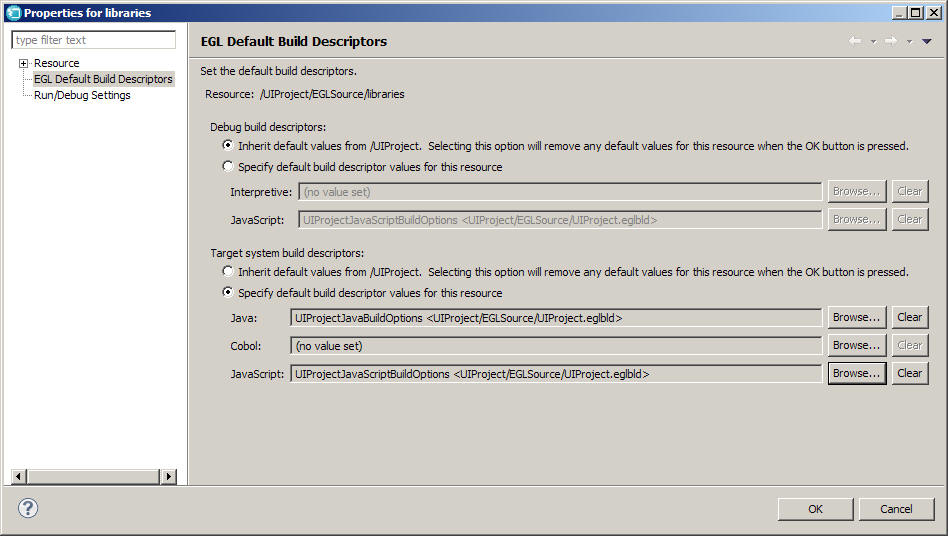
UIProject  <- JavaScript default build descriptor (system)
  EGLSource
    handlers
      MyHandler.egl
    libraries  <- Java and JavaScript default build descriptors (user)
      MyLibrary.egl
    UIProject.eglbld
...- For the MyLibrary.egl library, EGL begins with the source file and moves up the directory structure until it reaches the package level. At that level, EGL finds custom default build descriptors for both Java™ and JavaScript™. If you were careful to use only those EGL types in your source file that were compatible with Java™ and JavaScript™, EGL generates both versions of the library.
- For the MyHandler.egl file, EGL begins with the source file and moves up the directory structure until it reaches the project level. At that level, EGL finds the system default build descriptor for JavaScript™ and generates a .js file. The .js file is embedded in an HTML file during deployment.
Example 2: Generation failure
           <- JavaScript default build descriptor (system)
UIProject  <- Java default build descriptor (user)
  EGLSource
    handlers
      MyHandler.egl
    libraries
      MyLibrary.egl
    UIProject.eglbld
...- For
MyLibrary.egl, EGL begins with the source file and moves up the directory structure until it reaches the project level, where it finds default build descriptors for both Java™ (custom) and JavaScript™ (system). EGL generates both versions of the library, as before. - For
MyHandler.egl, EGL begins with the source file and moves up the directory structure until it reaches the project level, where it finds the same default build descriptors for both Java™ and JavaScript™. Because it cannot generate a Rich UI Handler as Java™, it terminates with an error.
Example 3: Generating a UI and a Service in the same project
UIProject  <- JavaScript default build descriptor (system)
  EGLSource
    handlers
      MyHandler.egl
    services  <- Java default build descriptors (user)
      MyService.egl
    UIProject.eglbld
...- For the MyService.egl service, EGL begins with the source file and moves up the directory structure until it reaches the package level. At that level, EGL finds a custom default build descriptor for Java™ and generates the Java™ Service.
- For the MyHandler.egl file, EGL begins with the source file and moves up the directory structure until it reaches the project level. At that level, EGL finds the system default build descriptor for JavaScript™ and generates a .js file.
Example 4: Generating a UI and a Service in separate projects
ServiceProject  <- Java default build descriptor (system)
  EGLSource
    services
      MyService.egl
    ServiceProject.eglbld
  ...
UIProject  <- JavaScript default build descriptor (system)
  EGLSource
    handlers
      MyHandler.egl
    UIProject.eglbld
...- For the MyService.egl file, EGL begins with the source file and moves up the directory structure until it reaches the project level. At that level, EGL finds the system default build descriptor for Java™ and generates the Java™ service.
- For the MyHandler.egl file, EGL begins with the source file and moves up the directory structure until it reaches the project level. At that level, EGL finds the system default build descriptor for JavaScript™ and generates a .js file.
Master build descriptors and build descriptor chains
Your system administrator might require that you use a master build descriptor. This kind of build descriptor specifies information that cannot be overridden and that is in effect for every generation that occurs in your installation of EGL. The system administrator identifies that part by name, along with the EGL build file that contains the part. For information about how to set the master build descriptor, see Setting the master build descriptor.
You can create a chain of build descriptors from the generation-specific build descriptor, so that the first in the chain is processed before the second, and the second before the third. When you define a given build descriptor, you begin a chain (or continue one) by assigning a value to the nextBuildDescriptor build descriptor option. Your system administrator can use the same technique to create a chain from the master build descriptor. The implication of chaining information is described later.
Any build part that is referenced by a build descriptor must be visible to the referencing build descriptor. For example, the build part can be a linkage options part or a resource associations part, or the next build descriptor.
Precedence of options
- The master build descriptor
- Certain build descriptor options containing override values that are specified at generation time, if you use the Generate With Wizard menu option; however, these options cannot override values set in the master build descriptor.
- The generation-specific build descriptor, followed by the chain that extends from it
- The chain that extends from the master build descriptor
- The system administrator can specify unchanging values by setting up a master build descriptor.
- You can use a generation-specific build descriptor to assign values that are specific to a particular generation.
- A project manager can specify a set of defaults by customizing one or more build descriptors. In most of these cases, the generation-specific build descriptor points to the first build descriptor in a chain that was developed by the project manager. Default options can be useful when your organization develops a set of programs that must be generated or prepared similarly.
- The system administrator can create a set of general defaults by establishing a chain that extends from the master build descriptor. It is unusual to use this feature.
- If you must override certain build descriptor options, such as the destination user ID or password, you can do it without setting up a different Build Descriptor part.
If a given build descriptor is used more than once, only the first access of that build descriptor is effective. Also, only the first specification of a particular option is effective.
Example 5: Build descriptor chains
Assume that the master build descriptor contains these hypothetical option-and-value pairs:
  OptionX                02
  OptionY                05
In this example, the generation-specific build descriptor, which is called myGen, contains these option-and-value pairs.
  OptionA                20
  OptionB                30
  OptionC                40
  OptionX                50
As identified in myGen, the next build descriptor is myNext01, which contains these pairs:
  OptionA                120
OptionD 150 OptionB 220
OptionD 260
OptionE 270As identified in the master build descriptor, the next build descriptor is myNext99, which contains these pairs:
OptionW                  myUserID
OptionZ                  99
EGL accepts option values in the following order:
- Values for options in the master build descriptor:
  OptionX             02
  OptionY             05
Those options override all others.
- Values in the generation-specific build descriptor myGen:
  OptionA             20
  OptionB             30
  OptionC             40
The value for OptionX in myGen was ignored.
- Values for other options in myNext01 and myNext02:
  OptionD             150
  OptionE             270
The value for OptionA in myNext01 was ignored, as were the values for OptionB and OptionD in myNext02.
- Values for other options in myNext99:
OptionW myUserID OptionZ 99 - In addition, if you use the Generation wizard, you can choose to override certain build descriptor options, such as the destination user ID and password, for the system where the generation output is going to be prepared for deployment. For example, if OptionW in myNext99 is the destUserID build descriptor option, and you use the Generation wizard, you can set or change the value of OptionW at generation time.