Lesson 5: Add code to the mortgage calculator handler
Add functions to the handler that you created in the previous lesson.
About this task
In this lesson, you work directly with EGL source code, starting with an EGL library that you write. A library can contain constants, variables, and functions, any of which can be accessed by the different units of logic in your application. An important characteristic of a library is that changes to a variable are available to any unit of logic that accesses the library. However, the focus in this tutorial is on functions, which you place in a library to avoid having to maintain the same, widely used logic in multiple places.
To handle some commonplace issues, you can use the EGL Model View Controller (MVC) framework, which is provided by the com.ibm.egl.rui project. Although the initials "MVC" typically describe the different components of an enterprise application, the MVC framework in Rich UI concerns only the components of a user interface. Here, the model is a variable or record field, the view is a widget, and the controller is a declaration that oversees the transfer of data between the model and view. That transfer of data is sometimes automatic and is sometimes a response to a function invocation, as shown later.
The drag-and-drop actions of the previous lesson added not only controller declarations, but a form manager, which is a declaration that lets you treat other declarations as components of a single form. A form manager includes a set of form fields, each of which can include a label, a controller, and an error field.
Create an EGL library
About this task
Procedure
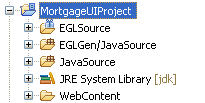
- Select the MortgageUIProject in Project Explorer.
- Click the New EGL Source File button.
Results
Change the code in the handler
About this task
Procedure
- Set default values for the Loan amount and Interest fields.
Go to the line where the inputRec record is declared and add the two
assignments to the declaration, as shown here:
inputRec MortgageCalculationResult
   {term = 30, loanAmount=180000, interestRate = 5.2};
Save the file and click the Preview tab. The interface now shows the default values, including the value that you specified in the previous lesson, for the term field: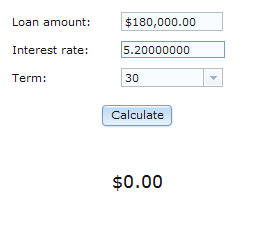
- On the first line of the handler, before the declaration
of the ui widget, declare a variable that the code uses to access
the dedicated service:
mortService MortgageCalculationService{@dedicatedService};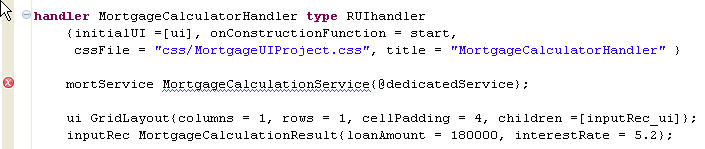
Complete the inputRec_form_Submit function
About this task
EGL created a stub inputRec_form_Submit function.
The intent is for the function to validate all the fields on the form
and to commit them. The commit is part of the MVC implementation
and means that the inputRec record is updated with
the values in the widgets.
You will add code to call two other
functions. The first function makes the processImage image
visible and in this way tells the user that the application is working.
The second function calls the service to calculate the mortgage payment.
inputRec_form_Submit function, update
the if statement so that it reads as follows: if(inputRec_form.isValid())
inputRec_form.commit();
showProcessImage();
calculateMortgage();
else
errorLabel.text = "Input form validation failed.";
end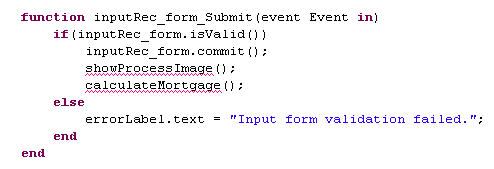
Add the showProcessImage function
About this task
showProcessImage function
to make the processImage image visible. To code the
function in the Rich UI editor, add the following lines before the
final end statement in the handler:function showProcessImage()
processImage.visible = yes;
endprocessImage image.Add the hideProcessImage function
About this task
hideProcessImage function
to hide the image when necessary. Add the following lines after the showProcessImage function: function hideProcessImage()
processImage.visible = no;
endAdd the calculateMortgage function
About this task
calculateMortgage function calls
a service to do a mortgage calculation based on the values displayed
in the UI. To code the function in the Rich UI editor, add the following
lines after the hideProcessImage function and ignore
the error marks: function calculateMortgage()
call mortService.amortize(inputRec)
returning to displayResults
onException handleException;
end - The call statement in Rich UI is a variation used only to access services. The runtime communication in this case is asynchronous, which means that the user can continue to interact with the handler while the service is responding.
- A service requester often passes a record to the service being
accessed. In this tutorial, the handler passes the global
inputRecvariable and receives, in the same record, the value returned from the service.
Add the displayResults function
About this task
displayResults function is a callback
function, which runs immediately after the service successfully returns
business data to the Rich UI handler. To code the function, add the
following lines after the calculateMortgage function: function displayResults(retResult MortgageCalculationResult in)
paymentLabel.text = MortgageLib.formatMoney(retResult.monthlyPayment as STRING);
inputRec_form.publish();
hideProcessImage();
end- You use the
formatMoneyfunction from your new EGL Library part to add commas and a dollar sign to the payment amount. Because you created thepaymentLabelvariable without involving the MVC framework, you must handle the formatting yourself. - As noted earlier, a form manager includes form fields that in
turn can include controllers and other declarations. The
publishfunction is available in any form manager and invokes the controller-specificpublishfunctions, one after the next, to do as follows:- Retrieve the data from the variable that serves as the controller model.
- Format that data.
- Write the formatted data to the widget that serves as the controller view.
Given that sequence of events, the form-level
publishfunction is often invoked as it is here: in a callback function that receives data from a service.
Write the exception handler
About this task
Do as follows:
Procedure
Test the calculator
About this task
You are now ready to test the calculator.
Procedure
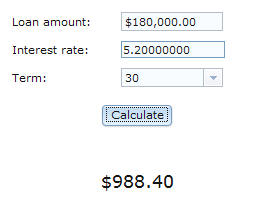
- Click Calculate.EGL displays the monthly payment.
- Type a letter in the first field.As is true of several EGL Dojo widgets, a red mark is displayed as soon as an error occurs, and an error message is displayed in an adjacent tooltip.
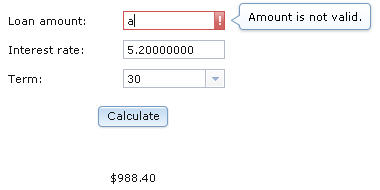
When the widget loses focus, the tooltip is hidden, and when the widget regains focus, the tooltip is shown.
Lesson checkpoint
About this task
- Work in the Rich UI editor Source tab
- Create an EGL Library part for reusable functions
- Use EGL Model-View-Controller framework
- Call an EGL Service from a function
- Catch and handle errors
In the next lesson, you create a pie chart to compare the total principal to the total interest in a given calculation.