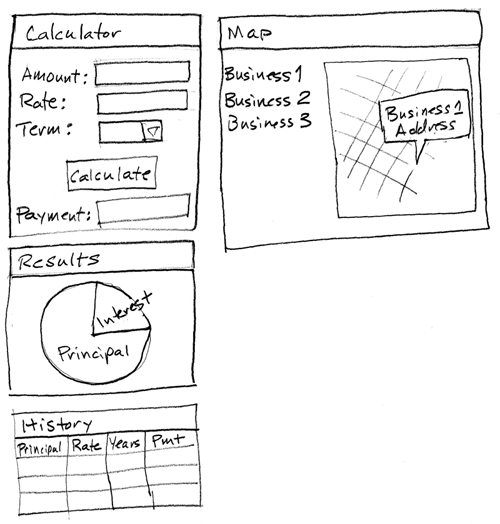
Design your application on paper before you begin coding.
About this task
When you plan an application, do as follows:
List your objectives, as this tutorial did earlier.
Sketch the interface.
Identify the application structure.
Sketch the interface
About this task
Use this sketch as a guide when you create the components
of the interface:
Identify the application structure
About this task
When you write a complex Rich UI application, you write
code in several Rich UI handlers, each of which corresponds to a web
page or to a section of a web page. As noted earlier, the handlers
can access services, some of which you might develop by using an EGL
Service part.
Whenever possible, use preexisting resources.
For one example, your Rich UI application will access a service hosted
by Google to retrieve a list of mortgage lenders within a specified
zip code. For a second example, you will use the following EGL projects
that are provided with the product:
com.ibm.egl.rui.dojo.samples
Provides the following kinds of code and more:
Widgets that divide the interface into sections, for flexibility
at development time
Logic that creates the dialog boxes with which you notify the
user who provides invalid data
Google map widgets
com.ibm.egl.rui.dojo.widgets
Provides the following widget types for this tutorial:
DojoButton
DojoComboBox
DojoCurrencyTextBox
DojoPieChart
DojoTextField
PieChartData
All those widget types are based on Dojo, as are many other
widgets that are available to you. For background details on that
technology, see Dojo
toolkit (http://dojotoolkit.org).
com.ibm.egl.rui
Provides the EGL Infobus, which provides communication between
the Rich UI handlers that contribute to the interface. The project
also provides the following widget types for this tutorial:
Box
DataGrid
GridLayout
HyperLink
Image
TextField
TextLabel
You will develop the following
logic:
MortgageCalculationService
A dedicated service that calculates monthly payments
MortgageLib
A library that provides code to several handlers
MainHandler
A handler that declares other handlers, each of which either controls
a section of the web page or does other work in the background
MortgageCalculatorHandler
A handler that calculates monthly payments
CalculationHistoryHandler
A handler that displays an interactive list of previous payment
calculations
CalculationResultsHandler
A handler that displays a pie chart of interest payments and principal
MapLocatorHandler
A handler that displays the locations of mortgage lenders
Lesson checkpoint
About this task
In this lesson, you completed the following tasks:
Sketched the application interface
Identified the application structure
In the next lesson, you import the Dojo samples project and
create two EGL projects to hold your code.