MCP Server Configurations
This section describes about the detailed view of various configuration available in the Unified MCP Server(HOD MCP Server).
MCP Security Configuration
Cors

| Section | Element | Description |
| cors | allowed-origins | Comma-separated list of frontend origins permitted to call this server — e.g. http://localhost:3021,... |
MCP UI OAUTH Security
This section of configuration is only for UI OAUTH configuration, this section will
be used only if mcp.ui_config.secured – true.
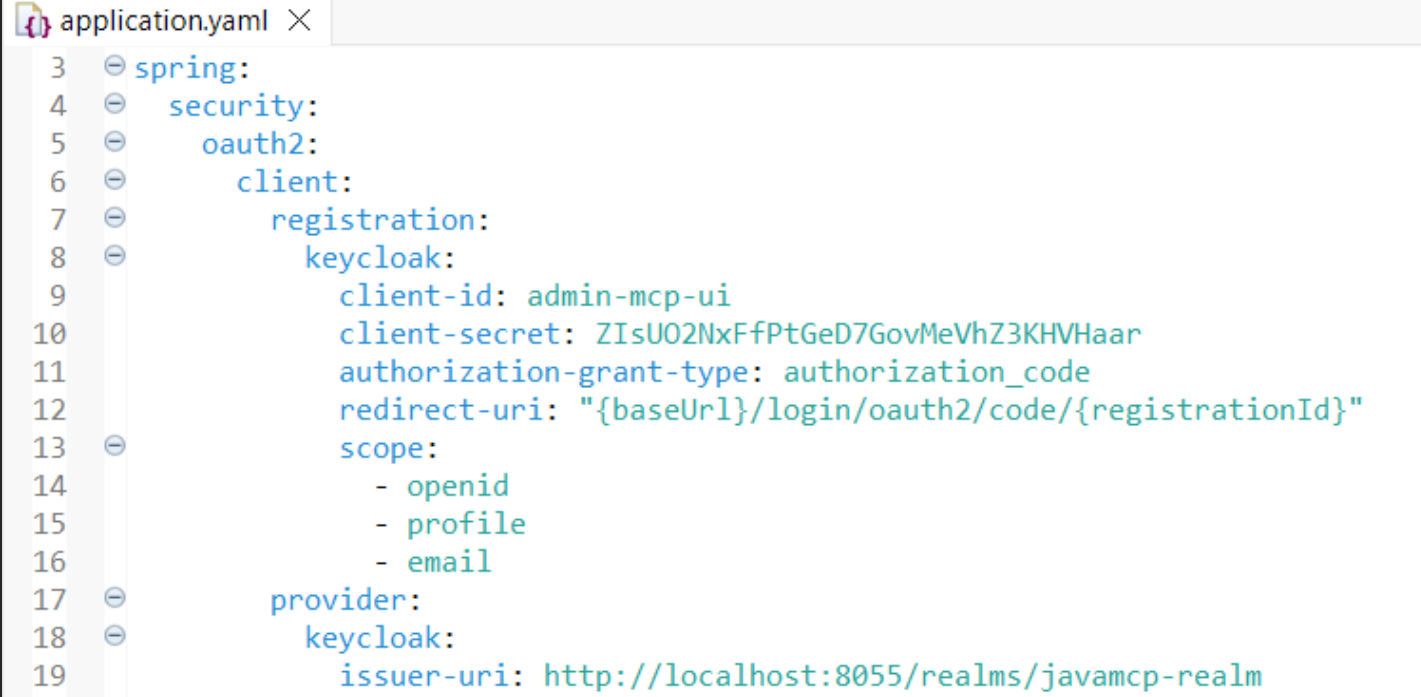
| Section | Element | Description |
|
spring.security.oauth2.client.registration.keycloak (For other IDP , their specific configuration needs to be added) |
client-id | The OAuth2 client ID registered in Keycloak for the MCP UI — e.g. admin-mcp-ui. |
| client-secret | The OAuth2 client secret paired with that client ID — e.g. ZIsUO2NxFfPtGeD7GovMeVhZ3KHVHaar. | |
| authorization-grant-type | The OAuth2 flow used to obtain tokens — e.g. authorization_code. | |
| redirect-uri | Where Keycloak redirects back after login — e.g. {baseUrl}/login/oauth2/code/{registrationId}. | |
| scope | List of OAuth2 scopes requested at login — e.g. openid, profile, email. | |
| spring.security.oauth2.client.provider.keycloak (For other IDP , their specific configuration needs to be added) | issuer-uri | The Keycloak realm URL used to discover OAuth2 endpoints — e.g. http://localhost:8055/realms/javamcp-realm. |
MCP Core Oauth Security
This section is used for OAUTH Security of MCP Core. It will be used only
mcp.security.enable – true. This is the Issuer-URI used by Chatbot to get
the meta-data to perform “Auth flow” to get the token.

| Section | Element | Description |
| spring.security.oauth2.resourceserver.jwt (For other IDP , their specific configuration needs to be added) | issuer-uri | The issuer URL used to validate incoming JWT access tokens as a resource server — e.g. http://localhost:8055/realms/javamcp-realm. |
MCP Security
This section has the flags to enable or disable security for MCP Core and UI. MCP
core can be secured by OUATH. API_KEY. MCP_UI is secured by OAUTH Login. We can
enable/disable Role, scope and type validation through the following flags.
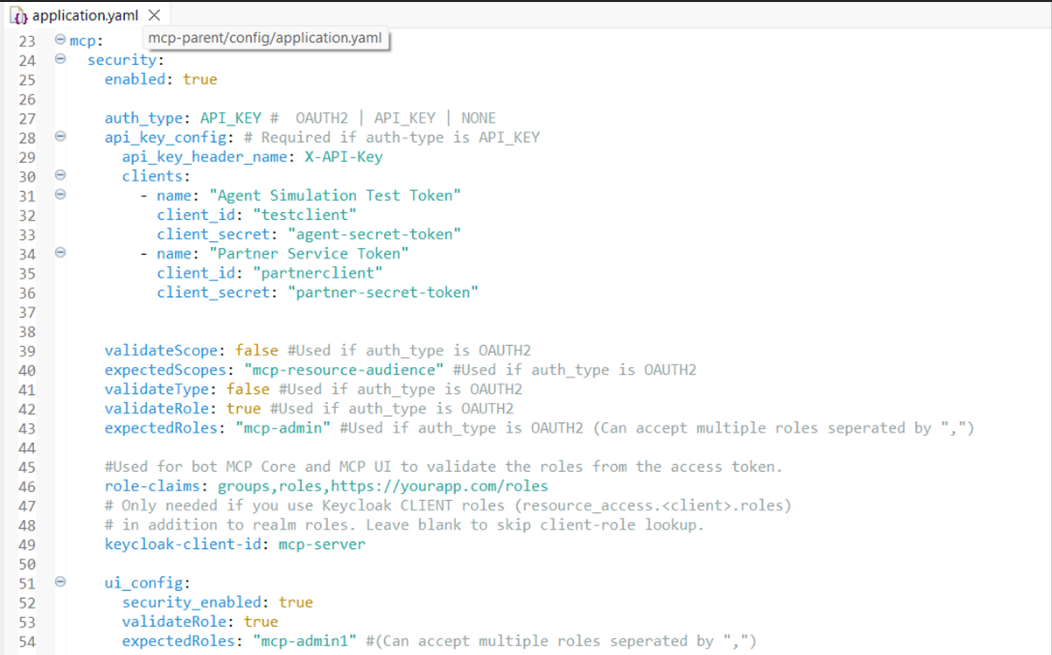
| Section | Element | Description |
| mcp.security | enabled | Master switch turning MCP-level security on/off — e.g. true. |
| auth_type | Which auth mechanism the MCP server enforces — e.g. API_KEY (Accepts either OAUTH2 or API_KEY or NONE). | |
| mcp.security.api_key_config (Used if auth_type is API_KEY) | api_key_header_name | The HTTP header name expected to carry the API key — e.g. X-API-Key. |
| clients | List of allowed API-key clients, each with a name, ID, and secret — e.g. testclient / agent-secret-token. | |
| mcp.security (OAuth2-specific) (Used if auth_type is OAUTH) | validateScope | Whether to enforce scope validation on tokens — e.g. false. |
| expectedScopes | The scope value required if validateScope is true — e.g. mcp-resource-audience. | |
| validateType | Whether to validate the token type claim — e.g. false. | |
| validateRole | Whether to enforce role-based authorization — e.g. true. | |
| expectedRoles | Role(s) required to pass authorization — e.g. mcp-admin. | |
| role-claims | Which JWT claim(s) to check for roles, comma-separated — e.g. groups,roles,https://yourapp.com/roles. | |
| keycloak-client-id | The client whose client-level roles should also be checked — e.g. mcp-server. | |
| mcp.security.ui_config | security_enabled | Whether the MCP UI itself enforces security — e.g. true. |
| validateRole | Whether the UI enforces role checks separately from the core server — e.g. true. | |
| expectedRoles | Role(s) required to access the UI — e.g. mcp-admin1. |
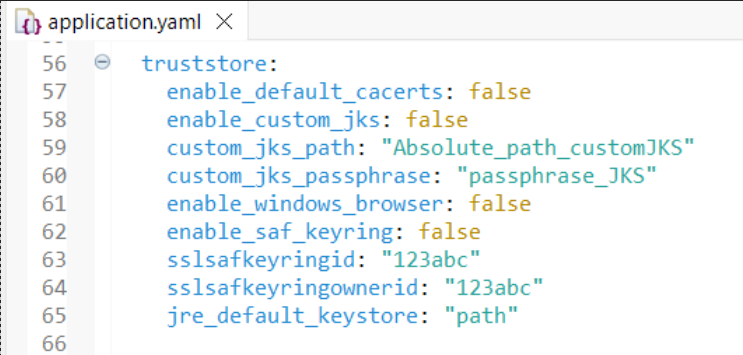
TrustStore flags
To make the HTTPS call from the server, the server may need certificates which can be
picked from various location. These flags are similar to HOD HEX that use to get the
certificate form different location.
api-config.yaml
Defines the backend API servers and the raw endpoints each tool can call.
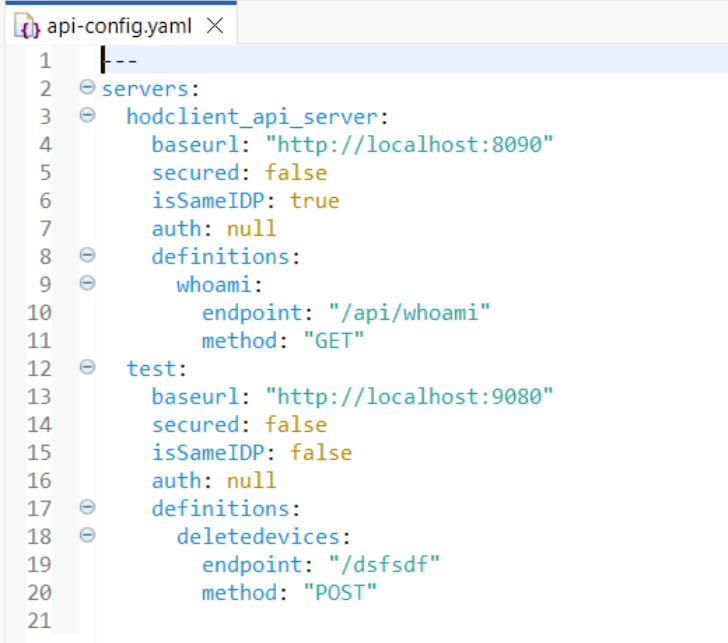
| Element | Description |
servers |
Top-level map of logical server names to their connection
details — e.g. hodclient_api_server,
test. |
<server_name> |
A unique key identifying one backend API server — e.g.
hodclient_api_server. |
baseurl |
Root URL prefix prepended to every endpoint under this
server — e.g. http://localhost:8090.
|
secured |
Whether this server requires authentication to call —
e.g. false (no auth needed). |
isSameIDP |
Whether this server trusts the same identity provider
(IDP) as the MCP server itself, so incoming tokens can be
forwarded as-is — e.g. true for
hodclient_api_server. |
auth |
Auth details/credentials for this server if
secured is true — e.g.
null here since neither server is
secured. |
definitions |
Map of endpoint keys (per server) that tools can
reference — e.g. whoami,
deletedevices. |
<endpoint_key> |
A unique key identifying one specific API operation on
this server — e.g. deletedevices. |
endpoint |
The URL path (relative to baseurl) that
gets called — e.g. /api/whoami. |
method |
The HTTP verb used for the call — e.g.
GET for whoami,
POST for
deletedevices. |
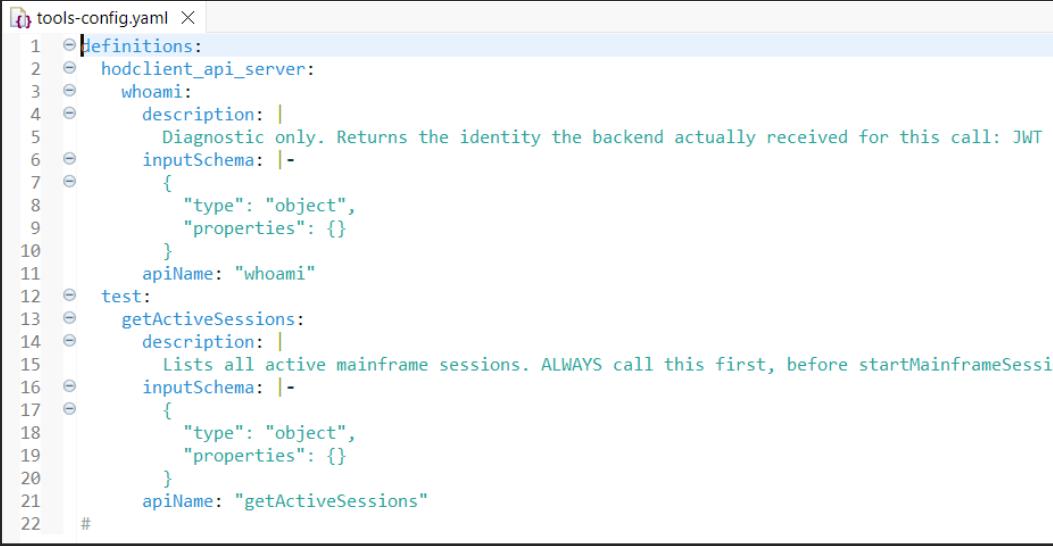
tools-config.yaml
Defines the MCP tools exposed to clients and maps each one back to an entry in
api-config.yaml.
| Element | Description |
definitions |
Top-level map grouping tools by the server they belong to —
e.g. hodclient_api_server,
test. |
<server_name> |
Must match a server key from
api-config.yaml, scoping the tools underneath
it — e.g. test. |
<tool_name> |
The unique tool identifier exposed via MCP — e.g.
getActiveSessions. |
description |
Human-readable text (shown to the LLM/client) explaining what
the tool does and when to use it — e.g. the
whoami description explaining it's
diagnostic-only and forwards identity claims. |
inputSchema |
A JSON Schema string defining the parameters this tool
accepts — e.g. {"type": "object", "properties":
{}} meaning whoami takes no input.
|
apiName |
The endpoint key (from api-config.yaml's
definitions under the same server) this
tool actually invokes — e.g. apiName: "whoami"
maps to hodclient_api_server → whoami. |