Licensing
Configuration
HOD Hex Client runs on an application server and provides the end users with a web-based interface to access the pre-configured HOD sessions and connect to the host systems.
It can fetch 3270/5250 display session configurations from both HTML-based model, combined-based model, and configuration server-based model pages of Host On-Demand.
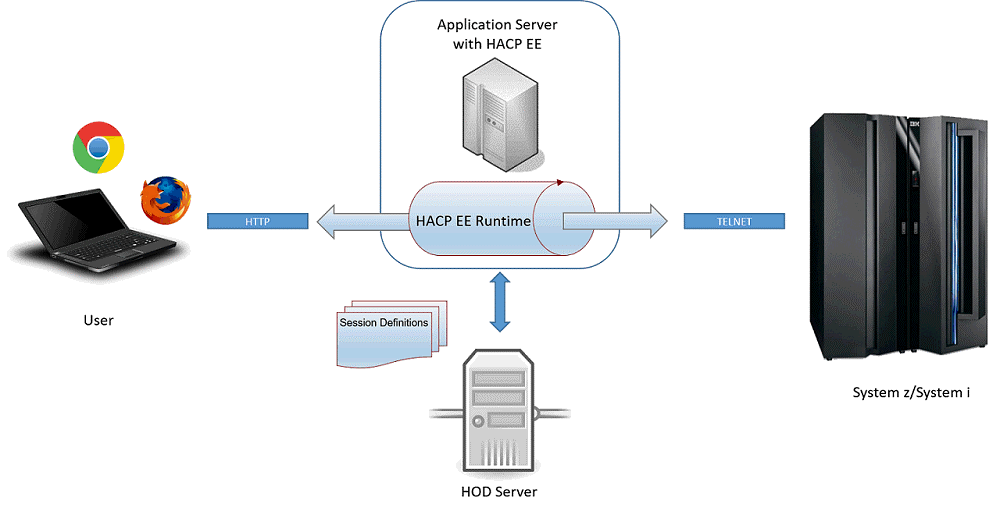
The following figure shows how a typical HOD Hex Client setup works:
-
User opens a HTML5 compatible web browser and navigates to HOD Hex Client application
Typically http(s)://<appserver_address:port>/hex/<hod_page_name>
- HOD Hex Client dashboard appears
based on the html page requested by the user.
- In case of HTML-based and combined-based model pages, session configurations are retrieved from HOD publish directory and listed.
- If it’s a configuration-based model page, a login screen is presented using which an HOD user can login to fetch the session configurations.
- User clicks on a session icon to connect to the host system.
- HOD Hex Client processes the request and renders the terminal screen on the web browser.
- User interacts with the host using the terminal screen.
Why use IBM HOD Hex Client?
- Zero Foot Print - Nothing gets downloaded to end users' systems
- No dependency on Java or any other browser plugins
- Secure access to host systems using HTTPS and TLS connectivity
- HTML5 compatible
- Intuitive and user centric design