Deploying HOD Hex Client
IBM HOD Hex Client package is available on IBM fix central.
Pre-requisites:
- IBM Host On-Demand server
- WebSphere Application Server (WAS) or TOMCAT or Liberty or HOD (Host On-Demand) embedded Server.
Deployment steps:
- Extract the contents of IBM HOD Hex Client package (.zip) file
- Deploy the EAR (Enterprise Application aRchive) file on WAS using WAS admin console.
- Configure the initial parameters of HOD Hex Client application on WAS with Host On-Demand service manager and web server details
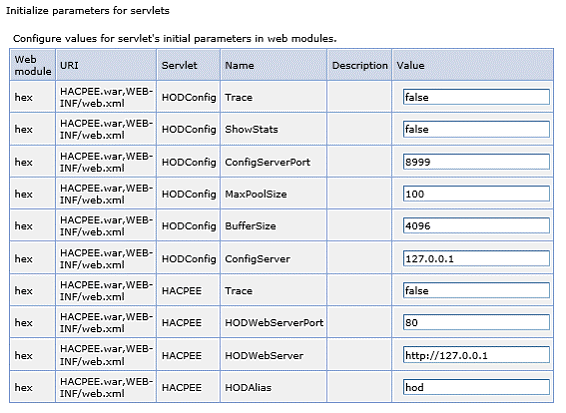
System Requirements:
Web browsers:
- Google Chrome v59.0.3071.115 or above
- Firefox v51.0.1 or above
- Edge 41 or above
- IE 11 or above
Application servers:
- IBM WebSphere Application Server v9.0.0.4 and above
- IBM WebSphere Application Server v8.5.5.11 and above *
- TOMCAT
- Liberty Server
- HOD (Host On-Demand) embedded Server
Client Operating Systems:
- Windows 10 and above
- RHEL 7.2 and above
- Mac OS 10.11 and above #
where,
* JRE 1.7 or above is required.
# Only Firefox browser is supported.
From HOD Hex Client V4.0 Onwards
HOD Hex Client Installer Supported Application Server HEXCLIENT_EAR/HEXCLIENT_WAR WAS Liberty Server -WebProfile 8(below Webprofile 8) and Tomcat Below 10 versions HEXCLIENT_EAR_JAKARTA/HEXCLIENT_JAKARTA_WAR WAS Liberty Server -WebProfile 10(above Webprofile 8) and Tomcat above 10 versions
License Manager
When the user launches an HTTPS secure connection with client authentication enabled in the browser, the unique user will be a combination of IP address instead of the system username and the common name (which reads from the certificate the client is presented with while accessing the HTTPS secure connection).
Support for Tomcat and Liberty Server:
Unlike previous versions of HOD Hex Client which supported only IBM WebSphere Application server (WAS) as the runtime environment, from HOD Hex Client version 1.10 onwards, the following application servers are also supported as runtime environments:
- IBM WebSphere Liberty, which is a highly composable, fast to start, dynamic application server at runtime environment.
- Tomcat, which is used as application server for web-based application.
These servers were based on Java 2 platform and Enterprise Edition (J2EE) which adopted a multitier distributed model, and also support multiple applications running simultaneously.
Support for One Server:
In addition to other supported servers, an embedded server (part of Host On-Demand) is also included in HOD Hex Client, as part of the deployable application. The advantage of the embedded One Server is that it is not necessary to pre-install a web server in the deployment environment. Embedded servers are scalable and can host applications that support millions of users.
By default, the parameters defined in the code are picked up by the Service Manager when it starts, but Administrators can override the default values by defining parameters of the existing config.properties (in the HOD publish directory).
Below are the parameters which can be defined to override configurations.
publishDirContextPath = hod
WebAppServerPort=8080
WebAppServerSecurePort=8443
ConfigServerPort=8999
zfpClientContextPath=hex
Administrator has to update /lib/config/zfp_overrides.xml with the below parameters
HODWebServerPort = 8080
ConfigServerPort=8999Deploying HOD Hex Client in Tomcat and IBM WebSphere Liberty server
1. Deploying HOD Hex Client in Tomcat server
Tomcat is normally defined as a reference implementation of the Java Servlet and Java Server Page (JSP) specifications. It basically executes Java servlets and renders web pages which include JSP coding.
To deploy an application using the Apache Tomcat manager web application, follow these steps:
- Download and install Tomcat server in user Machine.
- Host name and port number is defined at the time of installation.
- Start the Tomcat server and run URL (localhost:8080) in browser.
- Under Manage App category, deploy .war file under Deploy section
- Web application can be run from that deploy section.
By default, Tomcat server allows only 50MB size of file to deploying, but our HOD Hex Client war file exceeds that limit. So, we need to upgrade the file size limit on tomcat server. This can be achieved by doing some modification on web.xml.
PATH: (C:\Program Files\Apache Software
                Foundation\Tomcat9.0\webapps\manager\WEB-INF\web.xml.)
We can modify the file size to 100MB/200MB under multipart-config element in web.xml
Note: Value should be in bytes.
2. Deploying an application in IBM WebSphere Liberty server
- Download and Install 'IBM Websphere Liberty Server' in Local machine.
- Create a server by using the command
server create
                    servername
. - In the server.xml file that was created under server folder, in that xml file
http portandhost namecan be changed as per need.
Applications can be configured in two ways:
Method I
- Under installation directory of Liberty server, there is folder name called
dropins.
(usr/servers/servername/dropins) - Drop the application
.ear/.warfile into that folder. - After that Start the server using command server
start servername. - Then run the URL
hostname:
            port/context-root
in browser.
Method II
- Define the application by using an
applicationelement in server.xml.<application context-root= “sample” type=”war” id=”sample” location=” c:/app/sample.war” name=”sample”/> - The context-root attribute specifies the entry point of the deployed application.
NOTE: In an application server server.xml configuration, the application element can contain a context-root tag. This context-root tag is applicable in combination with the tag type="war". For all other application types, the context-root element has no effect. It is not possible to override the context-root for either an EAR application, or an EBA application. It is only possible to do an override for a stand-alone war file, or web Application.
Once the configuration is done, server can be start and run it on browser.
- Start the server in foreground by using the command
server start
          servername
or else run the server by usingserver run servernamecommand. - Test the application at
hostname: port/context-rootin browser. - Optional: Stop the server if you do not need it by using command
server
                        stop servername
.
HOD Hex Client as Default Client
With the release of Host On-Demand v16.0.0.0, users can now configure HOD Hex Client as the default web client. The update introduces support for deploying HOD Hex Client on various application servers through the HOD Hex Client, offering enhanced flexibility for installation, upgrade, and modification scenarios.
Additionally, the HODMain.html page has been updated with access links to launch the HOD Hex Client client, making it easier for users to access the next-gen web terminal alongside existing clients.
This release also supports:
-
Silent installation
- Console installation
Prereqisites
- IBM WebSphere Application Server
- IBM WebSphere Application Server Network Deployment
- Apache Tomcat Application Server
- IBM Liberty Application Server
Fresh Install of HACP EE Configuration
Previous versions of Host On-Demand did not support the deployment of the HOD Hex Client server. Host On-Demand v16.0.0.0 introduces support for deploying and configuring HOD Hex Client on Embedded Server, IBM WebSphere Application Server, IBM WebSphere Application Server Network Deployment, Apache Tomcat Application Server, and IBM Liberty Application Server.
HACP EE Embedded Server type
Manually Select Specific Application Server
- Default Selection:
-
The Embedded Web Server is selected by default during installation.
- WAR File Deployment Based on Server Selection:
-
If Host On-Demand Embedded Web Server is selected, the HOD Hex Client WAR file is deployed using the embedded server configuration.
-
If IBM WebSphere Application Server (WAS) is selected, the HOD Hex Client WAR file is deployed with default settings.
-
If Apache Tomcat or IBM Liberty Server is selected, the HOD Hex Client WAR file is deployed to the chosen server based on user input.
-
-
- Configuration Parameters (set in web.xml):
-
Max Pool Size
-
Buffer Size
-
Config Servlet Trace
-
Show Status
-
Mapped File
-
ZFP Servlet Trace
-
- Port Configuration:
-
The HOD Hex Client Web Server port is displayed in the HOD Hex Client configuration panel and is used for communication between the HOD Web Server and HACP EE Server.
-
Default port value: 80
-
- Conditional Port Display:
-
Application server and secure port fields are hidden if both the Web Server and HOD Hex Client Server types are set to Embedded.
-
- Context Root Configuration:
-
For IBM Liberty and Tomcat, the context root is used for WAR file deployment.
-
For Embedded Server, the WAR file retains its original name. The default value is in hexadecimal format.
-
- Manual Path Specification Required For:
-
Apache Tomcat: up to the parent folder of / webapps
-
IBM Liberty: up to the parent folder of the / bin directory
-
Silent Installation Support
V16.0.0.0 Supports HOD Hex Client deployed on fresh, upgrade silent installation, and it does not support silent modify installation.
Silent installation support variables are described on below tables:# /*
# *+------------------------------------------------------------------------+
# *| Licensed Materials - Property of HCL |
# *| (c) Copyright HCL Technologies Ltd. 2021. All Rights Reserved. |
# *+------------------------------------------------------------------------+
# */
# ---------------------------------------------------------------------------
# Silent Installation properties file
# ---------------------------------------------------------------------------
INSTALLER_UI=silent
# ---------------------------------------------------------------------------
# IBM Host On-Demand supports Multiple/Upgrade Instance Support
# 0 -> To install only one instance
# 1 -> To Support More than one instance or Upgrade Instance
# ---------------------------------------------------------------------------
MI_SUPPORT=0
# ---------------------------------------------------------------------------
# Specify Product Name to install as New instance or Upgrade Instance
# For Upgrade instance Product name with Version
# MI_PRODUCT_NAME=IBM Host On-Demand 15.0.1.0
# For Multiple/New Instance support
# MI_PRODUCT_NAME=IBM Host On-Demand New Instance
# ---------------------------------------------------------------------------
MI_PRODUCT_NAME=IBM Host On-Demand New Instance
# ---------------------------------------------------------------------------
# IBM Host On-Demand IM Instance upgrade Support
# 0 -> Does Not IM HOD Upgrade Installation
# 1 -> To Support IM HOD Upgrade Installation
# ---------------------------------------------------------------------------
IM_UPGRADE_SUPPORT=0
# Specify Product Name with Installation Path to Migrate Installation Manager installed Instance
IM_PRODUCT_NAME=Host On-Demand 14.0.4.0 (C:\\Program Files\\IBM\\HostOnDemand)
# ---------------------------------------------------------------------------
# IBM Host On-Demand Installation Path
# ---------------------------------------------------------------------------
USER_INSTALL_DIR=C:\\Program Files\\IBM\\HostOnDemand_16.0.0.0
# ---------------------------------------------------------------------------
# Manditate Product Features
# Host On-Demand -> HOD
#Choose optional Language Features
# For Brazilian Portuguese Language Pack -> LANG_PT_BR
# For Catalan Language Pack -> LANG_CA
# For Czech Language Pack -> LANG_CS
# For Danish Language Pack -> LANG_DA
# For Dutch Language Pack -> LANG_NL
# For Finnish Language Pack -> LANG_FI
# For French Language Pack -> LANG_FR
# For German Language Pack -> LANG_DE
# For Greek Language Pack -> LANG_EL
# For Hungarian Language Pack -> LANG_HU
# For Italian Language Pack -> LANG_IT
# For Japanese Language Pack -> LANG_JA
# For Korean Language Pack -> LANG_KO
# For Norwegian Language Pack -> LANG_NO
# For Polish Language Pack -> LANG_PL
# For Portuguese Language Pack -> LANG_PT
# For Russian Language Pack -> LANG_RU
# For Simplified Chinese Language Pack -> LANG_ZH_CN
# For Slovenian Language Pack -> LANG_SL
# For Spanish Language Pack -> LANG_ES
# For Swedish Language Pack -> LANG_SV
# For Traditional Chinese Language Pack -> LANG_ZH_TW
# For Turkish Language Pack -> LANG_TR
# ---------------------------------------------------------------------------
CHOSEN_INSTALL_SET=Custom
CHOSEN_FEATURE_LIST=HOD,LANG_HU,LANG_IT,LANG_JA,LANG_KO,LANG_NO,LANG_PL,LANG_PT
# ---------------------------------------------------------------------------
# IBM Host On-Demand Publish Information
# ---------------------------------------------------------------------------
# Publish alias Name
PUBLISH_ALIAS_NAME=hod
# Publish Director name to install publish files
PUBLISH_DIR=HOD
# Publish Port
PUBLISH_PORT=8999
# Publish secure Port
PUBLISH_SECURE_PORT=9001
# ---------------------------------------------------------------------------
# IBM Host On-Demand Web Server Configuration
# Web Server Type
# 1 -> Embedded Web server Type
# 2 -> Detected Web server Type
# 3 -> Manually select specific Web server Type
# 4 -> No Web server Type
# ---------------------------------------------------------------------------
WS_TYPE=1
# ---------------------------------------------------------------------------
# Embedded Web Server Type IBM Host On-Demand Installation
# ---------------------------------------------------------------------------
# Web Server Port
WS_PORT=8080
# Web Server SSL Port
WS_SSL_PORT=8443
# ---------------------------------------------------------------------------
# Detected Web server Type IBM Host On-Demand Installation
# ---------------------------------------------------------------------------
#Supported Web Server are APACHE or IIS
WS_DTD_SERVER_TYPE=IIS
# If IIS Webserver type then specify ISS Website Name
WS_DTD_IIS_APPNAME=Default Web Site
# If Apache is selected for installation need to specify apache installed Config Path
# C:\\Program Files (x86)\\Apache Software Foundation\\Apache2.2\\conf\\httpd.conf
WEB_SERVER_CONFIG_FILE=C:\\Program Files (x86)\\Apache Software Foundation\\Apache2.2\\conf\\httpd.conf
#
# ---------------------------------------------------------------------------
# Manual specify web server Type IBM Host On-Demand Installation
# 1 -> Apache HTTP Server 2.2 or newer
# 2 -> IBM HTTP Server 8.5 or newer
# ---------------------------------------------------------------------------
WS_MAN_SERVER_TYPE=1
# If Apache or HTTP Server is selected for installation need to specify Server Config Path
WS_MAN_CONFIG_FILE=C:\\Program Files (x86)\\Apache Software Foundation\\Apache2.2\\conf\\httpd.conf
# ---------------------------------------------------------------------------
# IBM WebSphere Application Server Configuration
# 0 -> without Application Server Configuration
# 1 -> To Configure WAS Application Server
# ---------------------------------------------------------------------------
# CTED=0
# Application Server Name
APP_SERVER=IBM WebSphere Application Server V9.0
# Application server Profile Name
WAS_PROFILE=AppSrv01
# WAS Server Name
WAS_SERVER=Server1
# ---------------------------------------------------------------------------
# HACP EE Application Server Configuration
# 1 -> Embedded Server
# 2 -> IBM WebSphere Application Server
# 3 -> Manually select specific Web Server
# ---------------------------------------------------------------------------
HOD Hex Client_SERVERTYPE=1
# ---------------------------------------------------------------------------
# HOD Hex Client_SERVERTYPE=2
# HACP EE IBM WebSphere Application Server Configuration
#----------------------------------------------------------------------------
# Application Server Name
HOD Hex Client_WAS_APPSERVER=IBM WebSphere Application Server V9.0
# Application server Profile Name
HOD Hex Client_WAS_PROFILE=AppSrv01
# WAS Server Name
HOD Hex Client_WAS_PROFILE_SERVER=Server1
# ---------------------------------------------------------------------------
# HOD Hex Client_SERVERTYPE=3
# HACP EE Manually select specific Web Server
# 1 -> Tomcat Apache Server
# 2 -> IBM Liberty WebSphere Server
#----------------------------------------------------------------------------
HOD Hex Client_MAN_SERVERTYPE=1
#----------------------------------------------------------------------------
# For Tomcat Apache Server instalaltion path should be define upto Parent folder of WebApps
# HOD Hex Client_MAN_SERVERPATH=C:\Program Files\Tomcat9.0
# For BM Liberty WebSphere Server instalaltion path should be define upto Parent folder of bin
# HOD Hex Client_MAN_SERVERPATH=C:\Program Files\IBM Liberty
#----------------------------------------------------------------------------
HOD Hex Client_MAN_SERVERPATH=C:\\Program Files\\Tomcat9.0
#----------------------------------------------------------------------------
# HOD Hex Client Configuration
# If Web Server Configuration type Embedded server is selected,
# Application Server and Secure field not required to define.
#----------------------------------------------------------------------------
# Host On-Demand Configured WebServer port to communicate with HACP EE Application Server
HOD Hex Client_WEBSERVER_PORT=80
# HOD Hex Client Application Server Port
HOD Hex Client_APPSERVER_PORT=8999
# HOD Hex Client Application Server Secure Port
HOD Hex Client_APPSERVER_SECUREPORT=9001
# HOD Hex Client Max Pool Size accepts only integer value
HOD Hex Client_MAX_POOL_SIZE=100
# HOD Hex Client Buffer Size accepts only integer value
HOD Hex Client_BUFFER_SIZE=4096
# HOD Hex Client War file will be deployed based on HOD Hex Client_CONTEXT_ROOT value
HOD Hex Client_CONTEXT_ROOT=hex
# HACP EE Config trace accepts true or false
HOD Hex Client_CONFIG_TRACE=true
# HACP EE Show Status accepts true or false
HOD Hex Client_SHOW_STATUS=false
# HACP EE Map File accepts true or false
HOD Hex Client_MAP_FILE=true
# HACP EE ZFP trace accepts true or false
HOD Hex Client_ZFP_TRACE=false
# ---------------------------------------------------------------------------
# System Level Configuration: Don't change below values until it requires.
# Reboot Parameter on uninstall and install scenarios
# ---------------------------------------------------------------------------
USER_REQUESTED_RESTART=NO
RESTART_NEEDED=NO