Understanding HATS application processing
Before creating a HATS project, you should understand how HATS processes
host applications. As users access each screen of an application, HATS processes
the application as described in the following steps. HATS screen processing shows the flow of these steps. Key concepts are
described in Understanding HATS key concepts and objects.
- When the host displays a screen, HATS compares the host screen to the set of screen recognition criteria that is defined in each of the project's enabled screen events, in the order that is defined by event priority, until a match is found.
- When a match is found, HATS performs the actions that are defined
for the screen event. For both screen customization
and screen combination events, these can include the actions listed
below. For a screen combination event, in addition, HATS navigates
through multiple screens gathering data from each screen to display
to the user.
- Apply a transformation using the associated template. HATS displays any host components (defined in the transformation) as GUI widgets.
- Execute business logic
- Extract global variable
- Insert data
- Set global variable
- Remove global variable
- Send global variable (HATS standard portlet projects only)
- Show URL or SWT Composite (RCP-only)
- Show URL (Web-only)
- Forward to URL (Web-only)
- Play macro
- Perform macro transaction
- Send key
- Disconnect
- Pause
Note:- When a screen match is found, at least one action must be performed, but a transformation of the screen is not required to be displayed to the user. In other words, the apply a transformation action is not required.
- You can perform actions against the host screen data before and after the user interacts with it. For example, you can extract some data as a global variable, replace some information with new data, and then apply the transformation before showing the transformation to the user. After the user performs an action that returns the screen data, you can perform additional extractions and insertions before the data is finally returned to the host.
- If no screen recognition criteria match the host screen, HATS processes the unmatched screen application event. The default action of this event is to display the host screen using the default transformation and applying the default template. The default transformation uses the rendering settings that are defined in the project settings.
- As the host presents each new screen of an application, HATS begins
at step 1 again and proceeds through
all steps. HATS screen processing shows how HATS processes screens.
Note:If a macro is used for skip-screen processing, those screens are not subject to this process.
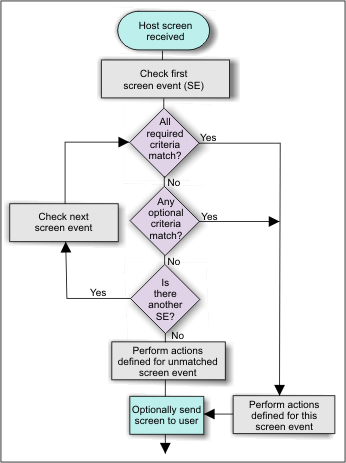
Screen events are an important concept in the development of a HATS project. Without defined screen recognition criteria in a screen event, HATS does not know what actions to take when the host screen is received.
You should familiarize yourself with the basic principles of screen events before beginning the development process. The core elements of setting screen recognition criteria are discussed in Working with screen events.