What is HATS?
With HATS, you can create Web applications and rich client applications that provide an easy-to-use graphical user interface (GUI) for your 3270 applications running on IBM® System z® platforms and your 5250 applications running on IBM® i operating system platforms. HATS applications can access 5250 applications without requiring Online Transaction Processing (OLTP) capacity. In this book, these character-based 3270 and 5250 applications are referred to as host applications. You can also create service-oriented architecture (SOA) assets using Web services that provide standard programming interfaces to business logic and transactions contained within host applications. Data from video terminal (VT) emulation screens can also be accessed.
HATS applications can be given a modern appearance. HATS Web applications can be developed with an interface that matches your company's Web or portal pages, and your users can access them through their Web browsers. HATS Web applications can also be developed to provide access from mobile devices such as cellular phones, data collection terminals, and personal digital assistants (PDAs).
HATS rich client applications can be developed to run in an Eclipse Rich Client Platform (RCP) implementation, in Lotus Notes®, or in the Lotus® Expeditor Client to provide native client applications targeted for a user's desktop. For more information about the Eclipse RCP environment, see https://wiki.eclipse.org/Rich_Client_Platform.
- The HATS Toolkit is a set of plug-ins for
the Eclipse-based IBM® Rational® Software Delivery Platform (Rational® SDP). For more on which
versions of Rational® SDP are supported, see Prerequisites.
The HATS Toolkit enables you to develop new applications, previewing and saving each change you make. Over time, or as quickly as you like, you can streamline your HATS application, making it easier to use than the host applications whose data it presents, and possibly moving functions from the host applications into your HATS applications. The development process for building HATS Web and rich client applications is similar.
After you have developed a HATS application, you deploy it to a production runtime environment.
-
The HATS runtime code runs as part of a HATS application deployed in a production runtime environment, WebSphere® Application Server, WebSphere® Portal, or rich client platform. Users interact with the HATS application through the HATS GUI and data is sent back and forth between the user and the host application.
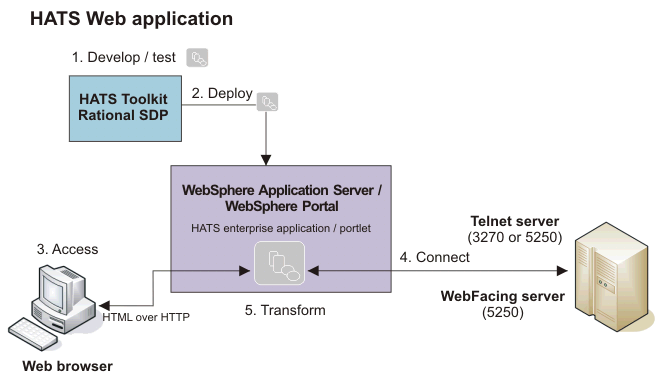
- The developer uses the HATS Toolkit to develop and test a HATS Web application.
- When ready, the developer deploys the HATS application by exporting it as a Java™ EE application and installing and running it on a WebSphere® Application Server system.
- Using a Web browser, the user accesses the HATS application.
- The HATS runtime connects to the target host system through either a Telnet or a WebFacing server.
- As the user interacts with the host through the HATS application, the HATS runtime transforms host screens to a GUI.
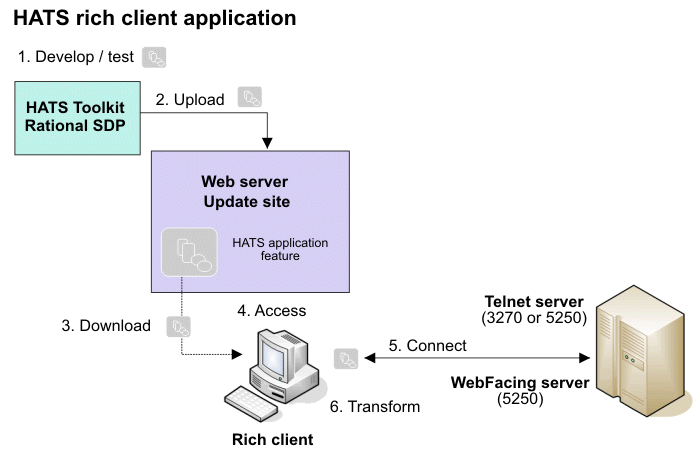
- The developer uses the HATS Toolkit to develop and test a HATS rich client application.
- When ready, the developer exports the HATS application as an Eclipse
feature, creates an update site containing the application feature, and
uploads it to a Web server for deployment.
Note:Different methods can be used for deploying HATS rich client applications. For example, Lotus® Expeditor Server can be used to centrally manage the software deployed to Lotus® Expeditor Client systems.
- The user, running a rich client platform, downloads and installs the HATS application feature from the update site.
- The user starts and accesses the HATS application using the rich client platform environment.
- The HATS runtime connects to the target host system through either a Telnet or a WebFacing server.
- As the user interacts with the host through the HATS application, the HATS runtime transforms host screens to a GUI.