Rich UI Tooltip
A Rich UI tooltip widget defines hover help: text or widgets that are displayed when the user hovers over a widget. A tooltip is displayed only if you enable the tooltip widget, as described in this section. You can use the same tooltip for several widgets, and you can enable the tooltip for a given widget in response to a runtime event.
Here is an example Rich UI handler, which displays a button and
assigns hover help that says, To toggle the text, click the
button!:
package myPkg;

import com.ibm.egl.rui.widgets.Box;
import com.ibm.egl.rui.widgets.Button;
import com.ibm.egl.rui.widgets.Tooltip;
import egl.ui.rui.Event;


Handler MyHandler Type RUIHandler { initialUI = [theButton],
                               onConstructionFunction= begin }

   theButton Button { text = "Start", onClick ::= click };
   theToolTip Tooltip { text = "To toggle the text, click the button!",
                        delay = 800 };
   myBox Box{};

   function begin()
      theToolTip.enable(theButton);
   end

   Function click(e Event in)
      if (theButton.text == "Start")
         theButton.text = "Stop";
      else
         theButton.text = "Start";
      end
   end
end
The following tooltip widget properties are supported:
- text, which holds a string for display. If you specify a string here, the provider property is not used.
- delay, which holds an integer that represents the number of milliseconds between the start of the user's hover and the display of the hover help
- provider, which refers to a function
that returns a box for display within the hover help. For example,
assume your Rich UI handler displays a button that says "Start". You
can create a tooltip that is enabled for the button and that displays
a hypertext link in the hover help:
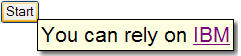 Here is the provider function that makes the output possible:
Function GoToWebsite(myWidget any in) returns(Box) myLink html{text = "You can rely on <a target = \"_blank\", href=\"http://www.ibm.com\">IBM</a>"; myBox.children = [mylink]; return (myBox); endA Delegate part named ToolTipTextProvider describes the access characteristics of any function that is referenced by theproviderproperty. Specifically, the Delegate part indicates that the provider function has one parameter type and returns a box:Delegate TooltipTextProvider(widget any in) returns(Box) endBe aware of the issue described in Rich UI memory management.
The following tooltip widget function is supported:
enable(widget in)enables the tooltip for a particular widget, as shown in our first example.
Use of this widget requires the following statement:
import com.ibm.egl.rui.widgets.ToolTip;