EGLSDK
The command java EGLSDK gives you access to the EGL Software Development Kit (EGL SDK). You must satisfy the prerequisites listed in Generation using the EGL software development kit (SDK). For details on generating a main part and on generating by part, see Generation mode.
The command has several forms, and the last section in this topic gives reference details for any form.
To generate from a command file
If you are using a command file, use the following form of the command:

The following examples assume that you are starting the command java EGLSDK in the directory that includes the command file:
java EGLSDK "commandfile.xml"

java EGLSDK "commandfile.xml"
   -eglpath "c:\myGroup;h:\myCorp;c:\myDirectory\myELGAR.eglar"

java EGLSDK "myCommand.xml"
   -sqlID myID -sqlPassword myPW
   -destUserID myUserID -destPassword myPass
Place the content for a given command on a single line. If your command file is in another directory, you must add the path to the command file name.
To generate a main part and its associates
If you are generating a main part and its associates and are not using a command file, use the generate subcommand:
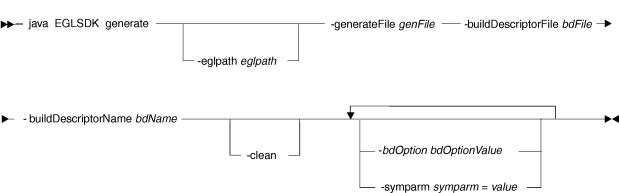
Here is an example, which belongs on a single line:
java EGLSDK generate
   -eglpath "c:\myGroup;h:\myCorp;c:/myELGAR.eglar"
   -generateFile "c:\myProg.egl"
   -buildDescriptorFile "c:\myBuild.eglbld"
   -buildDescriptorName "myBuildDescriptor"
To generate by part
If you are generating by part and are not using a command file, use the generatePart subcommand:
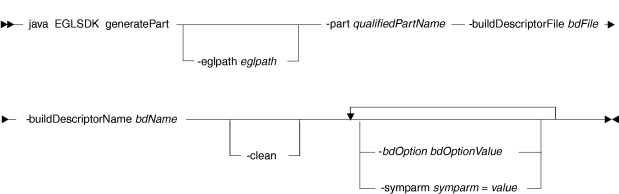
- Generate a program:
java EGLSDK generatePart -eglpath "c:/common.eglar" -part "test.my.pkg.program1" -buildDescriptorFile "c:/myBuild.eglbld" -buildDescriptorName myBuildDescriptor - Generate all IR files in package
myPackage:java EGLSDK generatePart -eglpath "c:/common.eglar" -part "MyPackage.*" -buildDescriptorFile "c:/myBuild.eglbld" -buildDescriptorName myBuildDescriptor - Generate the output for a Record part:
java EGLSDK generatePart -eglpath "c:/MyProject/EGLSource"
                         -part "MyPackage.MyRecord"
                         -buildDescriptorFile "c:/myBuild.eglbld"
                         -buildDescriptorName myBuildDescriptor
Additional reference details for generation
Here are additional details, in alphabetical order:
- -bdOption bdOption
- Sets an option value that overrides the related value in the build
descriptor or in the command file. Specify an option name for bdOption and specify the related value for bdOptionValue. The following build descriptor options are supported:
- desthost
- destport
- destuserid
- destpassword
- destdirectory
- destlibrary
- gendirectory
- sqlid
- sqlpassword
- sqldb
- sqljndiname
- genproject
- tempdirectory
- templatedir
- reservedword
- projectid
A build descriptor option that you specify when invoking the EGLSDK command takes precedence over the same build descriptor option in the build descriptor (if any) that is referenced in the EGL command file. The options that are only in the EGLSDK command or only in the build descriptor are also in effect at generation time.
- -buildDescriptorFile bdFile
- The absolute or relative path of the build file that contains
the build descriptor. Relative paths are relative to the directory
in which you run the command.
Enclose the path in double quotes.
Note:The eglpath option is not used to find the build descriptor, so the bdFile parameter must specify the correct file. - -buildDescriptorName bdName
- The name of a Build Descriptor part that guides generation.
Please note that debugging information is never included in the generated output, even if you specify a debug build descriptor.
- -clean
- A directive to remove the IR files in the EGLbin directory before running a build or generate process and after generation is complete.
- cmdFile
- The absolute or relative path of the file. Relative paths are
relative to the directory in which you run the command.
Enclose the path in double quotes.
- -eglpath eglpath
- The list of directories and EGLAR files to search when EGL uses
an import statement to resolve the name of a part. You specify a quoted
string that identifies one or more directories and EGLAR files, with
each name separated from the next by a semicolon.
The eglpath value that you specify when using the command java EGLSDK takes precedence over any eglpath value entered into the Generation wizard, which takes precedence over any eglpath value in the Build Descriptor part.
- -generateFile genFile
- The absolute or relative path of the EGL file that contains the
main part you want to process. Relative paths are relative to the
directory in which you run the command.
Enclose the path in double quotes.
- -part qualifiedPartName
- The part you want to generate, qualified by the package name. Enclose the qualified name in double quotes. The part location is resolved from the eglpath value. To generate every part in the package and sub-packages, use an asterisk (*) is in place of a part name.
- -symparm symparm = value
- A symbolic parameter and the related value. If the value includes
a space, embed the value in quotation marks. If multiple symparm entries
reference the same symbolic parameter, the last entry is in effect.
The symbolic parameters that you specify when invoking the EGLSDK command take precedence over the same-named symbolic parameters in the build descriptor (if any) that is referenced in the EGL command file. The parameters that are only in the EGLSDK command or only in the build descriptor are also in effect at generation time.
To deploy output
If you are deploying the Rich UI application or dedicated service, use the deploy command.
             Java EGLSDK deploy
             -genDirectory "C:\myGenPath"
             -targetDirectory "C:\myTargetPath"
             -deploymentDescriptorFile "C:\myegldd.egldd"
             -deploymentDescriptorFile "C:\myegldd.egldd"
             -sourceDirectories "C:\mySourcePath"
             -tempDirectories "C:\myTempPath"
             -javaRuntimeDirectory "C:\IBM\IBMIMShared\plugins\com.ibm.etools.egl.java.runtime_8.0.0.v20160803_1102"
             -javascriptRuntimeDirectory "C:\IBM\IBMIMShared\plugins\com.ibm.etools.egl.rui_1.0.1.v20160823_2014"
- Reference Detail
- The absolute or relative path of the build file that contains
the build descriptor. Relative paths are relative to the directory
in which you run the command. Enclose the path in double quotes.The following build descriptor options are supported:
- genDirectory The directory of the generation results. The EGLSDK will fetch the generated js files or java files from this directory. This is usually the genDirectory of the EGLSDK generate command.
- targetDirectory The parent directory of the target web project; it is the workspace path if the user keep the project structure as in the IDE.
- tempDirectory The temporary directory to store the intermediate files created during the process.
- templateDir For the ZOSBATCH processing, templatedir is mandatory field in the build descriptor while executing the EGLSDK command through command file.
- deploymentDescriptorFile The path to the egldd file.
- sourceDirectories The parent directories for all the resources(css, images, external JS and properties etc.) This is equivalent to the projects in the EGL build path if keeping the project structure in the IDE.
- javaRuntimeDirectory The path of the Java runtime plugin. During deployment, the fda7.jar will be copied to the target project. This parameter will let EGLSDK know the path of fda7.
- javascriptRuntimeDirectory The path to the Javascript runtime plugin. It is essential to get the runtime files during HTML generation and other RUI deployment process.
- CICS service deployment
- Notice that, the COBOL CICS generator leverage some external Jars which are not built into eglbatchgen.jar, so you will need to add it to the classpath as below.
java -cp "eglbatchgen.jar; %SDPSharedPath%/plugins/org.apache.xerces_2.9.0.v201101211617.jar"
- Special consideration and limitation
- As in EGLSDK environment, there is no project/workspace concepts
which makes it almost missing context between multiple EGLSDK sessions.
Deployment depends on the generated files, so the user needs to make
sure all needed EGL parts are generated before calling EGLSDK deploy.
Due to the lack of context, EGLSDK deploy only supports Rich UI application, dedicated service and CICS service deployment.