EXEC statement
Defines a new job step and specifies the name of the program to run.
Syntax
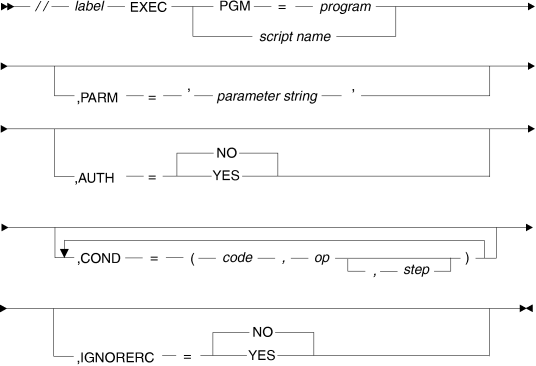
Parameters
- label
- The step name.
- PGM
- Specifies the name of an executable load module.
- script name
- Specifies the name of an existing pseudo-JCL script in the PDS allocated by data definition name (DDNAME) CCUPROC when the build server is started.
- PARM
- Specifies a parameter
string that can contain embedded spaces and quotation
marks. If you want to embed a quotation mark in the string, enter
it between
apostrophes (
'"') or as two quotation marks (""). If you want to embed an apostrophe in the string, enter it as two apostrophes. For example, if the value of the substitution variable X isitand your pseudo-JCL has the fieldPARM='&X''s', the field in your pseudo-JCL acquires the following value:PARM='it's' - AUTH
- Indicates that the program to
be executed is an APF authorized program.
- YES (the default value)
- The program is an APF authorized program.
- NO
- The program is not an APF authorized program.
- COND
- The
following values apply:
- code
- The value to test against the return code in a specified prior step.
- op
- The comparison operator.
- step
- The name of the step that issues the return code.
- IGNORERC
- The following
values are available:
- YES
- Tells the build server to ignore the return code from this step of the build script.
- NO (the default value)
- Tells the build server not to ignore the return code from the build script. The return code of the last step without IGNORERC=YES is the return code of the build.
You can use substitution variables to modify the cards.