Step 6. Customizing the PARMLIB members
About this task
The IBM Z Workload Scheduler initialization statements are kept in a parameter library that is identified by the EQQPARM DD statement in the JCL procedure. When you start IBM Z Workload Scheduler, a member in the library containing the initialization statements of the end-to-end server is read.
- Define CPU configuration and domain organization by using the CPUREC and
DOMREC statements in a PARMLIB member (the default member name is TPLGINFO). For details, see
Defining the distributed agents and domains.
A special case of a multiple domain configuration is when every fault-tolerant agent is a domain manager, that is, every FTA has CPUFULLSTATUS(ON). Avoid this configuration, because it is inefficient, in that every message for every event on every FTA must be sent to all the CPUFULLSTATUS FTAs. If you use this configuration, you must increase the REGION SIZE to an appropriate value, which you obtain by tuning your network environment.
For a description about how to set up the distributed network, see Choosing the agents.
- Define user IDs and passwords for Windows™ users by using the USRREC statement in a PARMLIB member (the default member name is USRINFO). Alternatively, you can define the Windows™ user IDs and passwords in a file stored locally in the workstation. In this case, you must set LOCALPSW(YES) in the TOPOLOGY statement. For details, see Defining user IDs and passwords for Windows users.
- Define the end-to-end with fault tolerance capabilities configuration by
using the TOPOLOGY statement in a PARMLIB member (the default
member name is TPLGPARM). In this statement, specify the following:
- For the TPLGYMEM keyword, write the name of the member used in step 1.
- For the USRMEM keyword, write the name of the member used in step 2.
- Add the TPLGYSRV keyword to the OPCOPTS statement to specify the server name to be used for end-to-end communication. For details, see Specifying the name of the end-to-end server with the TPLGYSRV keyword.
- Add the TPLGYPRM keyword to the SERVOPTS statement to specify the member name used in step 3. This step activates end-to-end communication in the server. For details, see Activating end-to-end with fault tolerance capabilities communication in the server with the TPLGYPRM keyword.
- Add the TPLGYPRM keyword to the BATCHOPT statement to specify the member name used in step 3. This step activates the end-to-end with fault tolerance capabilities environment in the Daily Planning batch programs. See Activating the end-to-end scheduling with fault tolerance capabilities in the Daily Planning batch programs for details.
- Add the TWSJOBNAME parameter in the JTOPTS statement to define the rules used to generate the job name in the Symphony file. For details, see Defining standards for generating job names in the Symphony file.
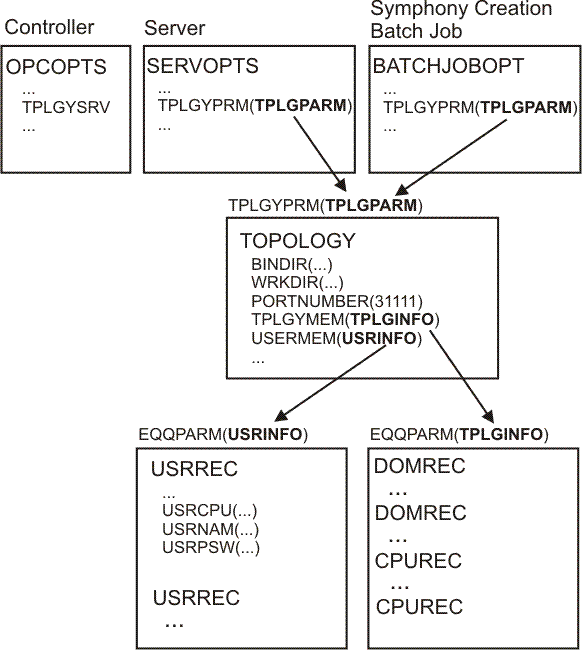
The following sections explain the steps in detail.