Using the Attach Manager
An important LU 6.2 feature is the ability of a program in one node to start corresponding programs in other nodes. The attach manager handles incoming requests to start programs.
This chapter considers programs in your (local) workstation that start at the request of partner programs. The local program is referred to as remotely started. Workstation users and administrators want to control which programs can be remotely started for security and resource control. Users at remote nodes should not start programs that destroy data or use the local workstation's memory at critical times. The attach manager acts as a gate keeper, handling incoming requests to start programs on the local workstation.
The attach manager takes its name from an SNA message, called an Attach, that flows between a pair of LUs. An Attach flows when a program that uses the partner LU initiates a conversation. The LU 6.2 component in the local workstation passes any Attach it receives to its attach manager for handling. A received Attach is called an incoming allocation request or incoming Attach. In this chapter, the phrase incoming allocation request means that the SNA Attach is generated by a partner LU.
- Enables remote nodes to start applications in the local workstation. Multiple instances of a program can be started in series (queued) or in parallel (nonqueued).
- Passes parameters to remotely started programs.
- Starts programs in Windows® or in the background.
- Uses security guidelines to verify incoming allocation requests.
- Forwards the incoming allocation request to the client workstations.
- Checks the conversation type (that is, basic or mapped) and synchronization level of incoming allocation requests.
- For server programs, specifies timeout values for holding incoming allocation requests and locally issued APPC RECEIVE_ALLOCATE verbs or CPI Communications Accept_Conversation or Accept_Incoming (CMACCP, CMACCI) calls.
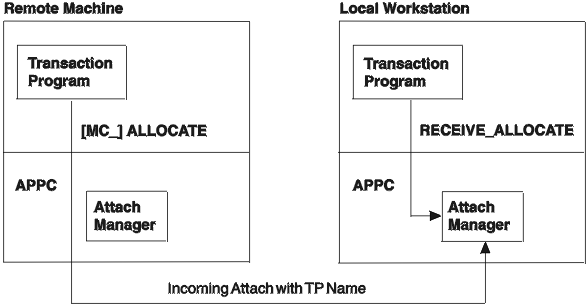
- Incoming allocation requests (Attaches) from partner transaction programs
- APPC RECEIVE_ALLOCATE verbs or CPI Communications CMACCP and CMACCI calls from local programs
- Configuration definitions for transaction programs, user IDs, and passwords
The TP name is a key piece of information in an incoming allocation request. The attach manager uses the transaction program name to decide which program to start in the local workstation. Programmers and administrators at both nodes need to agree on each transaction program name. A program that issues an allocation request supplies a transaction program name as a parameter to the APPC [MC_]ALLOCATE or [MC_]SEND_CONVERSATION verb.
When an Attach is received, the transaction program name in the Attach is matched against transaction program names from the transaction definitions. If a match is found, the executable name from that definition is started or routed to a client workstation. If a match is not found, then the name of the executable is assumed to be the same as that which is specified in the Attach appended with .EXE.