Lesson 7: Pass a parameter to another page
The file allcustomers.jsp lists every row in the database. In the next exercise, you will create a second page that displays the details from one row in the database. In this exercise, you will add a link on the file allcustomers.jsp that sends the user to the detail page. That link also indicates which record to display on the detail page.
Add the link to allcustomers.jsp
Add the parameter to the link
About this task
Procedure
-
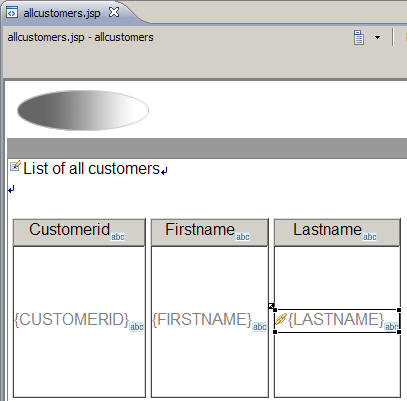
Click directly on the link icon of the link control you
just added to the
{LASTNAME}control.The link icon itself,
 ,
not the text control, must be selected before you can continue. You
have the link selected correctly if it is lightly shaded and the selection
box is surrounding the link icon and the text control. Do not double
click the link icon.
,
not the text control, must be selected before you can continue. You
have the link selected correctly if it is lightly shaded and the selection
box is surrounding the link icon and the text control. Do not double
click the link icon. -
Click the
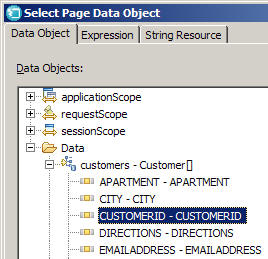
 Select Page Data Object button.
The Select Page Data Object window opens.
Select Page Data Object button.
The Select Page Data Object window opens. -
Click CUSTOMERID - CUSTOMERID.
The Select Page Data Object window looks like this:
Results
Now, the value of the CID parameter for
the link is bound to the value of the customer_id field. When the
user clicks the link, the runtime code invokes the file updatecustomer.jsp
and makes the customer ID number available to the onPreRender function
of the related JSF handler.
In the next lesson, you will create the web page for the file updatecustomer.jsp, and later, you will set up the JSF handler to receive the parameter and to show only the customer with that ID number.