Lesson 4: Create parts to access a database
In this lesson, you will create the data and logic parts that allow you to access the sample database.
About this task
- For each table you select from the database, the wizard creates a record part representing that table. This Record part is a series of fields, each representing the columns in the table.
- For each table you select from the database, the wizard creates a library part. This library contains EGL functions that you can use to read from or write to the database.
- For each row in the database tables you select, the wizard creates a DataItem part. These DataItem parts represent the columns in the database. The Record parts created by the wizard are made of a sequence of these DataItems.
Create parts from the database connection
About this task
Procedure
-
Under Select Tables, select the
check boxes next to the following tables only:
- EGL.CUSTOMER
- EGL.ITEM
- EGL.ORDERITEM
- EGL.ORDERS
- EGL.SITEUSER
- EGL.STATETABLE
The EGL Data Access Application wizard looks like this: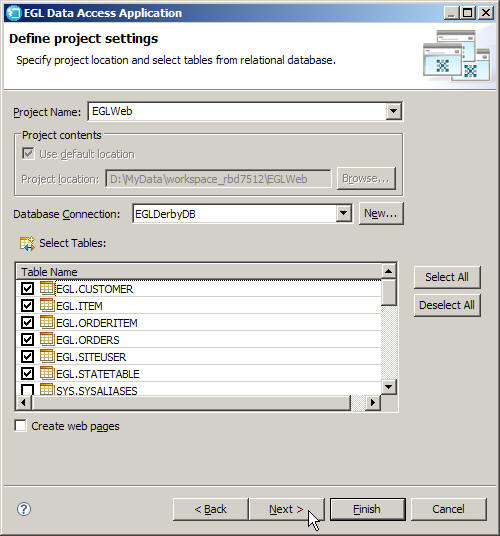
Lesson checkpoint
The Data Access Application wizard has created several EGL artifacts in your EGLWeb project.
Procedure
First of all, there are several new EGL packages in the EGLSource folder of your EGLWeb project, including eglderbydb.data, eglderbydb.access, and eglderbydb.primitivetypes.data. Packages work just like folders: they contain your source code files and organize them into meaningful groups. In this case, the eglderbydb.data package holds the records, the eglderbydb.access package holds the libraries, and the eglderbydb.primitivetypes.data package holds the DataItems.
Here are some of the files that will be useful for this tutorial:
- eglderbydb.primitivetypes.data.DataDefinitions.egl
- This file lists all of the DataItems that make up the Record
parts in the other files. For example, the customer ID number given to each
customer record in the database is represented by a DataItem named CUSTOMER_ID:
In this case, the ID number field is based on the integer primitive type. The DataItem can have other properties to specify details like its valid range of values and how it should be formatted in the UI.dataitem CustomerId INT end - eglderbydb.data.Customer.egl
- This file contains one of the records created from the
database tables, in this case the Customer table. This record contains fields to
hold information about a customer, such as the customer's first name, last name,
address, telephone number, and ID number. The record definition looks like this:
record Customer type sqlRecord { tablenames=[["EGL.CUSTOMER"]], fieldsMatchColumns = yes, keyItems=[CUSTOMERID] } CUSTOMERID CUSTOMERID {column="CUSTOMERID"}; FIRSTNAME FIRSTNAME {column="FIRSTNAME", sqlVariableLen=yes, maxLen=30, isSqlNullable=yes}; LASTNAME LASTNAME {column="LASTNAME", sqlVariableLen=yes, maxLen=30, isSqlNullable=yes}; ... end - eglderbydb.access.CustomerLib.egl
- This file contains an automatically-generated library of
functions that you can use to access the Customers table of the database. For
example, the first function is
AddCustomer, which adds a new customer record to the database. There are other functions in this library that retrieve, update, and delete records in the database, and each table has similar functions in a separate library. You will use these functions later in the tutorial.