Introduction
In this tutorial, you will learn how to build a simple dynamic web site using EGL. This site has two pages: one to display a list of records in a database and another to allow users to change the data from one of those records.
This tutorial might require some optionally installable components. To ensure that you installed the appropriate optional components, see the System requirements list.
Enterprise Generation Language (EGL) is a development environment and programming language that you can use to write full-function applications quickly, freeing you to focus on the business problem your code is addressing rather than on software technologies.Learning objectives
In this tutorial, you learn how to complete these tasks:- Create and configure an EGL project
- Create EGL source code that accesses a data source
- Create two simple web pages that access data in a relational database
- Pass a parameter from one web page to another
- Test an application on a web application server
Time required
To complete this tutorial, you will need approximately 90 minutes. If you decide to explore other facets of EGL or dynamic web sites while working on the tutorial, it could take longer to finish.Skill level
IntroductorySystem requirements
To complete this tutorial, you need to have the following tools and components installed:- Enterprise Generation Language (EGL)
- Either WebSphere® Application Server or Apache Tomcat server. The instructions give you the option of using either server; and they will include instructions for installing Apache Tomcat if you do not have WebSphere® Application Server.
Prerequisites
You will be best prepared to complete this tutorial if you have programmed in any third- or fourth-generation language such as COBOL, RPG, or a client/server language, and if you are familiar with these topics:- Terms used with relational databases, such as table, row, and column
- Basic web-related terms such as browser, web page, and web application server
Tutorial application
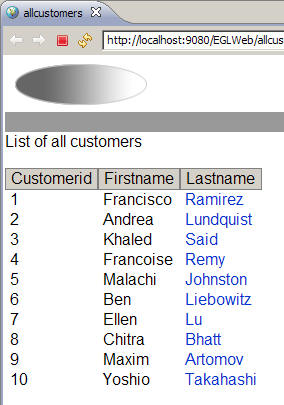
In this tutorial, you will create an EGL web project and import a sample database. You will then create a simple EGL web application that works with this database. The first of the two web pages in your application shows a list of customers from data stored in the database:
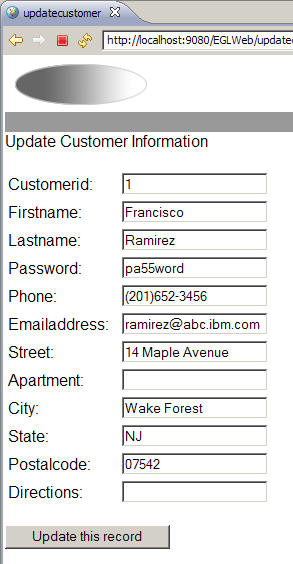
The second web page shows details about one customer and allows users to change those details:
EGL is the language that you use to manage the interaction between users and the database:
- After retrieving data from the database, the functions that you write in EGL can apply business rules as appropriate.
- When preparing to present data to users, those functions can alter characteristics of the web-page display, even choosing which page to present.
- On accepting the users' responses, those functions can apply additional business rules before storing the data.
Each of the two pages pictured above are controlled by EGL logic parts called Handlers, which control the runtime interaction with a user interface. In this case, the Handler parts are JSF Handler parts, Handler parts specialized to control a single web page at run time. A JSF handler's function is invoked by a user click, and the function in turn invokes a library function that you create. The result is that a user working at a web browser can view and alter data stored in a database.
As shown in this tutorial, EGL promotes code reuse in several ways:
- First, EGL lets you define DataItem parts, which are a
simple type of EGL data structure. A DataItem part is based on a single
primitive data type, with any number of added EGL properties. For
example, if your application uses many telephone numbers, you can
define a DataItem to represent a telephone number. This DataItem would
use a numeric primitive as its base and have properties that define
its exact length and output formatting. You can then create many variables
or other data parts in your code based on that single DataItem part.
DataItem parts are similar to entries in a data dictionary, with each part including details on data size, type, formatting rules, input-validation rules, and display suggestions. You define a DataItem once and can use it as the basis for any number of variables or record fields.
- Second, EGL lets you define Record parts, which are used
as the basis for structured data. A Record part is a collection of
other data parts (such as DataItem parts or primitives) that are organized
into a hierarchical structure. This kind of data part is often used
to create variables that access a file or relational database.
In this tutorial, you create a record part that represents contact information for a customer. This Record part contains data items representing information about a customer, such as first and last name, telephone number, and address. Also, this Record part is specialized, or stereotyped, as an sqlRecord part, to work directly with the database.
A Record part can reference a series of DataItem parts, as shown in this tutorial. If you organize your data in this way, you can realize a more consistent definition of your data parts and can increase efficiency over time. Your changes to a single DataItem part will cause a change in every variable that accesses the related, stored data.
- Third, EGL lets you create source libraries, which contain functions, data parts, and constants that provide a basis for logic reuse and for modular programming based on proven code.
EGL also provides the Data Access Application wizard, which you will use to create the elementary code necessary to access a relational database. This wizard creates EGL parts that have these specific purposes:
- Record parts that reflect the characteristics of each database table.
- DataItem parts that reflect the characteristics of each table column.
- Source libraries that include functions to create, read, update,
and delete rows in the database.
The library functions include parameters that are based on the Record parts created by the wizard. You can start to build a robust application just by invoking those functions with arguments that are based on the same Record parts.