Understanding how browsers handle a Rich UI application
- To help you learn the technology faster, as is possible if you understand the runtime effect of what you code at development time
- To make it easy for you to do advanced tasks
When a user enters a web address into a browser, the browser transmits a request to a web server, which is usually on a second machine. The address identifies a specific server and indicates what content is to be returned to the browser. For example, if you enter the address http://www.ibm.com, an IBM® server replies with a message that the browser uses to display the IBM® home page. The question that is of interest now is, how does the browser use the message?
The browser brings portions of the message into an internal set of data areas. The browser then uses the values in those data areas to display on-screen controls, which are commonly called widgets. Example widgets are buttons and text fields.
Consider the following web-page content:

- The enclosing box is
myBox - The upper box within
myBoxismyBox02and includes the text fieldmyHelloField - The lower box within
myBoxismyBox03and includes the text fieldmyInTextField, the buttonmyButton, and the textFieldmyOutTextField
The internal data areas used by the browser are represented as an inverted tree:
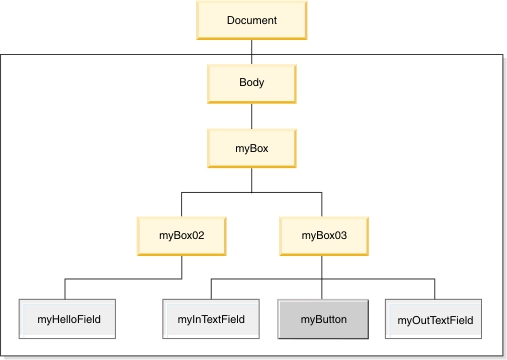
The tree is composed of a root, named Document, and a set of elements, which are units of information. The topmost element that is available to you is named Body. The elements subordinate to Body are specific to your application.
myBox03andmyInTextFieldare parent and childmyBoxandmyButtonare ancestor and descendantmyInTextField,myButton, andmyOutTextFieldare siblings
- A widget that reflects a child element is displayed within the widget that reflects a parent node
- A widget that reflects a sibling element is displayed below or to the right of a widget that reflects the immediately previous sibling element
We often use a technical shorthand that communicates the main idea without distinguishing between the displayed widgets and the DOM elements. Instead of the previous list, we might say, "A widget is contained within its parent, and a sibling is displayed below or to the right of an earlier sibling."
The DOM tree organization does not completely describe how the widgets are arranged. A parent element may include detail that causes the child widgets to be arranged in one of two ways: one sibling below the next or one sibling to the right of the next. The display also may be affected by the specifics of a given browser; for example, by the browser-window size, which the user can update at run time in most cases. Last, the display may be affected by settings in a cascading style sheet.
When you develop a web page with Rich UI, you declare widgets much as you declare integers. However, the widgets are displayable only if your code also adds those widgets to the DOM tree. Your code can also update the tree (adding, changing, and removing widgets) in response to runtime events such as a user's clicking a button. The central point is as follows: Your main task in web-page development is to create and update a DOM tree.
When you work in the Design tab of the Rich UI editor, some of the tasks needed for initial DOM-tree creation are handled for you automatically during a drag-and-drop operation. When you work in the Source tab of the Rich UI editor or in the EGL editor, you can write code directly and even reference DOM elements explicitly.
- Declare widgets of specific types: That is, button for buttons, TextField for text fields, and so on, and then customize the widget properties. For example, you might set the text of a button to "Input to Output," as in our example.
- Add widgets to the initial DOM tree.
- Alter the DOM tree by adding, changing, and removing widgets at those points in your code when you want the changes to be displayable.
We say that a widget or its changes are "displayable" rather than "displayed" because a widget in a DOM tree can be hidden from view.
At a given point in runtime processing, a widget can be the child of only one parent.