End-to-end processing with a UI program and a data grid
This topic gives an example of end-to-end processing. At the back end is a UI program. At the front end is a Rich UI application that displays a data grid. For background information on the two technologies, see UI program and the gateway service and Rich UI DataGrid and DataGridToolTip.
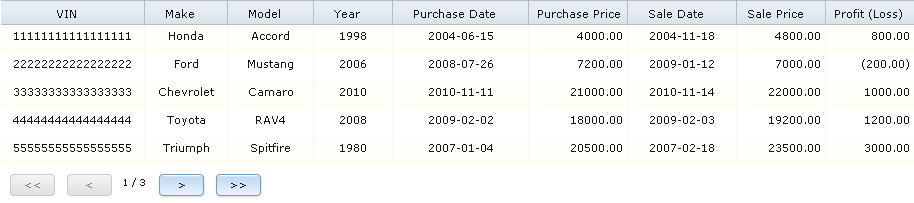
Events at run time
In brief, the data loader requests an initial page; the UI program retrieves the records needed for all pages and returns the total count along with the records for the first page; and the data loader responds to user clicks by invoking the UI program to provide additional pages as needed. When the user requests the last page that was not previously viewed, the data loader requests page number -1, which ends the UI program.
- The data loader does as follows:
- Invokes the gateway service to access the UI program, specifying the size of the page in the data grid, as well as the number of the page being requested; in this case, 1.
- Sets to true the first element in a global array that is hereafter called the pages-requested array because it holds the history of page requests.
- The UI program takes these steps:
- Accesses a relational database to determine the number of records that will be retrieved.
- Tests if the number is sufficiently small. If the test succeeds, re-accesses the database to read the data required for all the pages in the grid. If the test fails, throws a customized exception and ends processing.
- Stores the data in an array of SQL records.
- Disconnects from the database.
- Calculates the number of available pages and the number of records on the last page.
- Runs a while loop that has two tasks at this point: first, to set up an array that holds only the number of records to be sent; and second, to issue a converse statement that sends the records.
- A callback function in the Rich UI application does as follows:
- Receives the records for the first page, along with the count of records that the UI program retrieved.
- Tentatively sets to true a global Boolean variable that is used by the data loader to determine whether all pages were received.
- Calculates the number of pages that will be required to handle all the records
- Expands the pages-requested array if appropriate, setting all elements after the first to false.
- Tests whether all pages were requested. If so, invokes the UI program with the page number set to -1. If not, sets the global Boolean variable to false.
- Adds the records for the first page to an array that is hereafter called the data array.
- Assigns the data array to the data grid.
- Invokes the grid-specific render function to complete processing for the current page.
- The user clicks the button bar in the data grid to go to another page.
- The Rich UI application re-invokes the data loader, which takes
these steps:
- Uses a parameter value to calculate the number of the page being requested.
- Sets to true the appropriate element in the pages-requested array.
- Invokes the gateway service to access the UI program, specifying the page number.
- The UI program continues the while loop:
- Removes all elements from the array that was previously used to send data to the Rich UI application.
- Adds to that array the number of records to be sent.
- Issues a converse statement to send the records.
The development effort
- Ensure that an application server is available.
- Create an SQL database connection, as described in Creating an SQL database connection.
- Create the target project: an EGL Web project or a non-EGL Dynamic
Web project. The name is hereafter assumed to be
TargetProject. - Develop the code, as follows:
- Develop the Rich UI application in a Rich UI project, accessing
the UI program from the Preview pane of the Rich UI editor. Ensure
that the deployment descriptor has a REST service binding for the
gateway service:
- REST service binding name:
UIGatewayService - Base URL is similar to this:
http://localhost:8080/TargetProject/restservices/uiGatewayService
To cause all headers to be centered, include the following entry in the project's WebContent folder, css subfolder, CSS file:.EglRuiDataGridHeaderCell { text-align: center; }You do not need to deploy the Rich UI application to the target project until all development is complete.
- REST service binding name:
- Develop the UI program in a General project. Periodically do as
follows:
- Generate the General project into the target project. By generating the General project rather than just the program, you generate both the program and the EGL deployment descriptor.
- Deploy the target project externally to the application server. Thereafter, the Rich UI application can access the UI program from the Rich UI editor, Preview tab. Access of the UI program is always to the deployed code.
To make generation work, specify that the genProject build descriptor option refers to the target project. Also ensure that the deployment descriptor has an entry for deploying the gateway REST service and that you check the Web Service Deployment tab, Stateful checkbox.
To ensure that the details necessary for database access are available at generation time and run time, follow these steps:- In the build descriptor editor for the General project, select the SQL database connection by specifying the database connection in the list box for Load DB options using Connection.
- Update the same build descriptor to ensure that the details for Java™ EE are generated. Specifically, set the additional build descriptor options j2ee (YES) and sqlJNDIName (jdbc/connection, where connection is the lowercase name of the connection you referenced).
- Ensure that the target project can access the database. The following steps might be sufficient: right-click that project, click Properties, click EGL Runtime Data Sources, load values from your connection, and click Okay when asked if you want to update the project files. If you later encounter an issue in accessing the database at run time, review the procedure described in Using an SQL database connection at run time.
- Develop the Rich UI application in a Rich UI project, accessing
the UI program from the Preview pane of the Rich UI editor. Ensure
that the deployment descriptor has a REST service binding for the
gateway service:
- Generate the Rich UI application and deploy it to the target project, which already includes the UI program.
- Access the Rich UI application in a browser that is external to
the Workbench. For example, your web address might be similar to this
one:
http://localhost:8080/MyTargetProject/MyRichUIHandler-en_US.htmlThat address is appropriate in the following case: you deploy the project on your workstation, the application server is listening on port 8080, the target project is named
MyTargetProject, the Rich UI handler is namedMyRichUIHandler, and the HTML file is configured for the US English locale. - Click to the last screen and then back one. At that point, all
records are loaded, and sorting is enabled. Note:At this writing, sorting works correctly in a data grid only after all the data is loaded. For this reason, the application sets the grid-specific sortingEnabled property, initially to false and later to true.
Database structure and sample data
- The CAR_MASTER table stores the Vehicle Identification Number (VIN) and additional details about the car itself.
- The CAR_PURCHASES table gives the purchase date and cost.
- The CAR_SALES tables gives a subsequent sales data and cost.
The database schema is appropriate only for a sample. For example, no key constraints are present.
CREATE TABLE APP.CAR_MASTER
(
   VIN     CHAR(17)    NOT NULL,
   Make    VARCHAR(15) NOT NULL,
   Model   VARCHAR(15) NOT NULL,
   TheYear CHAR(4)     NOT NULL
);

CREATE TABLE APP.CAR_PURCHASES
(
   VIN            CHAR(17)      NOT NULL,
   PURCHASE_DATE  DATE          NOT NULL,
   COST           DECIMAL(8,2)  NOT NULL
);

CREATE TABLE APP.CAR_SALES
(
   VIN            CHAR(17)      NOT NULL,
   SALE_DATE      DATE          NOT NULL,
   PRICE          DECIMAL(8,2)  NOT NULL
);INSERT INTO APP.CAR_MASTER VALUES
( '11111111111111111', 'Honda', 'Accord', '1998'),
( '22222222222222222', 'Ford', 'Mustang', '2006'),
( '33333333333333333', 'Chevrolet', 'Camaro', '2010'),
( '44444444444444444', 'Toyota', 'RAV4', '2008'),
( '55555555555555555', 'Triumph', 'Spitfire', '1980'),
( '66666666666666666', 'BMW', '328XI', '2007'),
( '77777777777777777', 'Cadillac', 'Escalade', '2004'),
( '88888888888888888', 'Chrysler', 'Sebring', '2006'),
( '99999999999999999', 'Lexus', 'ES 300', '2009'),
( 'AAAAAAAAAAAAAAAAA', 'Honda', 'Civic', '2008'),
( 'BBBBBBBBBBBBBBBBB', 'Toyota', 'Celica', '2005');
INSERT INTO APP.CAR_PURCHASES VALUES
( '11111111111111111', '2004-06-15', 4000.00),
( '22222222222222222', '2008-07-26', 7200.00),
( '33333333333333333', '2010-11-11', 21000.00),
( '44444444444444444', '2009-02-02', 18000.00),
( '55555555555555555', '2007-01-04', 20500.00),
( '66666666666666666', '2010-08-08', 26900.00),
( '77777777777777777', '2010-04-04', 17200.00),
( '88888888888888888', '2009-11-06', 11400.00),
( '99999999999999999', '2009-12-07', 37000.00),
( 'AAAAAAAAAAAAAAAAA', '2010-11-12', 13000.00),
( 'BBBBBBBBBBBBBBBBB', '2008-03-03', 8300.00);
INSERT INTO APP.CAR_SALES VALUES
( '11111111111111111', '2004-11-18', 4800.00),
( '22222222222222222', '2009-01-12', 7000.00),
( '33333333333333333', '2010-11-14', 22000.00),
( '44444444444444444', '2009-02-03', 19200.00),
( '55555555555555555', '2007-02-18', 23500.00),
( '66666666666666666', '2010-09-20', 28000.00),
( '77777777777777777', '2010-05-06', 18500.00),
( '88888888888888888', '2009-11-06', 11400.00),
( '99999999999999999', '2010-02-07', 37200.00),
( 'AAAAAAAAAAAAAAAAA', '2010-11-16', 13800.00),
( 'BBBBBBBBBBBBBBBBB', '2008-04-05', 7400.00);UI program
Here is the example UI program:
package myPkg;

record CarStatus type SQLRecord {
                 tableNames =[["APP.CAR_MASTER", "A"],
                 ["APP.CAR_PURCHASES", "B"],["APP.CAR_SALES", "C"]],
                 defaultSelectCondition =
                 #sqlCondition{ A.VIN = B.VIN AND A.VIN = C.VIN ORDER BY VIN},
                 keyItems =[VIN]}
   VIN string{column = "A.VIN"};
   MAKE string;
   MODEL string;
   YEAR string{column = "A.THEYEAR"};
   PURCHASE_DATE date;
   COST decimal(8, 2);
   SALE_DATE date;
   PRICE decimal(8, 2);
end

// initial page size from requester
Record PageSizeContainer
   pageSize INT;
end

Record MyException type Exception end

Record SendListContainer
   // number of available records
   numberOfRecords INT;
   pageNumber INT = 1;
   sendList CarStatus[]{};
end


program MyUIProgram type UIProgram
                    { inputUIRecord = myPageSizeContainer, segmented = true }

   const MAXIMUM_DATABASE_ROWS INT = 100;

   myPageSizeContainer PageSizeContainer;

   function main()

      tentativeCarListSize INT;
      numberToSend INT;
      numberOnLastPage INT;
      sendCounter, startRowOnPage, endRowOnPage INT;
      numberOfAvailablePages INT;
      mySendListContainer SendListContainer;
      myCarList CarStatus[]{};
      i int;

      if (myPageSizeContainer.pageSize <= 0)
         throw new MyException{ message =
            "Your page size is not valid.  You requested " + numberToSend + "."};
      end

      tentativeCarListSize = getNumberofCars();

      if (tentativeCarListSize  > MAXIMUM_DATABASE_ROWS || tentativeCarListSize == 0)
         throw new MyException{message =
            "The number of available rows is not valid.  Cannot return " +
            tentativeCarListSize + " rows."};
      end

      // set up array with retrieved database rows.
      try
         get myCarList;
         SQLLib.disconnect();
         onException(except AnyException)
            throw new MyException{message = "Problem in data access.  "
                                  + except.message};
      end

      // no exception thrown if too many rows now
      mySendListContainer.numberOfRecords = myCarList.getSize();

      numberOfAvailablePages =
      MathLib.Ceiling(mySendListContainer.numberOfRecords /
                      myPageSizeContainer.pageSize);
      numberOnLastPage = mySendListContainer.numberOfRecords %
                         myPageSizeContainer.pageSize;

      if (numberOnLastPage == 0)
         numberOnLastPage = myPageSizeContainer.pageSize;
      end

      while (mySendListContainer.pageNumber != -1)

         // set up array for the number of elements to send
         if (mySendListContainer.pageNumber < numberOfAvailablePages)
            numberToSend = myPageSizeContainer.pageSize;
         else
            numberToSend = numberOnLastPage; // last page
         end

         for (sendCounter from 1 to numberToSend)
            mySendListContainer.sendList.appendElement(new CarStatus{});
         end

         // specify which database records to send
         if (mySendListContainer.pageNumber == 1)
            startRowOnPage = 1;
         else
            startRowOnPage = (mySendListContainer.pageNumber - 1) *
                             myPageSizeContainer.pageSize + 1;
         end

         if (mySendListContainer.pageNumber == numberOfAvailablePages )
            endRowOnPage = startRowOnPage + numberOnLastPage - 1;
         else
            endRowOnPage = startRowOnPage + myPageSizeContainer.pageSize - 1;
         end

         // copy the database records to send
         i = startRowOnPage;

         for (n int from 1 to numberToSend)
            mySendListContainer.sendList[n] = myCarList[i];
            i = i + 1;
         end

         converse mySendListContainer;

         mySendListContainer.sendList.removeAll();
      end
   end // end main()

   function getNumberOfCars() returns(int)
      numberOfRows INT;
      countQuery STRING = "Select count(*) from APP.CAR_MASTER";

      try
         prepare myTest from countQuery;
         get with myTest into numberOfRows;
         onException(except AnyException)
            throw new MyException{message =
                  "Problem in accessing the row count.  " + except.message};                end

      return(numberOfRows);
   end
end
Rich UI application
Here is the example Rich UI application:
package myRichUIPkg;

import com.ibm.egl.rui.widgets.DataGrid;
import com.ibm.egl.rui.widgets.DataGridColumn;
import com.ibm.egl.rui.widgets.DataGridLib;
import egl.ui.gateway.UIGatewayRecord;

record CarStatusBasic type SQLRecord
   VIN string;
   MAKE string;
   MODEL string;
   YEAR string;
   PURCHASE_DATE date;
   COST decimal(8, 2);
   SALE_DATE date;
   PRICE decimal(8, 2);
end

record PageSizeContainer
   pageSize int;
end

// field names must match entries in the JSON string
record CarStatusBasicContainer
   numberOfRecords int;
   pageRequested int{JSONName = "pageNumber"} = 1;
   sendList CarStatusBasic[]{};
end

handler MyRichUIHandler type RUIhandler
   {initialUI =[grid], onConstructionFunction = start,
    cssFile = "css/RichUIProject.css", title = "View Car Sales"}

   grid DataGrid{pageSize = PAGE_SIZE, showButtonBar = true, style = "overflow:auto",
      columns =[
      new DataGridColumn{name = "VIN", displayName = "VIN", width = 135,
         alignment = DataGridLib.ALIGN_CENTER},
      new DataGridColumn{name = "MAKE", displayName = "Make",
         alignment = DataGridLib.ALIGN_CENTER},
      new DataGridColumn{name = "Model", displayName = "Model",
         alignment = DataGridLib.ALIGN_CENTER},
      new DataGridColumn{name = "Year", displayName = "Year",
         alignment = DataGridLib.ALIGN_CENTER},
      new DataGridColumn{name = "Purchase_Date", displayName = "Purchase Date",
         alignment = DataGridLib.ALIGN_CENTER},
      new DataGridColumn{name = "Cost", displayName = "Purchase Price",
         alignment = DataGridLib.ALIGN_RIGHT, width=90},
      new DataGridColumn{name = "Sale_Date", displayName = "Sale Date",
         alignment = DataGridLib.ALIGN_CENTER},
      new DataGridColumn{name = "Price", displayName = "Sale Price",
         alignment = DataGridLib.ALIGN_RIGHT, width =80},
      new DataGridColumn{name = "Profit", displayName = "Profit (Loss)",
         formatters =[formatProfit], alignment = DataGridLib.ALIGN_RIGHT, width = 80}]};

   const PAGE_SIZE int = 5;
   myPageSizeContainer PageSizeContainer;
   listContainer CarStatusBasicContainer{};
   firstInvocation boolean;
   gridDataList CarStatusBasic[1]{};
   requestedPage int = 1;
   pagesRequested boolean[]{};
   handledEarlier boolean;
   numberOfAvailablePages int;
   gateRec UIGatewayRecord{};
   allLoaded boolean;
      gatewayServiceVar UIGatewayService{@BindService{bindingKey = "UIGatewayService"}};

   function start()
      gateRec.uiProgramName = "myPkg.MyUIProgram";
      myPageSizeContainer.pageSize = PAGE_SIZE;
      StrLib.defaultDateFormat = "yyyy-MM-dd";
      pagesRequested.appendElement(false);
      firstInvocation = true;
      allLoaded = false;

      // at this writing, sorting is available only when all the data is loaded
      grid.enableSorting = false;

      grid.dataLoader = myDataLoader;
      grid.data = gridDataList as any[];
   end

   function formatProfit(class string inOut, value string inOut, rowData any in)
      calculation decimal(8, 2) =
         rowData.Price as decimal(8, 2) - rowData.Cost as decimal(8, 2);

      if(calculation < 0)
         calculation = -calculation;
         value = "(" + calculation + ")";
      else
         value = calculation as string;
      end
   end

   function myDataLoader(startRow int in, endRow int in, sortFieldName string in,
                         sortDirection int in) returns(boolean)

      if(allLoaded)
         return(true);
      end

      if(firstInvocation)

         if(pagesRequested[1] == true)
            handledEarlier = true;
         else
            handledEarlier = false;
            pagesRequested[1] = true;
            gateRec.data = ServiceLib.convertToJSON(myPageSizeContainer);

            call gatewayServiceVar.invokeProgram(gateRec)
                 returning to callbackFunc onException handleException;
         end

      else
         requestedPage = mathLib.ceiling(startRow /
                         myPageSizeContainer.pageSize);

         if(pagesRequested[requestedPage] == true)
            handledEarlier = true;
         else
            handledEarlier = false;
            listContainer.pageRequested = requestedPage;
            pagesRequested[requestedPage] = true;
            gateRec.data = ServiceLib.convertToJSON(listContainer);

            call gatewayServiceVar.invokeProgram(gateRec)
               returning to callbackFunc onException handleException;
         end
      end

      return(handledEarlier);
   end

   function callbackFunc(gatewayRecord uigatewayrecord in)
      i, n, startUpdate, endUpdate int;
      ServiceLib.convertFromJSON(gatewayRecord.data, listContainer);
      numberOfReturns int = listContainer.sendList.getSize();
      allLoaded = true;

      // can set up the pagesRequested array only after learning
      // the number of records available from the UI program
      if(firstInvocation)
         numberOfAvailablePages =
            MathLib.Ceiling(listContainer.numberOfRecords /
                            myPageSizeContainer.pageSize);

         if(numberOfAvailablePages > 1)

            for(i from 2 to numberOfAvailablePages)
               pagesRequested.appendElement(false);
            end
         end

         // set up the data array for the grid
         for(i from 2 to listContainer.numberOfRecords)
            GridDataList.appendElement(new CarStatusBasic);
         end

         firstInvocation = false;
      end

      // end use of the UI program?
      for(i from 1 to numberOfAvailablePages)
         if(pagesRequested[i] == false)
            allLoaded = false;
         end
      end

      if(allLoaded)
         grid.enableSorting = true;
         listContainer.pageRequested = -1;
         gatewayRecord.data = ServiceLib.convertToJSON(listContainer);
         call gatewayServiceVar.invokeProgram(gatewayRecord)
              returning to handleServiceEnd onException handleException;
      end

      // load data
      if(requestedPage == 1)
         for(i from 1 to numberOfReturns)
            gridDataList[i] = listContainer.sendList[i];
         end
      else
         startUpdate = (requestedPage - 1) * myPageSizeContainer.pageSize + 1;
         endUpdate = startUpdate + numberOfReturns - 1;
         n = 1;

         for(i from startUpdate to endUpdate)
            gridDataList[i] = listContainer.sendList[n];
            n = n + 1;
         end
      end

      grid.data = gridDataList as any[];
      grid.render();
   end

   function handleException(exp AnyException in)
      SysLib.writeStdOut(exp.message);
      grid.cancelDataLoader();
   end

   function handleServiceEnd(gateRec uiGatewayRecord in)
      if(!gateRec.terminated)
         SysLib.writeStdOut("Error:  The program is still running.");
         grid.render();
      end
   end
end