Using breakpoints in the EGL debugger
This topic shows you how to use breakpoints in debugging your programs. You can manage breakpoints inside or outside of an EGL debugging session.
Prerequisites
- An EGL project
- An EGL program or other logic part that needs debugging
- A blue marker in the left margin of the Source view indicates that a breakpoint is set and enabled.
- A white marker in the left margin of the Source view indicates that a breakpoint is set but disabled.
- The absence of a marker in the left margin indicates that a breakpoint is not set.
Add or remove a breakpoint
To add or remove a single breakpoint in an EGL source file you can do either of the following:
- Position the cursor at the breakpoint line in the left margin of the Source view and double-click.
- Position the cursor at the breakpoint line in the left margin of the Source view and right-click. A menu opens. Click either Add or Remove (The Remove option is only there if a breakpoint is already set).
Disable or enable a breakpoint
To disable or enable a single breakpoint in an EGL source file, follow these steps:
- In the Breakpoint view, right-click on the breakpoint. A menu opens.
- Click either Enable or Disable.
You can also disable or enable a breakpoint from the Source view. Right-click the breakpoint indicator and click the appropriate option from the pop-up menu.
Create a global breakpoint condition
You can specify a condition that causes the debugger to suspend a program at the first line where the condition is true.
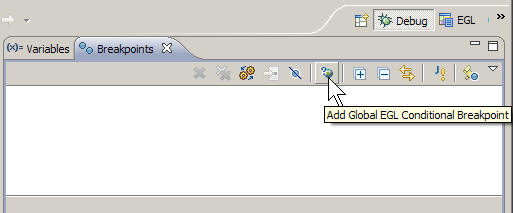
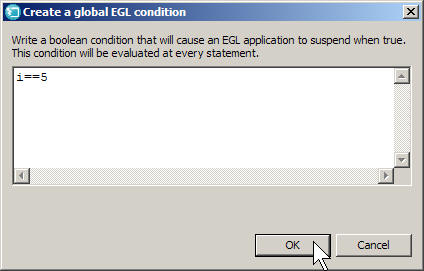
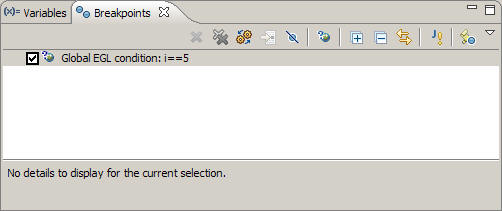
Begin the debug session. Once the condition is met, the program is suspended, and the breakpoint is disabled. You can enable the breakpoint again by selecting the check box for the condition.
	for (i int from 1 to 10 by 1)
		syslib.writeStdout(i);
endi==5In this case, the console displays 1 through 4, then suspends.
Add a condition to a breakpoint
- Right-click a breakpoint in one of the following places:
- The source editor
- The Breakpoints view
- Right-click the breakpoint and click Breakpoint Properties.
- In the EGL Line Breakpoint window, select the Conditional checkbox and enter a Boolean expression in the text box below.
- Click OK when finished.
Remove all breakpoints
To remove all breakpoints from an EGL source file, including global breakpoints, follow these steps:
- Right-click any breakpoint that is displayed in the Breakpoints view. A menu opens.
- Click Remove All.