EGL Libraries for SSO application for IBM i
New and extended IBD libraries are provided to create EGL REST and RUI applications that support Single Sign-On (SSO).
Below is the list of libraries:
RUILib.setBrowserLocalStorage(key string in, value string in)RUILib.getBrowserLocalStorage(key string in) returns (string)RUILib.removeBrowserLocalStorage(key string in)SysLib.setRemoteUserToken(token string in)
Libraries Overview
- RUILib.setBrowserLocalStorage(key string in, value string in):
This library stores the data in the browser's local storage as a key-value pair, but before storing it, it encodes the string and then stores it. If the key is already in the browser storage, it is replaced with the new value.
Example:loginDto LoginDto; loginDto.username=username.value; loginDto.password=password.value; json string = ServiceLib.convertToJSON(loginDto); RUILib.setBrowserLocalStorage("ssoToken", json);Here, LoginDto is the record type, and it has two members. It is converted into a JSON string and stored in the browser's local storage with encoding.
- RUILib.getBrowserLocalStorage(key string in) returns(string):
This library fetches the value from the browser local storage, then decodes, stringifies, and returns it as a string.
Example:
token string = RUILib.getBrowserLocalStorage("ssoToken");
loginDto LoginDto;
ServiceLib.convertFromJSON(token, loginDto);
After fetching the value from the browser local storage, it is converted into LoginDto, a record type.
- RUILib.removeBrowserLocalStorage(key string in):
This library removes the value from the browser local storage for the logout process.
Example:RUILib.removeBrowserLocalStorage("ssoToken");It will remove or destroy the stored values from the browser's local storage.
- SysLib.setRemoteUserToken(token string in):
As its name suggests, this library sets the token for IBM I communication/execution of any program on an IBM I system. This token has to be valid. Otherwise, it will throw an error.
Implementation of Examples
Below are a few sample codes/examples on how to use all of it together.
- REST Service
A REST Service needs to be created that accepts a token and any user operation that the API needs to perform on the IBM I system.
- Create a new EGL Rest Service.
- Create a function inside that service, and it should take two parameters as
input
e.g.,
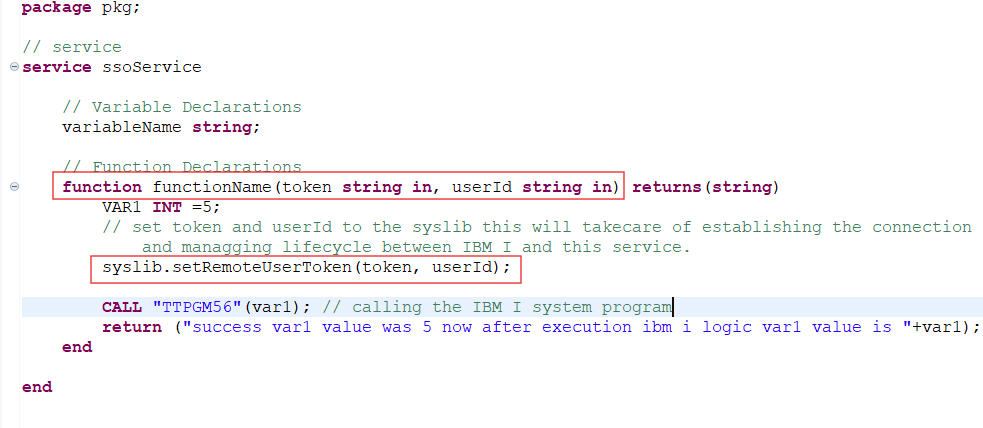
function function1(token string in, userId string in) - Now inside this function, you need to set the received token and user to the
SysLib method called setRemoteUserToken(token, userId),
e.g.,
SysLib.setRemoteUserToken(token, user); - Now you can write logic to call the IBM I System. You can refer to the
screenshot below.
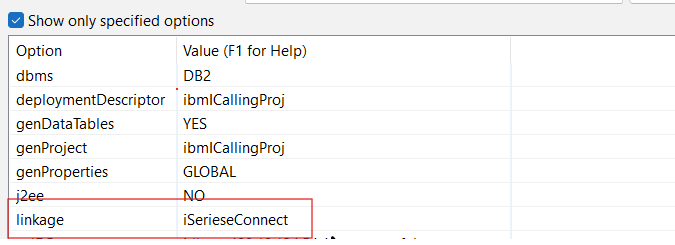
- Configure Build Descriptor with linkage properties file, file name could be
anything (instead of iSeriesConnect) as per the screenshot below.
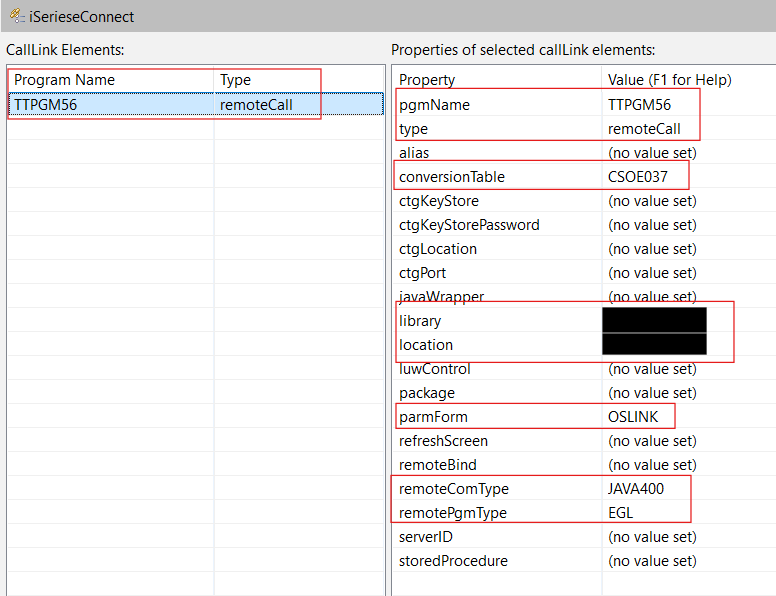
- In linkage properties, fill in the required details such as:
- programName (which is available at the IBM I system)
- Type (remoteCall - as we must call those programs from IBM I System)
- ConversionTable
- Library
- Location
- parmForm
- remoteConType
- remotePgmType
- RUI application.
- Create RUI Application
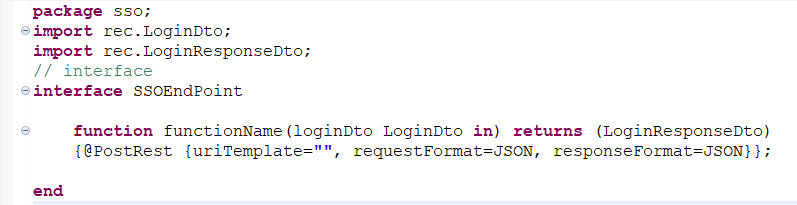
- Create an RUI interface to call the springboot-kerberos-sso application, which provides a token.
- Here, requestFormat & resposeFormat should be JSON and should be @PostRequest.
- It should be able to accept a LoginDto object as an input parameter and return
a LoginResponseDto object. For reference, below is the screenshot:
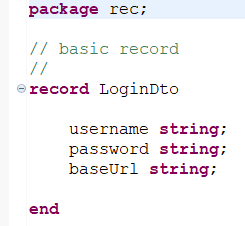
- Create a LoginDto record that should have username, password and baseUrl as a
string type, for example, please refer to the below screenshot:
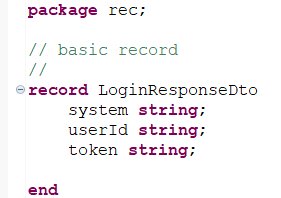
- Create a LoginResponseDto record, which should have system, userId and token
as a string type, for example, please refer to the screenshot
below:
- Now, you can call the springboot-kerberos-sso service to fetch the token.
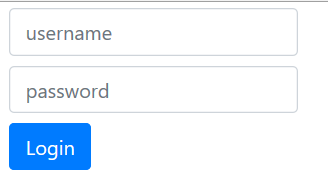
- Now, create an RUI Handler,
- It should have two input boxes and two buttons as below:
userId (user’s Windows/AD username)
password (user’s Windows/AD password)
Login Button
Logout button
- Now, you need to bind the event to the login button in the handler
- Go to the recently created RUI Handler source code and the below logics for
the springboot-kerberos-sso service API
call:
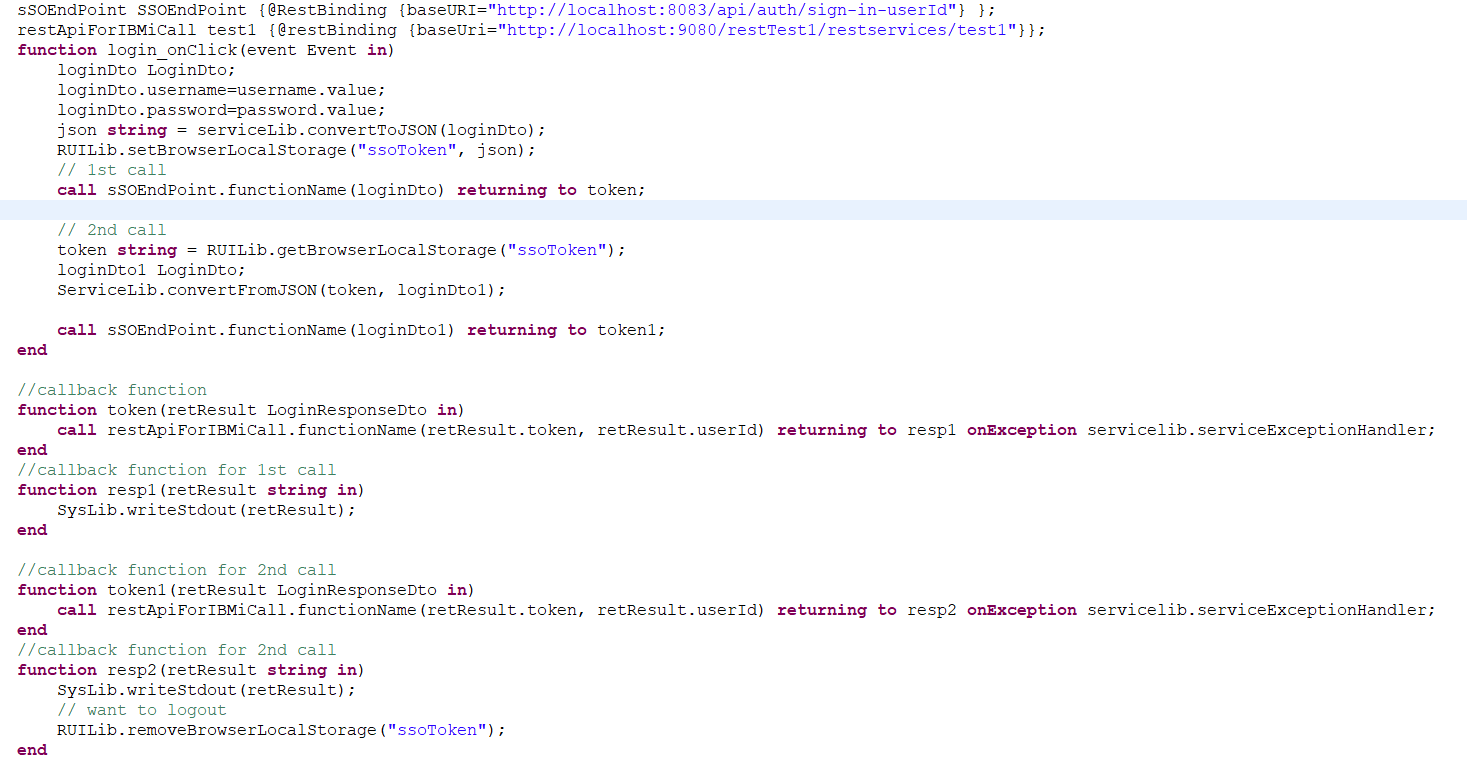
sSOEndPoint SSOEndPoint {@RestBinding {baseURI="http://localhost:8083/api/auth/sign-in-userId"} }; - Now, prepare the request payload as
follows:
loginDto LoginDto; loginDto.username=username.value; loginDto.password=password.value; json string = serviceLib.convertToJSON(loginDto); - Now store this JSON object using the code
below:
RUILib.setBrowserLocalStorage("ssoToken", json); - Now, it's time to call the springboot-kerberos-sso service API as
below:
call sSOEndPoint.functionName(loginDto) returning to token; - Create a callback function token
//callback function function token(retResult LoginResponseDto in) call restApiForIBMiCall.functionName(retResult.token, retResult.userId) returning to resp1 onException servicelib.serviceExceptionHandler; end - Here, you call restApiForIBMiCall.functionName by passing the token and userId in the EGL Rest Services you created earlier.
- So, you can make multiple calls to different EGL Rest services from the token callback function.
- But if you want to make a call later, follow the above procedure and use the
code below in addition to the previous
one.
// 2nd call token string = RUILib.getBrowserLocalStorage("ssoToken"); loginDto1 LoginDto; ServiceLib.convertFromJSON(token, loginDto1); call sSOEndPoint.functionName(loginDto1) returning to token1; - Now, you have the 2nd call back function token1, where you can make another EGL Rest service call.
- To log out/remove it from the browser local storage, use the following lines
of
code:
RUILib.removeBrowserLocalStorage("ssoToken"); - Below is a reference code screenshot: