get considerations for SQL
In the context of SQL, the get statement retrieves record data from a result set.
- Create the result set through the get statement.
- Read from a result set that you created with an earlier EGL open statement (if you specify a position option such as absolute or next with the get statement).
EGL creates an SQL SELECT statement in your generated code that is based on your get statement and the properties of the SQL record variable in that statement. For more information about this implicit SQL code, see SQL data access. Alternatively, you can use an #sql directive to write your own embedded SQL code (see sql directive). You can also assemble SQL code at run time using an EGL prepare statement, and then reference that code from your get statement. For more information about this use of dynamic SQL, see SQL data access.
If you specify the singleRow option, the SQL SELECT statement stands alone. If you do not specify singleRow, the SQL SELECT becomes a clause in a cursor declaration (an SQL OPEN statement). For more information about the SQL code that EGL generates, see SQL data access.
EGL provides a number of position options with the get statement (such as absolute and next) that allow you to retrieve a specific record relative to your current position in the result set. To do this, you must keep track of your current position by using a cursor. To be able to access the result set for your cursor, use the EGL open statement before you use the positional get. You can also use a get...forUpdate statement, but this is less common.
If the target of the get statement is a single SQL record variable, the statement returns the first record that matches the criteria (implicit or embedded) you provide. You can also specify a dynamic array of SQL record variables as the statement target. In this case, the get statement returns each matching row as an element in the array.
Syntax
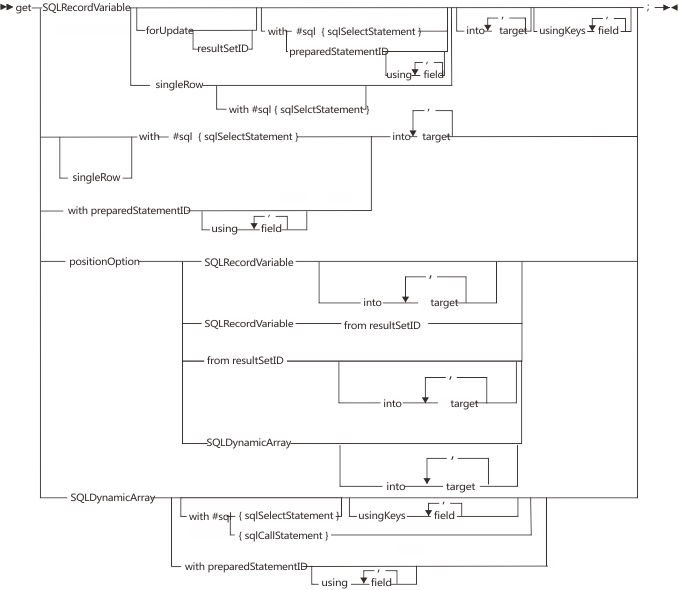
- SQLRecordVariable
- The name of an SQL record variable. The default behavior is to locate database rows in accordance with the values in the following Record part properties: keyItems and defaultSelectCondition.
- forUpdate
- If you are creating a new result set with your get statement and expect to replace or delete any database rows later, include this keyword to lock the rows that correspond to your result set. The database manager does not allow other programs to change locked rows until a commit occurs. For details on commit processing, see Logical unit of work.
- resultSetID
- If you are creating a new result set with your get statement, you can specify an ID of your choice with the forUpdate keyword to use the same result set in a later EGL replace, delete, execute, or positional get statement, or in an EGL close statement.
- singleRow
- This option generates more efficient SQL, which you might use when you are sure that the key in the get statement applies to only one row and when you do not intend to update or delete the row. EGL does not create a cursor in this case. A runtime I/O error results if you specify this option when the key applies to multiple rows.
- #sql{ sqlSelectStatement }
- If you are an experienced SQL programmer, you can override the
SQL code that EGL generates by embedding your own SQL SELECT statement,
as described in sql directive.
Do not leave space between #sql and the
left brace.Consider the following case: your code has a get or open statement that uses an SQL record, includes explicit SQL, and lacks an INTO clause. For example, here is EGL code that includes such a get statement:
customer CustomerRecordPart{};
get customer with #sql{
   select MySCHEMA.CUSTOMER.Column01
   from MYSCHEMA.CUSTOMER
   where MYSCHEMA.Column02 = "AZ"};
The Record part that was referenced in that code is as follows:Record CustomerRecordPart type SQLRecord {tableNames = [["MYSCHEMA.CUSTOMER"]]} customerNumber INT {column = "MYSCHEMA.CUSTOMER.Column01"}; ... endIn the get or open statement just described, the qualification used for a column name in the SQL SELECT clause must match the qualification used for the corresponding field in the Record part.
Restriction:When you code a relatively complex SQL SELECT statement, you might need to specify the INTO clause rather than relying on the EGL generator to create that clause. The situation arises (for example) when an SQL CASE expression is used in a SELECT statement, as shown here:SELECT CASE WHEN address1 <> '' THEN address1 WHEN address2 <> '' THEN address2 END...The situation does not arise if every entry in the initial SELECT clause is taken from one of the following categories:- A column name
- A literal
- A special register like CURRENT TIMESTAMP
- Column names, literals, and special registers that are joined
by one of the following operators:
||, +, -, *, /
Nevertheless, complexity in the SELECT clause can lead to a problem when you are using an SQL record because, to generate a valid INTO clause, you must assign a value to the column property to match the content that you are selecting. For example, here is an initial SELECT clause that includes a combination of entries from the previous categories:SELECT COLUMN01 || 10 + COLUMN02 * 5Here is the related SQL Record part:Record MyRecordPart type SQLRecord myField int { column = "COLUMN01 || 10 + COLUMN02 * 5" }; endIn that last case, consider writing your own INTO clause and not setting the column property. The reason is as follows: when you code an EGL add or replace statement that accesses a complex column property value, the SQL INSERT and UPDATE statements that are generated for you might not be valid.
- into ... target
- This clause corresponds to the INTO clause in the implicit SQL
code that EGL creates. The INTO clause identifies the EGL variables
that receive values from the result set. You can specify individual
variables, or you can specify a record name, in which case, EGL uses
all of the fields in the record. This clause is required when you
are processing SQL in either of these cases:
- You did not specify an SQL record variable in the get statement.
- You specified both an SQL record variable and an embedded SQL SELECT statement, but you have one or more columns in the SQL SELECT clause that do not have corresponding fields in the target SQL record variable.
Write the into clause in EGL, not in SQL. Do not begin the names of the variables in the clause with colons, as you can with host variables in an SQL statement. For more information, see Host variables.
- preparedStatementID
- This identifier points to an EGL prepare statement that prepares an SQL SELECT statement at run time. The get statement runs the SQL SELECT statement dynamically. For more information, see prepare considerations for SQL.
- using ... field
- This clause corresponds to the USING clause in the implicit SQL code that EGL creates. The USING clause identifies the EGL variables that you make available to the prepared SQL SELECT statement at run time. Write the using clause in EGL, not in SQL. Do not begin the names of the variables in the clause with colons, as you would with host variables in an SQL statement. For more information, see Host variables.
- usingKeys ... field
- You can specify field names from your SQL record here to override
the key fields you specified in that record definition. For example,
if
customerNumberis the key field you defined inCustomerRecord, but you want to search for records bycustomerName, you can use the following code:
Or, you can search based on a field from a different record entirely:get myCustomer usingKeys myCustomer.customerName;get myCustomer usingKeys myOrders.customerName;The field or fields that you specify with usingKeys plug into the WHERE clause in the implicit SQL statement EGL generates from the get statement. If you follow that statement with embedded SQL code, the embedded code overrides the implicit code.
In the case of a dynamic array, the fields in the usingKeys clause (or the host variables in the SQL record) must not be in the SQL record variable that is the basis of the dynamic array.
If you specify the forUpdate keyword, the columns associated with the key items are excluded from the columns listed on the FOR UPDATE OF clause.
- positionOption
- Use this option to retrieve data from an existing result set rather than creating a new one. For available options and details, see "Using position options" in this topic.
- from resultSetID
- When you use position options, you can use a resultSetID to specify the result set from which you want to retrieve record information by position. You assigned this ID in a previous open or get statement. If you do not specify a result set, EGL determines your current result set from context. See "Using position options" in this topic.
- SQLDynamicArray
- This variable names a dynamic array that is composed of SQL record variables. EGL retrieves all matching rows from the result set and inserts those values into the individual record variable elements of the array. Set the maxSize property of the array to avoid retrieving more data at one time than the program can handle. EGL stops retrieving results after the array has reached its maximum size. See Dynamic array properties.
- sqlCallStatement
- A call to a stored procedure in the database management system. The procedure must return exactly one result set. For examples, see Calling a stored procedure.
Using position options
- You cannot embed SQL in a #sql directive.
- You cannot use the singleRow option.
- You cannot use the forUpdate option (this was set, or not, in the statement that created the result set).
- You cannot use a prepared statement.
- You created a result set using the EGL open statement.
- You used the scroll option with the open statement.
The next position option is available in other circumstances as well.
- absolute (position)
- Retrieves a row that you specify with a number that either counts forward from the beginning of the result set (if you specify a positive value) or counts backward from the end of the result set (negative value).
- current
- Retrieves the row at your current cursor position.
- first
- Retrieves the first row in the result set.
- last
- Retrieves the last row in the result set.
- next
- Retrieves the first row following your current cursor position.
- previous
- Retrieves the last row before your current cursor position.
- relative (position)
- Retrieves a row that you specify with a number that either counts forward from the present cursor position (if you specify a positive value) or counts backward from the present cursor position (if you specify a negative value). A value of zero retrieves the record at the current cursor position and is equivalent to the current option.
The initial position for the cursor (or position indicator) for a result set is before the first row of results. Programs typically use a forEach statement or use get next repeatedly to iterate over the results.
Implicit SQL SELECT statement
When you specify an SQL record variable in the get statement but do not specify an embedded SQL statement with the #sql directive, you create implicit SQL code. The implicit SQL SELECT has the following characteristics:
- The defaultSelectCondition record-specific property determines the table row that the get statement selects, as long as the value in each SQL table key column is equal to the value in the corresponding key field of the SQL record variable. If you do not specify either a record key or a default selection condition, the result set includes all table rows. If multiple table rows are selected, and you specified a single SQL record variable (rather than an array of record variables) as the target of the get statement, the first retrieved row is placed in the record variable.
- As a result of the association of record fields and SQL table columns in the record definition, a given field receives the content of the related SQL result set column.
- If you specify the forUpdate option, the SQL SELECT FOR UPDATE statement does not include record fields that are read only.
- The SQL SELECT statement for a particular record is similar to
the following statement, except that the FOR UPDATE OF clause is present
only if the get statement includes the forUpdate option
:
  SELECT column01,
         column02,
         ...
         columnNN
  FROM   tableName
  WHERE  keyColumn01 = :keyField01
  FOR UPDATE OF
         column01,
         column02,
         ...
         columnNN
The SQL INTO clause on the standalone SQL SELECT or on the cursor-related FETCH statement is similar to this clause:INTO :recordField01, :recordField02, ... :recordFieldNNEGL derives the SQL INTO clause if the SQL record variable is accompanied by an embedded SQL SELECT statement when you have not specified an INTO clause. The fields in the derived INTO clause are those that are associated with the columns listed in the SELECT clause of the SQL statement. (The field-and-column association is in your custom SQL Record part; see SQLRecord stereotype.) An EGL INTO clause is required if a column is not associated with a field.
- The key-value component of the query is a set of relationships
that is based on a greater-than-or-equal-to condition:
keyColumn01 >= :keyField01 & keyColumn02 >= :keyField02 & ... keyColumnNN >= :keyFieldNN - The fields in the usingKeys clause (or the host variables in the SQL record) must not be in the SQL record variable that is the basis of the dynamic array.
Examples
  try
    get myCustomer singleRow into customerName with
      #sql{
        SELECT customer_name
        FROM Cusomter
        WHERE customer_number = :myCustomer.customerNumber
      };
  onException(sqlEx SQLException)
    myErrorHandler(8);
  end
  try
    get myCustomer forUpdate into customerName with
      #sql{
        SELECT customer_name
        FROM Cusomter
        WHERE customer_number = :myCustomer.customerNumber
      };

  onException(sqlEx SQLException)
    myErrorHandler(8);  // exits the program
  end

  myCustomer.customerName = newName;   // user entered name change

  try
    replace myCustomer;
  onException(sqlEx SQLException)
    myErrorHandler(12);
  end
employees Employee[0]{rowsetsize=10};
Open resultset1 scroll with #sql{
    select eID, uName, PASSWORD, fName, lName, office, sex, EMail
    from EMPLOYEETEST
} for employees;


Get Next employees;  //this empties the employees array and
                     // populates with up to the next 10 rows from the result set
or
eIDs INT[0]{};
uNames CHAR(20)[10]{};
Get Next employees into eIDs, uNames;
or
DynamicEmployee DynamicEmployee;
Get Next employees into DynamicEmployee;
Record DynamicEmployee
   eIDs INT[10];
   uNames CHAR(20)[10];
    end

or
structuredEmployee StructuredEmployee;
Get Next employees into structuredEmployee.eIDs, structuredEmployee.uNames; //
Get Next employees into structuredEmployee;

Record StructuredEmployee
   1 eIDs INT[10];
   1 uNames CHAR(20)[10];
 end
Error conditions
- You specify an SQL statement of a type other than SELECT.
- You specify an SQL INTO clause directly in an SQL SELECT statement.
- Other than an SQL INTO clause, you specify some but not all of the required clauses of an SQL SELECT statement.
- You specify (or accept) an SQL SELECT statement that is associated with a column that either does not exist or is incompatible with the related host variable.
- You specify (or accept) an SQL statement that shows an intent to update multiple tables.
- You use an SQL record variable in which all the record fields are read only.
- You customize an EGL get statement with the forUpdate option, but do not indicate that a particular SQL table column is available for update.
- The replace statement that is related to that get statement tries to revise the column.
- When you customize the EGL get statement, include the column name in the SQL SELECT statement FOR UPDATE OF clause.
- When you customize the EGL replace statement, eliminate any reference to the column in the SET clause of the SQL UPDATE statement.
- Accept the defaults for both the get and replace statements.
Compatibility
Each relational database management system (RDBMS) has its own version of SQL. Not all SQL statements are available in every implementation. See the documentation from your RDBMS before coding any embedded SQL.
| Platform | Issue |
|---|---|
| iSeries® COBOL | The absolute option is not supported. |