The Table (field) component is responsible for recognizing
logical columns of vertically aligned fields. For a region to be recognized
as a table (field), the left and right boundaries
of each field contained within the selected region (including partial
fields) must be the same as the left and right boundaries of the field
directly above (if the field in question is not on the first row)
and directly below (unless the field in question is not on the last
row).
A recognized table (field) can be rendered
by the following widgets:
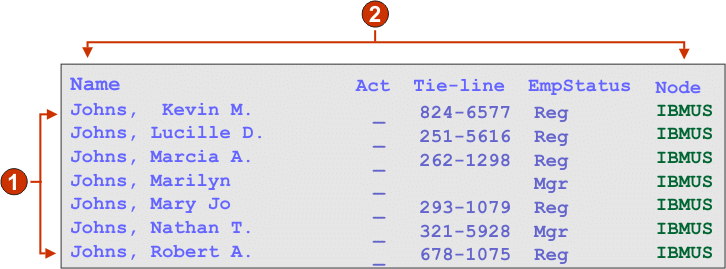
The following figure shows how a table (field) component
might appear on your host screen:
Figure 1. Table
(field) component example
Rows
Columns
The following settings can be configured for this component:
Row count above table as header(s)
To use the rows above the table as column headers, the user must update the number in the
Row count above table as header(s) field. This defines how many rows above the
table will be treated as column headers.
Note:
The column headers must be in protected fields.
If the row counts entered in the Row count above table as header(s) field
exceeds the number of available rows above the table, an error message will
appear.
Include empty rows
If selected, empty rows (rows without any visible text or input fields) will be
included in the rendered table or graph.
Rows to exclude
The comma-separated or ranged set of rows to exclude from the recognized table. This
setting is useful for hiding specific rows of data on a table or graph. The rows
represented by this value are based on the recognized table, not on the actual host
screen. Example values: 1,2,3..., 1,2-4, 3-5.
Columns to exclude
The comma-separated or ranged set of logical columns to exclude from the recognized
table. The columns represented by this value are based on the recognized table, not on
the actual host screen. Example values: 1,2,3...,
1,2-4, 3-5.
Minimum row count
The minimum number of rows the specified region must contain for the region to be
recognized as a table.
Note:
The number of recognized rows is evaluated
before the specified rows are excluded (see Rows to exclude).
Minimum column count
The minimum number of logical columns (not host screen columns) the specified region
must contain for the region to be recognized as a table.
Note:
The number
of recognized columns is evaluated before the specified columns are excluded (see
Columns to exclude).
Note:
Unless you have access to the host screen map which created the table, use the
Table (visual) component to
recognize a tabular region. If this is not possible, turn on the
Input, Protected, and
Hidden options on the first page of the Insert Host Component
wizard to help determine where fields break within the selected host screen
region.