Using IBM® Z® Monitoring
This chapter describes how to use IBM Z Workload Scheduler with IBM Z Monitoring Version 6.2 with Fix Pack 1 installed. It describes how this integration works and the IBM Z Monitoring components involved.
IBM Z Monitoring monitors and manages system and network applications on a variety of platforms and can keep track of the availability and performance of your enterprise in its entirety. You can use the reports provided by IBM Z Monitoring to track trends and troubleshoot problems.
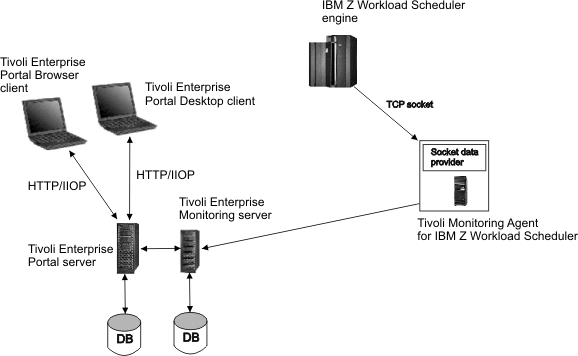
IBM Z Workload Scheduler uses an agent named Z Monitoring agent to send events and alerts to IBM Z Monitoring (ITM). IBM Z Workload Scheduler establishes an IP connection with the Socket Data Source of the Z Monitoring agent which acts like a listener task. Every time one of the monitored operations changes its status, or an alert is issued, the related event is sent to the Z Monitoring agent.
The data sent by IBM Z Workload Scheduler is interpreted by the Z Monitoring agent. The agent stores the event information in its cache and this information is later consolidated by the Tivoli® Enterprise Monitoring Server. The collected data is then retrieved and displayed by a component named Tivoli® Enterprise Portal.
The Tivoli® Enterprise Portal is an interactive interface used for viewing and monitoring your enterprise network. The Tivoli® Enterprise Portal client connects to the Tivoli® Enterprise Portal server that enables retrieval, manipulation, and analysis of data collected by all existing IBM Z Monitoring agents in your enterprise.
You can use the Tivoli® Enterprise Portal to display and manage events related to IBM Z Workload Scheduler operations such as operation start and end time. In the same way, you can configure the automatic selection of monitored operations and subtasks, providing a single point of management and control for the resources of your enterprise.
Because the Tivoli® Enterprise Portal component provides the user interface for viewing and managing IBM Z Workload Scheduler monitored objects, in this publication we refer to the integration with IBM Z Monitoring by referring to Tivoli® Enterprise Portal. For detailed information on IBM Z Monitoring components refer to the IBM Z Monitoring documentation.