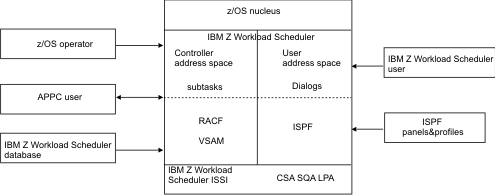
IBM Z Workload Scheduler dialogs
Most users of IBM Z Workload Scheduler functions use interactive system productivity facility (ISPF) panels to communicate with the product. These panels are referred to as IBM Z Workload Scheduler dialogs. Each dialog user is also a z/OS TSO user executing in a separate address space, or in a different z/OS® system.
The dialogs frequently require support from the IBM Z Workload Scheduler subsystem. IBM Z Workload Scheduler is a started task that must be active to run the dialogs. The z/OS subsystem interface (SSI) is used to pass requests from the user to IBM Z Workload Scheduler. To process the request, this subsystem interface invokes a routine residing in common storage. If the dialogs are executed in a different z/OS® system, the requests will be sent to an IBM Z Workload Scheduler server on an APPC or TCP/IP session. The server will then forward the requests to the IBM Z Workload Scheduler subsystem via the z/OS® SSI.
Before performing any function requested by a user, the IBM Z Workload Scheduler dialog function uses the system authorization facility (SAF) interface to pass the request to RACF® (or a functionally equivalent security package). RACF® verifies that the user is authorized to access the resources needed to run the current function. The z/OS router service calls RACF® to perform this authority check if RACF® is installed and active in the z/OS system. A typical request for service from aIBM Z Workload Scheduler dialog to the IBM Z Workload Scheduler subsystem is to access a set of database records (for example, application description records). The databases, as well as the planning data sets, are maintained and controlled by the started task.
A summary of the system components and interfaces used by IBM Z Workload Scheduler dialogs is provided in IBM Z Workload Scheduler dialog structure.