Combination Display of Grid-Line Screen Format and User Screen Format
Displays the grid-line screen format with the user-defined screen format.
To display the grid-line screen format on the screen, an application program on the host system should send the following character screen format to PC400. Character data longer than 1 byte should be sent with it so that the grid line can be displayed.
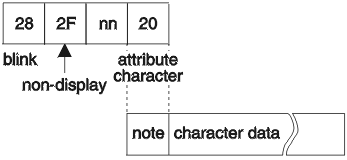
| Parameter | Meaning | Valid Value |
|---|---|---|
| nn | Grid-line information buffer designation data | X'C6' (F) Grid-line definition data in the grid-line information buffer 1 to be displayed X'C2' (B) Grid-line definition data in grid-line information buffer 2 to be displayed |
|
Note: The attribute character for the character data can be replaced with X'20' at the first line and fourth column. | ||
The position from the first to the fourth column on the first line of the user screen format can not be used as character data when displaying the grid line in the user-defined screen format. In addition, the character “F” or “B” should be present at the first row and third column position. If it does not exist, the grid-line screen format is not displayed and the user screen format which contains the only character data is displayed.