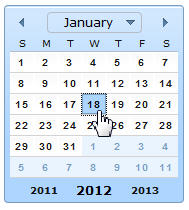
The user can set the date with a click, as shown here:
The user can change the month by clicking the upper left or right
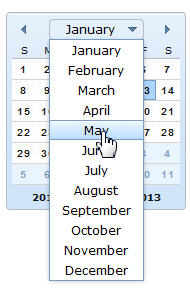
arrow. Alternatively, the user can click the upper middle arrow and
then click an entry in the month selector, as shown here:
The user can change the year by clicking the left or right year
at the bottom of the calendar.
Here is a supported property:
value
A Date value that represents a calendar date.
You can get or
set the date. The default is the current date.
Here is a supported function:
isSelectorOpen
Indicates whether the month selector is open.
Here is the function
prototype:
function isSelectorOpen() returns (boolean);
Other supported properties and functions are described in “Widget
properties and functions” and “Widget styles.”
Example
You can try different aspects of
the calendar by working with the following code, which also demonstrates
use of the EGL job scheduler:
package myPkg;

import com.ibm.egl.rui.widgets.GridLayout;
import com.ibm.egl.rui.widgets.GridLayoutData;
import dojo.widgets.DojoCalendar;
import dojo.widgets.DojoButton;
import egl.javascript.Job;

handler MyHandler type RUIhandler {
   initialUI = [ ui ], onConstructionFunction = start,
   cssFile="css/MyRichUIProject.css", title="MyHandler"}

   ui GridLayout{ columns = 3, rows = 4, cellPadding = 4,
                  children = [ myButton, myCalendar ] };

   myCalendar DojoCalendar{ layoutData = new GridLayoutData{ row = 2, column = 2 },
                            value = DateTimeLib.currentDate() };

   myButton DojoButton{ layoutData = new GridLayoutData{ row = 4, column = 2 },
                            text = "Is the month selector open?",
                            onClick ::= myEventHandler};

   doThis Job{runFunction = myRunFunction};

   function start()
	     strLib.defaultDateFormat = "yyyy/MM/dd";
   end

   function myEventHandler( e event in)
      doThis.repeat(1000);
      myCalendar.value = "2012/04/08";
   end

   function myRunFunction()
      isListBoxOpen Boolean = myCalendar.isSelectorOpen();
      writestdout ("The selector is open:  " + isListBoxOpen);

      if (isListBoxOpen)
         doThis.cancel();
      end

      writestdout ("The date is " + myCalendar.value);
   end
end