execute considerations for SQL
In the context of SQL, the EGL execute statement is typically used to carry out a prepared SQL statement with dynamic elements.
You can also use the statement to create implicit delete, insert, or update queries, or to write embedded SQL from a limited list of available commands.
Syntax
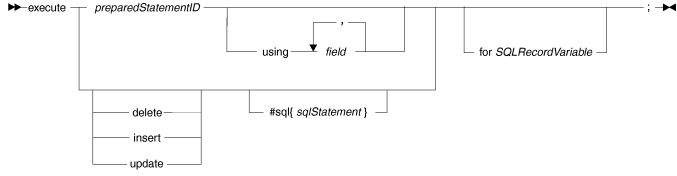
- preparedStatementID
- The identifier that you assigned to prepared SQL code when you used the EGL prepare statement. This is the most typical use of the execute statement, and usually involves dynamic SQL. For more information about dynamic SQL, see SQL data access.
- using ... field
- Identifies the EGL host variables (see Host variables) that are available to the prepared SQL statement at run time. In a clause such as this one (which is outside of a #sql block), do not include a colon before the name of a host variable.
- for SQLRecordVariable
- If you are creating an implicit SQL statement (delete, insert,
or update), EGL uses this SQL record variable to determine the contents
of that statement, as described in "Generating implicit SQL code"
in this topic. You can use the SQL record to test the outcome of the
operation, as in the following example:
onException (sqlEx SQLException) if (myCustomer is unique) myErrorHandler(8); end end - delete, insert, update
- Use these keywords to request an implicit SQL statement of the specified type. For an overview of implicit SQL statements, see SQL data access. If you use any of these keywords, include a SQL record variable in the execute statement.
- #sql{ sqlStatement }
- For more information about using this type of embedded SQL statement,
see sql directive. If you want
the SQL statement to update or delete a row in a result set, code
an SQL UPDATE or DELETE statement that includes the following clause:
WHERE CURRENT OF resultSetID- resultSetID
- The resultSetID specified in the EGL open or get statement that made the result set available.
Do not leave space between #sql and the left brace.
Generating implicit SQL code
You can generate implicit SQL through the execute statement to perform certain database operations without first performing an EGL open or get. EGL usually hides the details of SQL database access, such as the manipulation of result set row position. Through the execute statement, you can directly specify the rows of the database you want to change by setting the defaultSelectCondition property of the SQL Record part.
myCustomer SQL
record variable to allow any customer number to pass the filter. To
remove all selected customers from the Customer database without having
to create a result set, use the following EGL statement:execute delete myCustomer;Because of the lack of safeguards, exercise caution when you use these implicit SQL commands.
Implicit SQL DELETE
The implicit SQL DELETE statement uses the defaultSelectCondition SQL record property to determine the table rows to be deleted when the value in each SQL table key column is equal to the value in the corresponding key field of the SQL record variable. If you do not specify a record key or default selection condition, all table rows are deleted.
  DELETE FROM tableName
  WHERE  [ defaultSelectCondition AND ]
         keyColumn01 = :keyField01 [ AND
         ...
         keyColumnnn = :keyFieldnn ]
You cannot use a single EGL statement to delete rows from more than one database table.
Implicit SQL INSERT
- The key value in the SQL record variable determines the logical position of the data in the table. A record that does not have a key is handled in accordance with the SQL table definition and the rules of the database.
- As a result of the association of record fields and SQL table columns in the SQL record declaration, the generated code places the data from each field in the record variable into the related SQL table column.
- If you declared a record field as read-only, the generated SQL INSERT statement does not include that record field, and the database management system sets the value of the related SQL table column to the default value that was specified when the column was defined.
  INSERT INTO tableName
    (column01, ... columnNN)
    values (:recordField01, ... :recordFieldNN)
Implicit SQL UPDATE
- If the value in each SQL table key column is equal to the value in the corresponding key field of the SQL record, the defaultSelectCondition SQL record property determines the table rows to be selected. If you do not specify a record key or default selection condition, all table rows are updated.
- As a result of the association of record fields and SQL table columns in the SQL record declaration, a given SQL table column receives the content of the related field in the record variable. However, if an SQL table column is associated with a record field that is read-only, that column is not updated.
  UPDATE tableName
  SET    column01 = :recordField01,
         column02 = :recordField01, ...
         columnNN = :recordFieldNN
  WHERE  keyColumn01 = :keyField01 [ AND
         ...
         keyColumnnn = :keyFieldnn ]
Embedded SQL
targetDate, a date set earlier in
the EGL code:execute #sql{
DELETE FROM Customer
WHERE last_order_date < :targetDate
};The EGL variable targetDate becomes a host variable
(preceded by a colon) in the SQL code. For more information, see Host variables.
You can also use similar syntax to embed SQL INSERT or UPDATE statements.
You cannot use an EGL execute statement to embed a SQL statement that returns a result set. This is because you do not have direct control of the cursor; EGL handles all cursor definition and management internally.
- ALTER
- CALL
- CREATE ALIAS
- CREATE INDEX
- CREATE SYNONYM
- CREATE TABLE
- CREATE VIEW
- DECLARE global temporary table
- DELETE
- DROP INDEX
- DROP SYNONYM
- DROP TABLE
- DROP VIEW
- GRANT
- INSERT
- LOCK
- RENAME
- REVOKE
- SAVEPOINT
- SET
- SIGNAL
- UPDATE
- VALUES
- CLOSE
- COMMIT
- CONNECT
- CREATE FUNCTION
- CREATE PROCEDURE
- DECLARE CURSOR
- DESCRIBE
- DISCONNECT
- EXECUTE
- EXECUTE IMMEDIATE
- FETCH
- OPEN
- PREPARE
- ROLLBACK WORK
- SELECT
- INCLUDE SQLCA
- INCLUDE SQLDA
- WHENEVER
Examples
myCustomer is a SQL record variable: execute #sql{
create table Customer (
customer_number int not null,
customer_name char(40) not null,
customer_balance decimal(9,2) not null)
};
execute update for myCustomer;
execute #sql{
call aStoredProcedure( :parameterVar)
};
execute myPreparedStatement;
Error conditions
A declaration-time error occurs if you call for an implicit delete, insert, or update query but do not specify an SQL record variable.
An error occurs on the implicit insert or update queries if the only available host variables are read-only.