Lesson 8: Add variables and functions to the Rich UI handler
Add source code that supports the user interface.
About this task
Add code to support the data grid
About this task
Procedure
Code the function that responds when the user clicks the data grid
About this task
The cellClicked function is invoked when
the user clicks a cell in the data grid.
start function,
add the following lines:function cellClicked(myGrid DataGrid in)
selectedPayment = allPayments_ui.getSelection()[1] as paymentRec;
selectedPayment_form.publish();
endFirst, the cellClicked function
updates the selectedPayment record with data from
a single data-grid row. That row can include more fields than are
displayed to the user. In this application, the single row in the
data grid will have come from a single row in the database.
selectedPayment record to the selectedPayment_ui layout.
That transfer is made possible by code that was provided for you when
you created the selectedPayment_ui layout, which
is the single-record layout at the right of your web page. If you
review the code, you can trace the relationships: - A Form Manager declaration includes form fields.
- Each form field references a controller declaration.
- The controller declaration relates a model to a view; in this
case, a field of the
selectedPaymentrecord to a child of theselectedPayment_uilayout.
The Form Manager provides various benefits but is essentially a collection of controllers.
[1]),
and the use of the as operator:- The getSelection function always returns
a subset of the rows in the data array of
the data grid. However, when you declared the data grid, you specified
the following setting to indicate that the user can select only one
row at a time:
selectionMode = DataGridLib.SINGLE_SELECTION. When the user can select only one row, only one element is available. - Every element in the array returned by a getSelection function
is of type ANY. You typically use the same Record part to process
input to the grid and to process output from the grid, and in this
tutorial, the Record part is
paymentRec. The Record part has the following uses:- To be the basis of the array elements that you assign to the data property
of the data grid, as shown in the following setting:
data = allPayments as any[] - To cast the array element that is returned by the getSelection function
of the data grid, as shown here:
allPayments_ui.getSelection()[1] as paymentRec
In each case, the as clause provides the necessary cast.
- To be the basis of the array elements that you assign to the data property
of the data grid, as shown in the following setting:
Format column values in the grid
Procedure
Test the formatting of the data grid and the transfer of data to the single-record layout
About this task
You can test your recent changes even before you gain access to the database.
Procedure
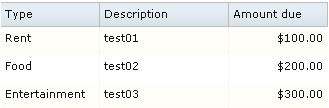
- Click the Preview tab and note that the categories are
now descriptions (for example, Rent rather than 1).
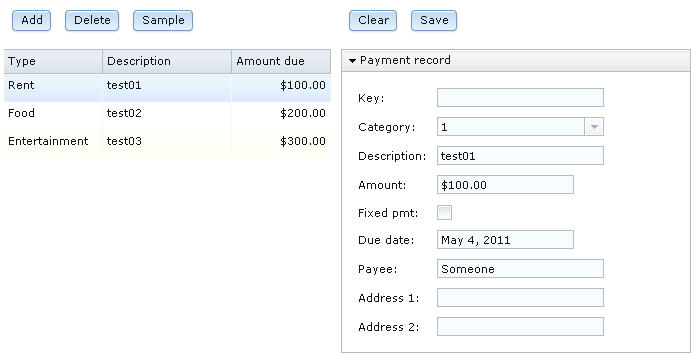
- Click the Preview tab and click the first row in the data
grid.
Results
Comment the prototype data
About this task
Procedure
- In the
startfunction, select the complete assignment statement, right-click the area selected, and click Comment.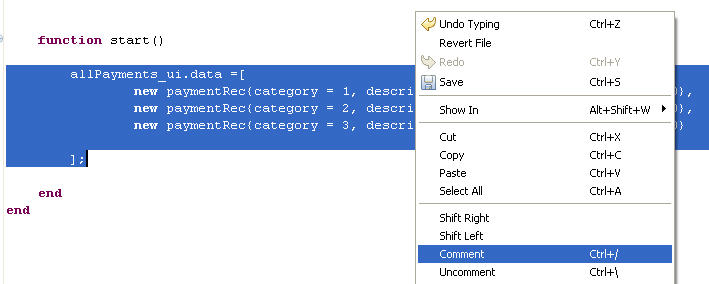
Declare a service-access variable
About this task
You now declare a service-access variable, which will let you communicate with the service that you defined earlier.
Procedure
- Near the top of the EGL source code, find the handler declaration
for
PaymentFileMaintenance. Add a blank line, and immediately before theuiGridLayout declaration, add the following statement:dbService SQLService{@dedicatedService};The @dedicatedService property indicates that the service being referenced is a dedicated service, which will be deployed with the Rich UI handler.
In the following display, the red X in the margin indicates a problem in the code:

To see the error message, move the cursor over the X.
Create functions that use the service-access variable to invoke the service
About this task
Procedure
- Click anywhere in the call statement,
right-click, and click Create Callback Functions.
Alternatively, you could clicked anywhere in the statement, held down
the Ctrl key, and pressed 1.
 EGL creates an empty
updateAllfunction. An error handler would have been created as well if you had specified a function name for onException, other thanserviceLib.serviceExceptionHandler.The parameter list in the createdupdateAllfunction is equivalent to the type of return value that is expected from the service. Here are the relationships that explain the behavior of the Rich UI editor:- The parameter list in the callback function is correct because
the
getAllPaymentsfunction in the Service part is available to the editor. - The function is available because you resolved the reference to
the
SQLServicepart in a previous step.
- The parameter list in the callback function is correct because
the
Update the start function to initialize the data grid with database rows
About this task
To initialize the data grid, add the following code before
the end statement of the start function:
readFromTable();Although
you could have assigned the readFromTable function
directly to the onConstructionFunction property,
you are advised to retain the start function as a
separate unit of logic in case you later decide to add other code
that runs before the web page is rendered.
Retain the commented
code in the start function in case you need to test
the web page without accessing the database. You can use the comment
and uncomment capability of the Rich UI editor to quickly switch from
the function call to the prototype data and back again.
Complete the callback functions
About this task
updateAllrecordAddedrecordRevised
Procedure
updateAll function receives an array
of paymentRec records from the dedicated service.
The function is called in the following ways:- As a callback function at startup, after the
readFromTablefunction calls the service. - As a callback function whenever the user clicks the Sample button
to invoke the
sampleDatafunction.
recordAdded function receives the
record that was sent to and returned by the service function addPayment.recordRevised function receives
the record that was sent to and returned by the service function addPayment.Test the interface
About this task
Procedure
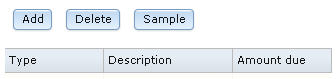
- Click the Preview tab.The data grid has no content because you commented out the prototype data, and the database has no rows.
- If EGL requests a password, enter admin for
both the User ID and Password fields.
Select Remember my user ID... and click OK.
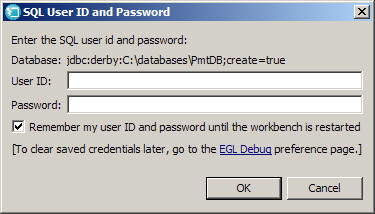
If you exit and restart the workbench before you complete this tutorial, this window might be re-displayed the next time you attempt to access the database.
Eventually the grid is re-displayed with rows of sample data.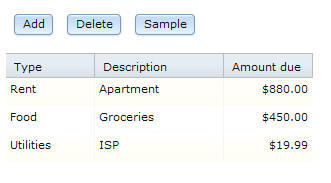
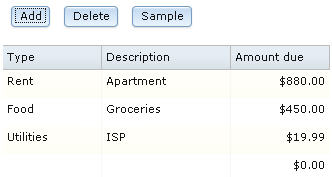
- Click the Add button.
A new row with a single default value is displayed at the bottom of the grid.
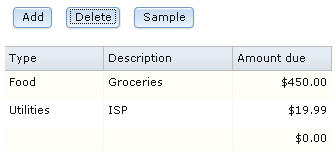
- Select the Apartment row and click Delete.
The row is deleted from both the display and the database.
- Click the first row of the data grid.
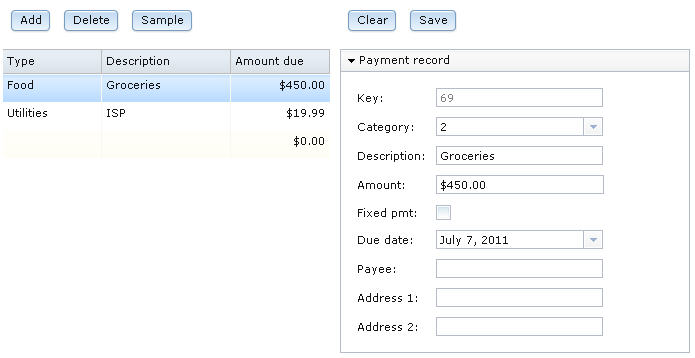 Data from the database was transferred from the data grid to the single-record layout. Note that the value of the Key field reflects how many rows were added to the database and will probably not match the value on your web page.
Lesson checkpoint
About this task
- To create formatters.
- To respond to the user's selection in a data grid.
- To transfer data from the data grid to a grid layout.
- To comment and uncomment code.
- To access services from a Rich UI application.
In the next lesson, you will complete the code for the Rich UI handler.