Accessing multiple DB2® plans in z/OS® CICS®
When creating a system of programs that access DB2® tables, you might not want to bind all the database request modules (DBRMs) for each program into one DB2® plan.
For security and maintenance reasons, you might want to access several DB2® plans in a system of programs. This section discusses three of the possible methods for accessing multiple DB2® plans in CICS® for z/OS®. The first two methods describe how to change the transaction ID. The third method uses the DB2® Dynamic Plan Selection function.
If you have associated the DB2® plan name and transaction ID in an RDO DB2ENTRY or DB2TRAN definition, you can change the DB2® plan name by changing the transaction ID. For more information on the RDO DB2ENTRY and DB2TRAN definitions, refer to the appropriate resource definition manual for your version of DB2®.
Accessing DB2® plans using sysVar.transactionID
The EGL system variable sysVar.transactionID enables you to dynamically change the segmented transaction ID. When running a segmented program, the value in sysVar.transactionID is used as the transaction ID to start the program again immediately after every converse statement. A simple example of using sysVar.transactionID to dynamically change the transaction ID is shown in the following diagram, where the initial value of the transaction ID is "Menu".
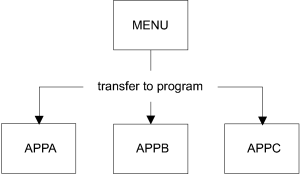
| Application: | APPA | APPB | APPC |
| Transaction ID (after converse): | AAAA | BBBB | CCCC |
| DB2® Plan: | PLANA | PLANB | PLANC |
...
sysVar.transactionID="AAAA"; // Set new transaction ID
converseInfoform();          // Converse information form to user
readDB2Record();             // Retrieve data from a DB2 table
...
There are no SQL statements in the menu program or, prior to the converse statement, in the task-oriented programs.
The DBRM for each task-oriented program is bound into a unique DB2® plan and associated with a unique transaction ID in the RDO DB2ENTRY or DB2TRAN definition. This is the transaction ID that is moved to sysVar.transactionID before the converse statement. After the converse statement, a new transaction starts with the DB2® plan associated with the new transaction ID.
The transaction IDs AAAA, BBBB, and CCCC are associated in the RDO DB2ENTRY definition with DB2® plans PLANA, PLANB, and PLANC, respectively.
This method of association can be used only in segmented programs. However, for CICS® programs, you can access different DB2® plans with a transfer to transaction statement or by dynamically selecting a DB2® plan.
Accessing DB2® plans with a transfer to transaction statement
This method is useful if you transfer control between programs using a transfer to transaction statement. The transaction ID is changed when you transfer from one program to another using a transfer to transaction statement. This gives you access to a new DB2® plan if you associated the new transaction ID with a different DB2® plan in the RDO DB2ENTRY definition.
Dynamically selecting a DB2® plan
This method uses DB2® dynamic plan selection, which provides the ability to dynamically select a DB2® plan name for a z/OS® CICS® transaction. DB2® dynamic plan selection provides you with the option of defining a PLANEXITNAME in the RDO DB2ENTRY definition instead of a DB2® plan name. The exit program selects a DB2® plan for the z/OS® CICS® transaction. With this function, you can associate several plans with one transaction ID. For more information about DB2® dynamic plan selection, refer to your DB2® system documentation.
The first SQL statement in a logical unit of work (LUW) starts the exit program.