Writing and reading to files
Reading and writing to files, such as sequential or comma-separated value (CSV) files, is similar to writing and reading records in any other type of data source. However, the process of connecting to the data source is different, and you are restricted to particular variations of the EGL data access statements.
EGL allows you to write and read several types of files, including indexed files, sequential files, and comma-separated value (CSV) files, also known as delimited files. These types of files differ mostly in the way they store information to the file; the process of reading the file and writing to the file is similar for each type. This topic deals with sequential files and CSV files.
Prerequisites
- An EGL project
Setting up a resource association
To connect to a file, you must first define a resource associations part that points to that file. The file itself can be a data set as well as a file on your system, but this example uses a local file.
- Open the project's build descriptor.
- Add a resource associations part to the build descriptor and open that part in the build parts editor. See "Adding a resource associations part to an EGL build file."
- In the new resource associations part, add a new association to
the location where the sequential file will go:
- In the resource associations part, click the Add Association button. A new entry is displayed under Association elements.
- In the File Name field of the new entry,
type a mnemonic for the sequential file that conforms to EGL naming
requirements, such as
myFile. This field is not the name of the actual file on disk; this field corresponds to the value of the fileName property of serial record parts that use this file. - Set the System field to the type of system
you are using, such as
winfor Windows™ orlinuxfor Linux™. - Set the File type field to
seqwsto represent a sequential record. - Set the systemName field to the fully qualified
location of the file. For example, in a Windows™ operating system, systemName should
be set to something like this:
If you point to a file that does not exist, EGL will create the file when you write to it.C:\myFolder\myFile.datThe resource associations part looks like this, with your own values in the fields: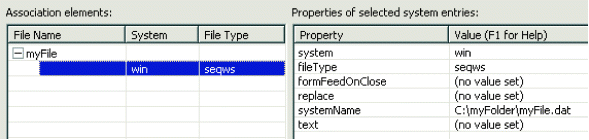
- Save and close the resource associations part.
- Set the value of the resourceAssociations build descriptor option to the name of the resource associations part.
- Define a Record part to represent the records that will be stored
in the file. For example, if you want to use a sequential file, define
a serialRecord:
record mySerialRecord type serialRecord 10 myInteger int; 10 myChar char(50); end - Set the fileName property to the value
of the File Name field in the resource association
part entry:
record mySerialRecord type serialRecord
    {fileName = "myFile"}
    10 myInteger  int;
    10 myChar     char(50);
end
Now you can use the record part in your code to access the sequential file.
For more information on resource associations parts, see the EGL Generation Guide.
Writing to the file
Writing to a file is similar to writing to any other data source.
- Open an EGL program or other logic part.
- Make sure that your serial record part is in scope and is associated
with the sequential file as in "Setting up a resource association"
above. You might need to use an import statement
to bring it into scope:
import myProject.myData.mySerialRecord; - In an EGL program, declare a variable that is based on your serial
record:
variableRecord mySerialRecord; - Add data to the fields in the new variable:
variableRecord.myInteger = 45; variableRecord.myChar = "Hello!"; - Use an appropriate EGL data access statement, such as add to
write the record to the file:
add variableRecord; - Save, generate, and run the program. The new record is written to the end of the sequential file.
Reading from the file
Reading data from a sequential or CSV file is similar to reading from any other data source, except that you must read the records in order.
In general, use the get next statement to read a single record and the get statement to read multiple records when you deal with serial records. In this context, get next begins with the first record in the sequential file and reads the records in order.
- Open an EGL program or other logic part.
- Make sure that your serial record part is in scope and is associated
with the sequential file as described in "Setting up a resource association"
above. You might need to use an import statement
to bring it into scope:
import myProject.myData.mySerialRecord; - In an EGL logic part, declare a variable that is based on your
serial record:
variableRecord mySerialRecord; - Retrieve a record from the sequential file using the variable:
get next variableRecord; - Use the data from the sequential file:
sysLib.writeStderr(variableRecord.myChar); - Save, generate, and run the program. The program reads the sequential
file and displays the data from the record in the console:
Hello!
Using CSV files
123,yes,3/9/2007,Rahima
-1,no ,9/9/1999,Jorge
92,yes,,Ludmillarecord CsvRec type CSVRecord
{
fileName = "CSVFile",
delimiter = ",",
textQualifier = "\"",
style = CsvStyle.quoted
}
jobCode int;
permStatus char(3);
hireDate date?;
firstName string;
endprogram readCSV type BasicProgram {}
oneRecord CsvRec;
function main()
//get the first record
get next oneRecord;
if (oneRecord is endOfFile)
//if there are no records
SysLib.writeStdout("This file is empty.");
else
while (oneRecord not endOfFile)
//perform this action for each record found
SysLib.writeStdout(oneRecord.firstName);
get next oneRecord;
end
end
end
end