IBM i5/OS or OS/400 host with Kerberos passticket authentication
Currently, Web Express Logon supports i5/OS or OS/400 (V5R4 and later) telnet-negotiated environments that have Kerberos authentication enabled. It does not require the CMS, a login macro, a Network Security plug-in, nor the HCM database. Instead, it extends the existing single sign-on capability of the i5/OS and OS/400 operating systems.
- Windows Domain Controller (Microsoft Active Directory)
- key distribution center (KDC)
- Kerberos network authentication enabled on each target i5/OS or OS/400 system
- i5/OS or OS/400 V5R4 or later as the host operating system
- Windows as the client operating system
You must configure your i5/OS or OS/400 environment to use single sign-on capability in order to implement connection-based logon automation. The i5/OS or OS/400 environment provides single sign-on capability through a combination of network authentication service and an IBM technology called Enterprise Identity Mapping (EIM). Host On-Demand uses this existing methodology for acquiring credentials to allow users to bypass the 5250 session login screen. Both network authentication service and EIM technology are available with the i5/OS or OS/400 (V5R4 and later) operating systems.
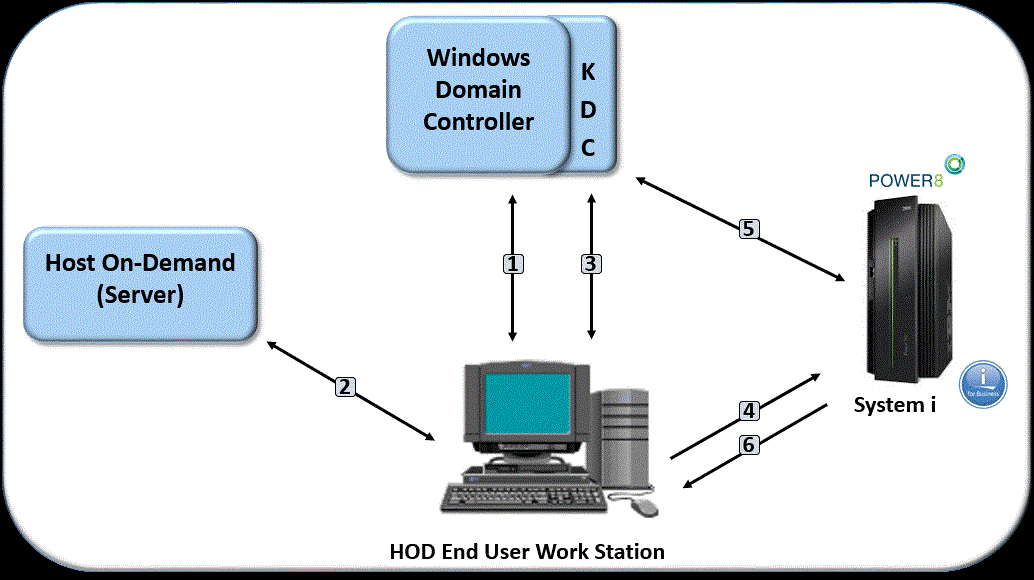
- A user logs on to the Windows domain. The Windows domain gives users access to the network.
- The user requests a Host On-Demand session from the Host On-Demand server.
- The Host On-Demand session initializes and requests a Kerberos ticket from the KDC.
- The user attempts to create a connection with the identified session using the Kerberos ticket as the credential.
- The i5/OS or OS/400 host validates the ticket with the KDC.
- The user is successfully logged in