Enhanced grid (Dojo) (Web-only)
The Enhanced grid widget is responsible for rendering a Dojo table. The rendered table is read-only.
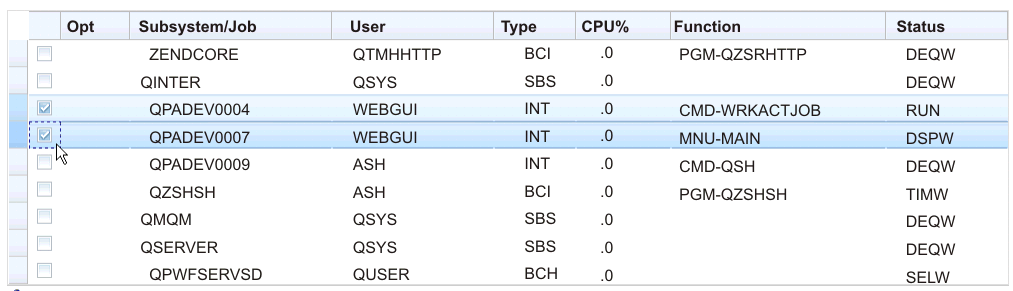
When using the Dojo Claro theme, default rendering of the Enhanced grid widget includes a row selector column as the first column in the table. Users can click cells in this column to select rows to drag to another location in the table. To select multiple consecutive rows, click the first row, press Shift, and click the last row, or click the first row and holding down the mouse, swipe to the last row. To select multiple nonconsecutive rows, press Ctrl while clicking each row. To drag, click the selected row, or rows, and drag.
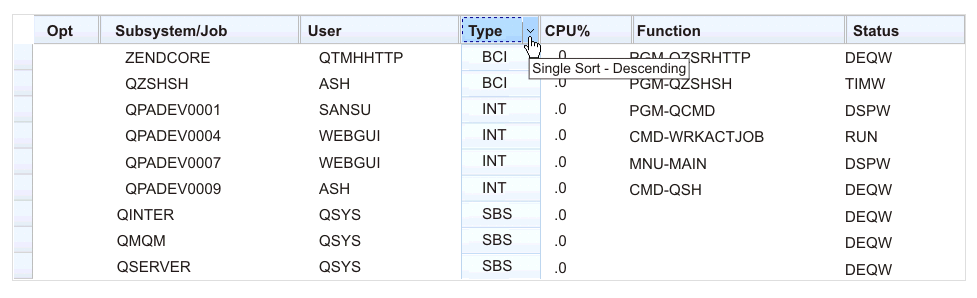
Another function of the default rendering of the Enhanced grid widget includes a sort function. You can sort rows by column contents in ascending or descending order and remove a sort. You can also perform a nested sort, that is, sorting a second column nested within a sorted first column.
mm/dd/yy, do not sort as expected. To perform a sort, click the column heading as shown in the example below.