Dialogs
You can embed dialogs in your applications by using OSCL providers.
OSLC providers help you to embed creation and selection dialogs in your applications. The dialogs available for ClearQuest® are defined in the service description document for a ClearQuest® database.
OSLC dialogs can communicate with the parent page by using both the Post Message or Window Name protocols as defined by the OSLC Core 2.0 specification.
Selection Dialogs
Rational®
ClearQuest® has
a default selection dialog that helps to select records of any type
and selection dialogs for each record type. These dialogs help to
pick more than one record at a time, so you must be prepared to handle
multiple oslc:results in the resource selection response. 
oslc:results message from
this dialog.
{
   "oslc:results":[
      {
         "rdf:resource":"http://quagmire.rtp.raleigh.ibm.com/cqweb/oslc/repo/DOC/db/SAMPL/record/16777224-33554433",
         "oslc:label":"SAMPL00000001: spelling error in login screen"
      },
      {
         "rdf:resource":"http://quagmire.rtp.raleigh.ibm.com/cqweb/oslc/repo/DOC/db/SAMPL/record/16777224-33554434",
         "oslc:label":"SAMPL00000002: sales tax incorrect if item deleted from purchase"
      }
   ]
}
Creation Dialogs
Rational®
ClearQuest® has
a different creation dialog for each record type. The default creation
dialog is for the default record type for the current schema. Only
one record can be created at a time, and the oslc:results array
in the resource creation response have one item.
Prefilling Values
You can prefill values in the creation dialog by making a POST
request to the creation dialog URI. The request body can contain the
field values to prefill. The response is 201 Created with the Location response
header set to the dialog URL. The following is an example of prefilling
a creation dialog by using RDF/XML.
POST /cqweb/oslc/repo/DOC/db/SAMPL/record-type/16777224/creationDialog?dc%3Atype=Defect HTTP/1.1
Host: quagmire.rtp.raleigh.ibm.com
OSLC-Core-Version: 2.0
Content-Type: application/rdf+xml
Accept: application/rdf+xml

<?xml version="1.0" encoding="UTF-8"?>
<rdf:RDF xmlns:cq="http://www.ibm.com/xmlns/prod/rational/clearquest/1.0/" xmlns:dcterms="http://purl.org/dc/terms/" xmlns:oslc="http://open-services.net/ns/core#" xmlns:oslc_cm="http://open-services.net/ns/cm#" xmlns:rdf="http://www.w3.org/1999/02/22-rdf-syntax-ns#">
<oslc_cm:ChangeRequest>
<dcterms:title>Failing Test Case: Server Reliability</dcterms:title>
</oslc_cm:ChangeRequest>
</rdf:RDF>HTTP/1.1 201 Created
OSLC-Core-Version: 2.0
Location: http://quagmire.rtp.raleigh.ibm.com/cqweb/oslc/repo/DOC/db/SAMPL/record-type/16777224/creationDialog?fields=%5B%7B%22FieldName%22%3A%22Headline%22%2C%22ControlValue%22%3A%22Failing%20Test%20Case%3A%20Server%20Reliability%22%7D%5DThe Location URL in this response shows this dialog. 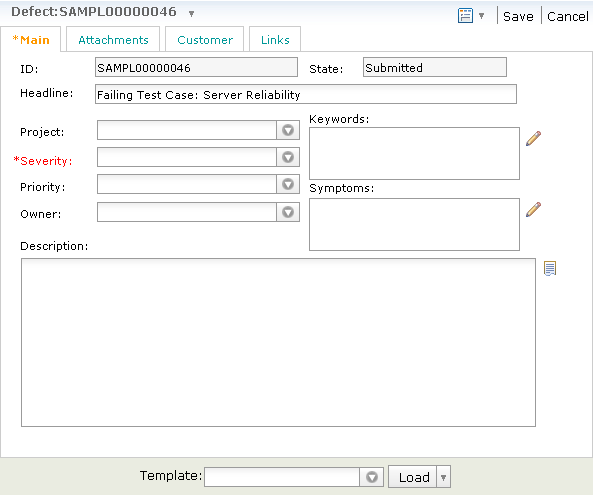
oslc:results message from this
dialog.
{
   "oslc:results":[
      {
         "rdf:resource":"http://quagmire.rtp.raleigh.ibm.com/cqweb/oslc/repo/DOC/db/SAMPL/record/16777224-33602109",
         "oslc:label":"SAMPL00000046: Failing Test Case: Server Reliability"
      }
   ]
}