LDAP authentication model
Description of the LDAP authentication processing model.
You enable LDAP authentication at both the database set level and the individual user level. This approach allows Rational® ClearQuest® to support a mixed authentication environment. A database set that you configure for LDAP authentication can support users marked for Rational® ClearQuest® authentication and users marked for LDAP authentication, as shown in LDAP and Rational ClearQuest user authentication. When you configure the Rational® ClearQuest® database set for LDAP authentication, you specify whether Rational® ClearQuest® attempts Rational® ClearQuest® authentication first. If that attempt fails, Rational® ClearQuest® tries LDAP authentication and after tries the Rational® ClearQuest® authentication.
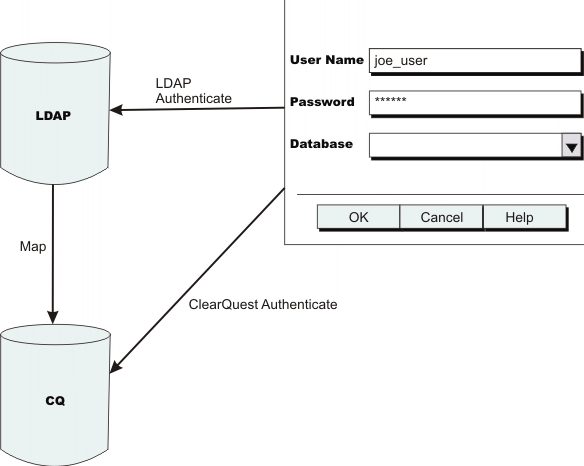
- A user enters a user name and password and selects a database in the Rational® ClearQuest® Login window.
- Rational®
ClearQuest® searches the user database
for a user profile record whose Login name field value matches the user name that the user entered
in the Login window. If Rational®
ClearQuest® finds a
match and the user profile record is marked for Rational®
ClearQuest® authentication, Rational®
ClearQuest® performs traditional Rational®
ClearQuest® authentication. Proceed to Step 6.
If Rational® ClearQuest® finds a match and the user profile record is marked for LDAP authentication, or if Rational® ClearQuest® does not find a match, Rational® ClearQuest® attempts to authenticate the user against LDAP. Proceed to Step 3.
- Rational® ClearQuest® searches the LDAP directory for a user record. Rational® ClearQuest® uses the user name from the Login window plus search criteria that you specify when you configure the database set for LDAP authentication. If Rational® ClearQuest® finds a matching user record, it authenticates the user by having the LDAP server compare the password that the user entered in the Login window with the password in the LDAP user record. If the LDAP authentication succeeds, Rational® ClearQuest® proceeds to correlate the LDAP user record with a Rational® ClearQuest® user profile record.
- Rational® ClearQuest® retrieves attributes from the user record that it finds in the LDAP directory.
- Rational® ClearQuest® searches the database set for a user record that corresponds to the LDAP directory user record. When you configure the database set for LDAP authentication, you specify a Rational® ClearQuest® record field and an LDAP user record attribute to be used for mapping. Rational® ClearQuest® searches for a record whose mapping field contains the same value as the mapping attribute in the LDAP user record. If Rational® ClearQuest® finds a match, proceed to Step 6.
- Rational® ClearQuest® checks to see if the user is authorized to access the database and what privileges and groups are assigned to the user.