About projects enabled for Rational® ClearQuest®
If a project is enabled for Rational® ClearQuest®, links between PVOBs and Rational® ClearQuest® user databases are provided as shown in the figure below.
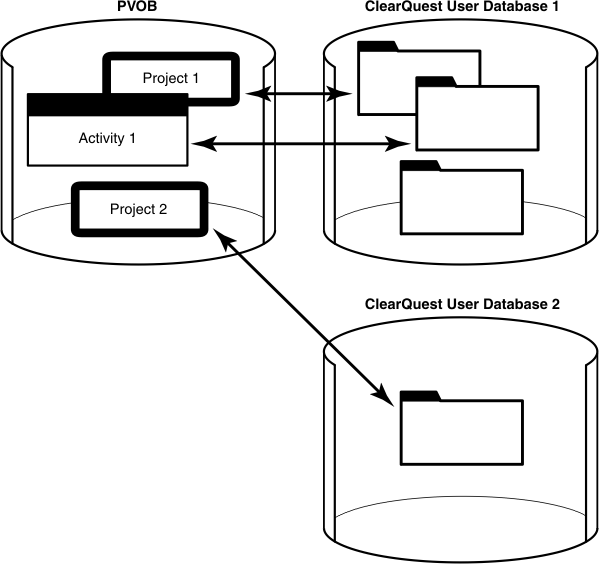
A Rational® ClearQuest® user database stores change requests as user-owned records.
One link connects the project in the PVOB with a Rational® ClearQuest® user database. Multiple Rational® ClearQuest® user databases can be used. Another link connects the project UCM activity objects in the PVOB to records in the associated Rational® ClearQuest® user database whose record types are enabled for UCM.
UCM activity objects in the PVOB can be linked with activity records based on a record type in the Rational® ClearQuest® user database (see the figure above). The link enables information to be displayed in the Rational® ClearQuest® client about the UCM activity (for example, its change set, its stream, and whether it is currently set in any view). The link also enables policies that govern when you can deliver an activity described in the PVOB and when you can close an activity in the Rational® ClearQuest® user database. Because of the close association between linked UCM activities and such Rational® ClearQuest® activity records, the UCM documentation usually refers to both linked entities as activities.
At any point in the cycle of a project, your Rational® ClearQuest® user database may contain records whose record types are enabled for UCM but those records are not linked to a UCM activity object. For example, a newly created record may not be linked to a UCM activity. One way to link such a record to a UCM activity is to explicitly complete an action on the record (for example, by clicking in a Rational® ClearQuest® user database).
Each UCM activity in a UCM project that is enabled for Rational® ClearQuest® must be linked to an activity record. You cannot create a UCM activity without linking it to a record in a Rational® ClearQuest® user database that is associated with the project.