Setting up help content on an intranet server
An administrator can set up the help content in an
Enterprise environment on an intranet server behind a firewall for users to access.
Then, users can access help without using the Internet or downloading anything to their
computers. 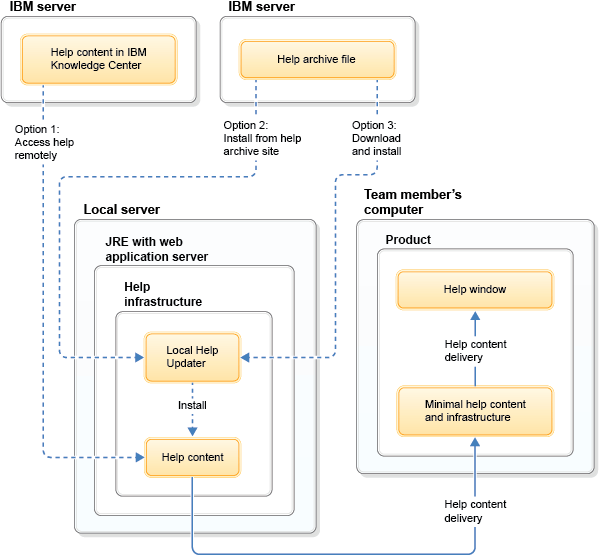
About this task
To set up
an intranet server, you must first deploy the help system, which is contained in
a help.war file. After the help system is deployed on the server, you have three
options for configuring the help, as shown in the graphic.
- Option 1: If the server has ongoing access to the Internet, the server can deliver help content from the remote IBM® Documentation, as described in Accessing the default remote help. This configuration is the default for the help and does not require setup.
- Option 2: Install the help content on the server from the remote help archive site by using the Local Help Updater.
- Option 3: Install the help content on the server from a downloaded help archive file by using the Local Help Updater.
Procedure
This basic procedure applies to all application servers:
- Install a Java™ Runtime Environment (JRE) or Java Development Kit (JDK).
- Install an application server.
- Deploy the help system on the server.
- Install the help content on the server by using one of the local installation tasks.
What to do next
For more
specific instructions, see the related application server-specific tasks. These
tasks include steps for WebSphere® Application Server and Apache Tomcat. Depending
on the version that you use, some steps of the tasks might vary. You are not limited
to these two types of application servers and might choose to use another type of
application server for your help system.